Best Refurbished Surface Pro: 9 Top Picks in 2026
If you are shopping for a refurbished Surface Pro, you are probably chasing that sweet spot where a device feels light in the hand, but still has enough muscle to handle real work. That usually means avoiding the classic traps: too little RAM, too little storage, or a bargain listing that looks good on paper and turns sluggish the moment you open a few tabs, a spreadsheet, and a video call at the same time. A good refurbished Surface Pro should feel crisp, dependable, and easy to carry from desk to couch to coffee shop, with a screen and keyboard setup that does not make you miss a full laptop after ten minutes.
Different buyers want different things here. Some want the cheapest path into the Surface ecosystem. Others want a newer chip, better battery life, or a certified refurb with warranty protection that feels closer to buying new. A few shoppers care most about portability, while others care about having enough power for heavier multitasking or a nicer display for long sessions. The best overall pick in this lineup balances those needs very well, while the strongest premium option leans hard into speed, display quality, and the kind of polished experience that makes a workday feel smoother.
If you are short on time, the table below gives a quick scan of the top options before the deeper reviews.
Best Refurbished Surface Pro Comparison Table
| Product | Best For | Main Strength | Key Specs |
|---|---|---|---|
| Surface Pro 11 Certified Refurbished, Black | Best Overall | Modern Copilot-ready performance with keyboard included | 13-inch, Snapdragon X Plus, 16GB RAM, 512GB SSD |
| Surface Pro 11 Certified Refurbished, Black 1TB | Best for Storage | Same strong platform with more room for files | 13-inch, Snapdragon X Plus, 16GB RAM, 1TB SSD |
| Surface Pro 7+ With Keyboard Type Cover | Best Budget Bundle | Low-cost entry with keyboard included | 12.3-inch, Core i5, 8GB RAM, 128GB SSD |
| Surface Pro 7+ Renewed, 256GB | Best Value | Practical everyday performance with extra storage | 12.3-inch, Core i5-1135G7, 8GB RAM, 256GB SSD |
| Surface Pro 11 Certified Refurbished, Sapphire | Best Style Pick | Refined colorway with the same capable hardware | 13-inch, Snapdragon X Plus, 16GB RAM, 512GB SSD |
| Surface Pro Copilot+ PC Bundle | Best Premium | OLED display, Snapdragon X Elite, Slim Pen bundle | 13-inch, OLED, Snapdragon X Elite, 16GB RAM, 1TB SSD |
| Surface Pro 7 Renewed, Black | Best for Light Work | Affordable everyday Surface with USB-A included | 12.3-inch, Core i5-1035G4, 8GB RAM, 256GB SSD |
| Surface Pro 7+ Renewed, 128GB | Best Compact Value | Lean spec sheet, lower cost, solid portability | 12.3-inch, Core i5-1135G7, 8GB RAM, 128GB SSD |
| Surface Pro 11 Certified Refurbished, Sapphire 1TB | Best High Capacity | Big storage plus certified refurb confidence | 13-inch, Snapdragon X Plus, 16GB RAM, 1TB SSD |
For a closer look at what separates these picks, the reviews below spell out where each Surface Pro shines and where it asks for a little compromise.
1. Best Overall: Microsoft Certified Refurbished Surface Pro 11 (2024), Black, 16GB RAM, 512GB SSD

This is the sweet-spot pick for most buyers who want a refurbished Surface Pro that still feels fresh, quick, and properly modern. The Snapdragon X Plus chip gives it a very different personality from the older Intel models in this roundup. Apps open with a snappy, almost effortless feel, and the 16GB of RAM helps the whole machine stay calm when you are juggling browser tabs, documents, and a call. On a commute, on a kitchen table, or tucked into a small work bag, the 13-inch size gives you that big, roomy Surface feeling without becoming a brick.
The certified refurbished angle matters here too. A Microsoft-backed warranty takes away a lot of the nervous energy people feel around used tech. Add the included Inateck Bluetooth backlit keyboard, and this becomes a much more complete package than a bare tablet listing. It is the kind of setup that works for remote work, note-taking, casual creative tasks, and travel days where you want one device that can flip between tablet mode and laptop mode without drama.
Pros
- Certified refurbished status with a Microsoft warranty adds real peace of mind.
- Snapdragon X Plus and 16GB RAM handle multitasking smoothly.
- 13-inch display gives you more room for split-screen work and reading.
- Keyboard bundle makes it ready to use without extra shopping.
- Light, portable, and easy to carry through a long day.
Cons
- Refurbished pricing still sits in a fairly premium lane.
- Some older Windows software may need compatibility checks on ARM-based hardware.
- Buyers wanting a true low-cost deal will find cheaper older Surface models.
If you want a refurbished Surface Pro that feels closest to a current-generation laptop-tablet hybrid, this is the one I would point to first. It has the right mix of speed, warranty confidence, and all-around usability. It is especially good for people who use their device every day and do not want to fight with sluggish performance or a tired battery-friendly compromise. To buy this product, click here.
2. Best For Storage: Microsoft Certified Refurbished Surface Pro 11 (2024), Black, 16GB RAM, 1TB SSD
For buyers who keep everything on the device, this version of the Surface Pro 11 makes a lot of sense. The hardware formula is essentially the same strong one as the top pick, but the 1TB SSD gives you a lot more breathing room for downloads, creative files, offline media, and work projects that pile up over time. That matters more than people think. A Surface Pro can feel wonderfully nimble, but nothing ruins that feeling faster than a storage warning popping up mid-project.
This model still brings the Snapdragon X Plus and 16GB RAM combination, so the core experience remains fast and smooth. The included keyboard keeps the package practical right out of the box, which is great for travelers, students, and office users who want one device that can move from class notes to a train tray table to a conference room. If you are the type who hoards PDFs, photo files, and offline playlists, the extra storage is the quiet hero here.
Pros
- Large 1TB SSD is ideal for file-heavy users.
- Same modern Surface Pro 11 platform as the best overall pick.
- Certified refurbished condition adds trust.
- Keyboard included, so setup is simple.
- Good fit for hybrid work and travel-heavy routines.
Cons
- Usually costs more than the 512GB version.
- Storage is the main upgrade, so some buyers may not need the jump.
- Still carries ARM compatibility questions for a few niche programs.
This is the right choice for people who want a refreshed, current-gen Surface Pro but hate the idea of managing storage like a puzzle every month. It is also a smart pick for creatives who keep a lot of local files and do not want to depend on cloud storage for everything. To buy this product, click here.
3. Best Budget Bundle: Microsoft Surface Pro 7+ 12.3″ Core i5, 8GB RAM, 128GB SSD With Keyboard Type Cover

If your goal is to spend as little as possible and still get a legitimate Surface Pro experience, this bundle has a strong argument. The older Core i5 platform will not feel as zippy as the newer Surface Pro 11 models, but it keeps the familiar Surface formula intact. You still get the kickstand, the 3:2 screen shape, and the useful flexibility that makes these devices so easy to live with on a sofa, at a dining table, or in a cramped dorm room.
The Type Cover inclusion is the real draw. So many refurbished listings make you chase a keyboard separately, which turns a cheap-looking deal into a not-so-cheap setup. Here, you get a ready-to-go package that can handle email, homework, browsing, light office work, and note-taking without asking for much else. The 128GB SSD is tight, no sugarcoating that, but for a focused user who keeps files trimmed and leans on cloud storage, this can still be a practical machine.
Pros
- Keyboard included, which saves money and hassle.
- Lowest entry cost among the more complete Surface Pro options here.
- Still has the classic Surface kickstand and tablet-laptop flexibility.
- Good for basic productivity and schoolwork.
- USB-A and USB-C add helpful legacy compatibility.
Cons
- 128GB storage fills quickly.
- 8GB RAM is fine for basics, but not heavy multitasking.
- Older hardware feels less future-focused than the newer Surface Pro 11 family.
This is a smart buy for someone who wants the Surface experience more than the newest silicon. It suits students, first-time Surface buyers, and anyone who needs a portable Windows device for light daily use. If your workflow is simple and your budget is tight, this bundle gets the job done without a lot of fluff. To buy this product, click here.
4. Best Value: Microsoft Surface Pro 7+ Tablet, Core i5-1135G7, 8GB RAM, 256GB SSD, Windows 11 Pro
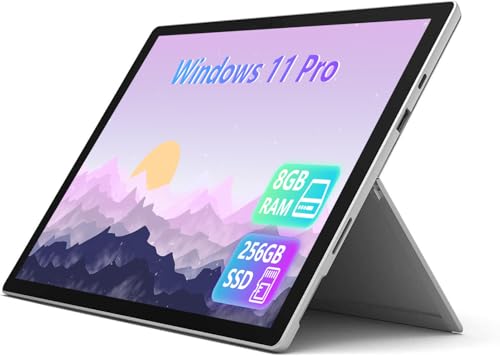
This renewed Surface Pro 7+ hits a very appealing middle ground. It is still older than the Surface Pro 11 family, but the Core i5-1135G7 is a decent step up from the more basic budget refurb options, and the 256GB SSD gives you enough room to breathe. For a buyer who wants a work-ready tablet without chasing the highest spec sheet, that balance is easy to appreciate. It feels like the kind of device you can toss into a bag, pull out in a meeting, and trust to boot quickly enough to keep pace with the day.
The 12.3-inch anti-glare display is another quiet win. Refurb shoppers often focus only on processor names and forget how often they will actually stare at the screen. A matte-leaning, low-fatigue display can make a long afternoon of reading, editing, or spreadsheet work feel a little less punishing. Add the solid port selection and Windows 11 Pro, and this becomes a very sensible pick for business use, remote work, or anyone who wants a reliable Windows machine without paying for the newest badge on the lid.
Pros
- Good balance of price, storage, and everyday performance.
- 256GB SSD is much more comfortable than 128GB.
- Windows 11 Pro fits business and productivity use well.
- Anti-glare screen helps during long work sessions.
- Port selection is practical for a refurbished tablet.
Cons
- Keyboard is not included in this listing.
- 8GB RAM is workable, but not ideal for heavy multitasking.
- Older design lacks the polish of newer Surface Pro 11 hardware.
Buy this one if you want a dependable, mainstream Surface Pro that feels sensible rather than flashy. It is a good fit for office work, classwork, and travel, especially if you already have a compatible keyboard or plan to buy one separately. To buy this product, click here.
5. Best Style Pick: Microsoft Certified Refurbished Surface Pro 11 (2024), Sapphire, 16GB RAM, 512GB SSD

The Sapphire version of the Surface Pro 11 is for buyers who want the same strong modern platform but prefer a little personality on the desk. That color matters more than it seems. A Surface Pro gets carried everywhere, set down in cafés, meeting rooms, libraries, and airport gates, and the Sapphire finish gives it a bit more flair than the usual black hardware parade. Under the hood, this is still the familiar Snapdragon X Plus, 16GB RAM, 512GB SSD formula, which means it feels quick and responsive in real use.
It is a very clean fit for people who work in public-facing settings, travel often, or simply want their tech to feel less generic. The bundled keyboard adds serious value, and the certified refurbished status keeps the buying process grounded in something safer than a random marketplace listing. If you care about the device looking sharp while still handling serious daily work, this one lands in a nice spot.
Pros
- Distinct Sapphire color gives it a nicer visual identity.
- Strong modern performance from Snapdragon X Plus and 16GB RAM.
- Certified refurbished with warranty support.
- Keyboard included for immediate productivity.
- Good all-around size for both portability and comfort.
Cons
- Color is a personal preference, so it does not matter to everyone.
- Performance is very similar to the black 512GB model.
- Refurbished premium pricing remains a hurdle for budget shoppers.
This is the Surface Pro 11 for the person who likes their gear to feel a little less cookie-cutter. It still works best for the same audience as the top overall pick, but with an extra dose of visual appeal. If that matters to you every time you unzip your bag, it is a nice touch. To buy this product, click here.
6. Best Premium: Microsoft Surface Pro Copilot+ PC Bundle, 13″ OLED, Snapdragon X Elite, 16GB RAM, 1TB SSD

This is the showpiece. The one that makes you pause for a second when you open the box, because the OLED display changes the feel of the entire device. Blacks look deep, colors pop with a kind of quiet confidence, and the 120Hz panel makes scrolling and pen work feel silky. Pair that with the Snapdragon X Elite chip, the dedicated NPU, and 16GB of RAM, and you get a Surface Pro that looks and behaves like a high-end work machine rather than a compromise device trying to do too much.
The bundle also matters a lot here. You are getting the keyboard and Slim Pen, which means the cost goes toward a complete setup instead of a half-finished starter kit. That is handy for designers, executives, and power users who want a premium machine for travel, presentations, note-taking, and media. The 1TB SSD and WiFi 7 support only deepen the appeal. It feels built for people who know they will use every ounce of what it offers, from long work sessions to bright, vivid streaming at night on the couch.
Pros
- OLED display is the standout feature, and it looks excellent.
- Snapdragon X Elite offers top-tier performance in this lineup.
- Keyboard and Slim Pen are included, which is a big value boost.
- 1TB storage gives plenty of headroom for demanding users.
- WiFi 7 and premium cameras make it feel very current.
Cons
- It is the most expensive option here by a wide margin.
- Premium features may be overkill for basic office work.
- Battery life and app compatibility can vary depending on workload and software support.
Buy this if you want the nicest Surface Pro experience available in this group and you are willing to pay for it. It is the pick for buyers who value display quality, bundled accessories, and strong all-around performance over thrift. For everyone else, the certified refurbished Surface Pro 11 picks may make more financial sense. To buy this product, click here.
7. Best For Light Work: Microsoft Surface Pro 7 Tablet, Core i5-1035G4, 8GB RAM, 256GB SSD, Windows 11 Pro

This renewed Surface Pro 7 is the kind of machine you buy when your needs are simple and your wallet wants to stay calm. It is not the most exciting model in the lineup, but it does a decent job of covering the basics. The 12.3-inch display keeps the classic Surface proportions, the kickstand still makes it feel flexible, and the 256GB SSD means you get a little more breathing room than the bare-minimum versions. For email, browsing, document editing, and streaming, it does the job without putting on a big performance show.
It also has that familiar Surface rhythm that longtime users tend to enjoy. You can prop it up in a tiny apartment kitchen while following a recipe, or use it on a train tray table while finishing a report. Those everyday moments are exactly where this sort of device earns its keep. If you need a travel-friendly Windows tablet and you are not asking it to chew through heavy workloads, this model can still be a practical companion.
Pros
- Affordable way into a Surface Pro with 256GB storage.
- Lightweight and easy to carry.
- Windows 11 Pro is useful for business and school tasks.
- USB-A and microSD support add old-school convenience.
- Good for everyday browsing and office basics.
Cons
- Older processor feels limited compared with newer Surface models.
- 8GB RAM can tighten up under heavier multitasking.
- No keyboard included, so total setup cost may rise.
This is a sensible pick for someone who mainly wants portability and a familiar Surface form factor rather than raw speed. It makes the most sense for casual users, note-takers, and people who want a lighter Windows device for everyday life. To buy this product, click here.
8. Best Compact Value: Microsoft Surface Pro 7+ Tablet, 12.3-Inch Touch, Core i5-1135G7, 8GB RAM, 128GB SSD

If you want the lowest possible spend while still keeping the Surface Pro name on the lid, this renewed 7+ is a lean, workable option. It has a more modern 11th-gen Core i5 than the older Surface Pro 7 models, and that helps it feel a bit more alive in day-to-day use. The 128GB SSD is small, yes, but the tradeoff is a compact, portable machine that can handle email, streaming, documents, and lightweight productivity with less fuss than some bargain tablets that feel flimsy from the start.
The inclusion of WiFi 6 and Bluetooth 5.0 is a nice touch for a device at this level, and the Surface kickstand keeps the whole experience familiar. I like it most for people who work on a simple routine and do not need big local storage. Think students, minimalists, and travelers who live in the cloud. It is a stripped-back choice, but it still keeps the core Surface charm intact, which is more than can be said for many cheap alternatives.
Pros
- Very accessible entry point for a Surface Pro with newer 7+ hardware.
- Portable, light, and easy to toss in a backpack.
- WiFi 6 and Bluetooth 5.0 are useful modern touches.
- Good for basic work, school, and casual media use.
- Strong option for cloud-first users.
Cons
- 128GB storage is tight for many buyers.
- Keyboard is sold separately.
- Not the best fit for large local file libraries or heavy apps.
This model makes sense if you want to keep the purchase lean and your workflow is simple. If you know your files live mostly online and you value portability over everything else, it has a clear role. To buy this product, click here.
9. Best High Capacity: Microsoft Certified Refurbished Surface Pro 11 2024, Sapphire, 16GB RAM, 1TB SSD
This Sapphire Surface Pro 11 keeps the same modern formula as the other certified refurbished Surface Pro 11 picks, but the 1TB SSD changes the conversation for serious file hoarders. If your laptop is usually packed with design files, project folders, offline media, and years of documents you swear you will sort someday, that larger drive is a relief. It is also just nice to buy a device and stop thinking about storage for a while. That mental quiet matters more than people expect.
The Snapdragon X Plus chip, 16GB RAM, and bundled keyboard make this a polished package for daily work and travel. Like the other Surface Pro 11 options here, it is especially appealing for buyers who want a modern device with strong battery-friendly architecture and a familiar tablet-to-laptop flow. The Sapphire finish gives it a more personal look, and the official Microsoft certification helps it feel like a safer bet than a random used listing. For buyers who want capacity first and do not want to sacrifice the newer Surface platform, this is a smart final pick.
Pros
- 1TB SSD is excellent for large local libraries and project files.
- Certified refurbished with Microsoft warranty support.
- Snapdragon X Plus and 16GB RAM remain strong for multitasking.
- Keyboard included, which boosts day-one usefulness.
- Sapphire finish adds a nicer visual touch.
Cons
- Costs more than the 512GB refurbished Surface Pro 11 options.
- Storage capacity may be overkill for light users.
- ARM software compatibility still deserves a quick check for niche apps.
This is a strong fit for power users who know they will keep a lot of content on the device itself. If storage anxiety is a real thing in your workflow, this version helps erase it. To buy this product, click here.
How To Choose The Right Refurbished Surface Pro
Start With How You Will Actually Use It
The biggest mistake shoppers make is chasing specs before thinking about daily life. If your Surface Pro will live on a desk and mostly handle email, docs, and video calls, you do not need the most expensive configuration in the bunch. If you plan to travel with it, carry it between classes, or use it on the couch for hours, then weight, battery behavior, and keyboard comfort matter just as much as raw speed. Picture two buyers. One just wants a portable office. The other wants a sketch pad, travel companion, and laptop replacement in one slim body. Those are very different missions, and the right refurbished Surface Pro should match the mission, not the hype.
Check The Processor Generation Before You Get Seduced By The Logo
Surface Pro naming can be slippery if you are skimming too fast. The newer Surface Pro 11 models are far more forward-looking than the older Surface Pro 7 and 7+ units, and that shows up in everyday snappiness. The older Intel models still have a place, especially if the budget is tight or you need legacy compatibility, but they are a different category of experience. A quick example. Someone editing a few spreadsheets and writing reports will be fine on a 7+ or older Pro 7. Someone who wants a more modern, smoother-feeling machine with better headroom should be looking at the Surface Pro 11 lineup first.
Do Not Underestimate Storage Space
128GB sounds okay until updates, apps, a handful of photos, and a few downloaded videos start stacking up. Then the machine feels cramped fast. For light users, 128GB can still work if cloud storage is part of the routine. For everyone else, 256GB is the safer floor, and 512GB or 1TB is where the device starts to feel comfortably roomy. I have seen buyers think they are saving money with a small SSD, then spend weeks juggling files like they are trying to clear space in a tiny apartment. If you hate that kind of maintenance, spend up for storage now and save yourself the headache later.
Pay Attention To Keyboard Inclusion
A Surface Pro without a keyboard can be a great tablet, but it is a weaker laptop substitute. That is fine if you really plan to use it mostly as a tablet. It is less fine if you want it to serve as your daily work machine. A bundle with a keyboard often feels like the smarter purchase, even when the sticker shock looks higher at first glance. Think about the difference between buying a bare tablet and buying a device you can use immediately in the next meeting. That convenience can matter more than a slightly lower upfront price.
Match RAM To Your Multitasking Habits
Eight gigabytes is acceptable for lighter work, but 16GB is where a Surface Pro starts to feel properly relaxed under pressure. If your day includes many browser tabs, office apps, messaging, a PDF open on one side, and a video call in the background, 16GB is worth chasing. It makes the machine feel less twitchy, less crowded, and more future-friendly. One buyer might never notice the difference. Another will feel it every afternoon when the laptop starts dragging like it needs a nap. Know which camp you are in before you buy.
Think About Ports And Compatibility
Older Surface Pro models often bring USB-A, microSD, and other familiar connections that can be handy in a pinch. Newer models may lean more heavily on USB-C and a slimmer port set. Neither approach is automatically better. It depends on your gear. If you still use thumb drives, older printers, memory cards, or wired accessories, a model with broader legacy port support can save you from carrying a small nest of adapters. If your setup is already modern and wireless, that matters less. A little port awareness upfront can save a lot of annoyance later.
Buy Certified Refurbished When You Can
Refurbished can be a fantastic value, but the source matters. Certified refurbished listings with a warranty reduce the guesswork and usually give you more confidence in the condition of the device. That is especially true with premium Surface models, where the whole point is to get a polished, premium-feeling machine without paying full new-device money. If you have ever opened a used laptop and felt a tiny jolt of panic at the battery health, scratches, or mystery setup state, you already know why this matters. Better refurb sourcing makes the whole experience calmer.
Best Refurbished Surface Pro FAQ
Is A Refurbished Surface Pro A Good Buy In 2026?
Yes, if you choose carefully. A good refurbished Surface Pro can save a serious amount of money while still giving you the slim design, detachable keyboard feel, and Windows flexibility that make the line so popular. The key is to look for a reputable seller, a sensible warranty, and enough storage and RAM for your actual workload.
Should I Buy A Surface Pro 11 Or An Older Surface Pro 7+?
If you want the newest experience, better performance headroom, and a more modern feel overall, the Surface Pro 11 is the stronger direction. If budget is the priority and your tasks are light to moderate, a Surface Pro 7+ can still be a smart purchase. The older model is easier to justify for basic work, while the newer one feels better for long-term ownership.
How Much Storage Do I Really Need?
For light cloud-based use, 128GB can work, but it gets tight fast. Most people will be happier with 256GB as a starting point. If you keep a lot of files locally, edit media, or prefer to avoid storage cleanup, 512GB or 1TB is much more comfortable. Storage is one of those things that feels boring until it becomes your biggest annoyance.
Is 8GB Of RAM Enough For A Refurbished Surface Pro?
It depends on your habits. For basic schoolwork, browsing, and light office tasks, 8GB can still be fine. If you tend to keep many tabs open, use several apps together, or want a machine that feels smoother over time, 16GB is the better target. Surface Pros with 16GB feel more relaxed under pressure.
Do I Need A Keyboard Bundle?
If you plan to use the device like a laptop, yes, a bundle is the easier path. Buying the keyboard separately often turns a cheap-looking listing into a more expensive total purchase. If you only want tablet use, a keyboard is less urgent. But for most buyers, it is part of the real Surface experience.
Are Refurbished Surface Pros Good For Students?
Very much so, as long as the device matches the student’s workload. Older Surface Pro 7 and 7+ models are great for note-taking, research, writing, and light multitasking. Surface Pro 11 options make more sense for students who want stronger performance, longer-term value, or a laptop replacement that feels less dated.
What Is The Safest Refurbished Surface Pro Choice?
The safest pick is usually a certified refurbished model from a trusted source with a clear warranty. In this lineup, the Microsoft certified Surface Pro 11 models stand out because they combine current hardware with more confidence on condition and support. That reduces the gamble and usually delivers the best all-around ownership experience.
Final Verdict
The best refurbished Surface Pro for most buyers is the Microsoft Certified Refurbished Surface Pro 11 with the 512GB SSD. It hits the nicest balance of speed, portability, modern design, and warranty-backed confidence, which is exactly what most people want from a refurbished tablet-laptop hybrid. If you need more storage, the 1TB version is a smart step up. If your budget is tighter, the Surface Pro 7+ bundle with the Type Cover gives you a very workable path into the lineup without overspending.
Premium buyers should look hard at the Surface Pro Copilot+ PC Bundle with OLED if display quality and top-end polish matter most. That one feels special in a way the others do not. But for everyday shoppers, the best move is simple. Match the model to your workload, pay attention to storage and keyboard inclusion, and favor certified refurbished listings with solid warranty coverage. Do that, and a refurbished Surface Pro can feel less like a compromise and more like a very clever buy.