best Refurbished MacBook Pro: 9 Top Picks in 2026
Introduction
Shopping for a refurbished MacBook Pro usually starts with a simple goal: get Apple’s polished hardware without paying fresh-from-the-box money. The catch is that refurbished listings can look similar on the surface while hiding very different realities underneath. One machine may deliver excellent battery life and quiet performance, while another leans on older Intel silicon that still feels fine for email and documents but can stumble once video edits, photo libraries, or a dozen browser tabs enter the picture. That is where buyers get burned, usually by chasing the biggest screen, the lowest price, or the most RAM without thinking about the actual workload.
The smartest way to shop is to match the MacBook Pro to your day-to-day rhythm. Some people want a roomy 16-inch screen for creative work and split-screen multitasking. Others care far more about portability, a lighter bag, or the newer Apple silicon experience that keeps the fan noise down and the battery meter calm. A few shoppers mainly want the cheapest reliable Mac laptop they can find for school, while power users want the kind of machine that can chew through 4K footage or code builds without sounding like a hair dryer. The top pick below leads because it hits the sweet spot for value, performance, and long-term usefulness, but the right choice depends on what you actually plan to do with it.
If you are short on time, the comparison table below gives a quick way to size up the strongest options before you read the full reviews.
Best Refurbished MacBook Pro Comparison Table
| Product | Best For | Main Strength | Display / Size |
|---|---|---|---|
| Apple MacBook Pro Late 2019 16-inch | Lowest-cost big-screen Pro | Strong specs for the money | 16-inch Retina |
| Apple MacBook Pro Late 2021 16-inch 512GB | Serious creators | M1 Pro speed and battery life | 16-inch Liquid Retina XDR |
| Apple Late 2021 MacBook Pro 16-inch 1TB | Heavy files and media libraries | More onboard storage | 16-inch Liquid Retina XDR |
| Apple 2020 MacBook Pro 13-inch 16GB | Budget-minded buyers | Balanced memory and SSD | 13-inch Retina |
| Apple MacBook Pro 2021 14-inch | Portable creative work | Top-tier screen and ports | 14-inch Liquid Retina XDR |
| Apple 2019 MacBook Pro 13-inch 128GB | Absolute lowest entry cost | Classic Pro feel on a tight budget | 13-inch Retina |
| Apple MacBook Neo 13-inch | Everyday use and AI features | Modern Apple silicon in a lighter class | 13-inch Liquid Retina |
| 2022 MacBook Pro 13-inch M2 | Long battery life on a smaller budget | M2 efficiency and active cooling | 13.3-inch Retina |
| Apple 2021 MacBook Pro 16-inch 32GB | Power users and multitaskers | 32GB RAM and strong sustained performance | 16.2-inch Liquid Retina XDR |
For a closer look at how these machines differ in daily use, the reviews below spell out the tradeoffs that matter once the laptop is on your desk.
1. Best Overall: Apple MacBook Pro Late 2019 with 2.6GHz Intel Core i7 (16 Inch, 16GB RAM, 512GB) Space Gray (Renewed)

This late-2019 16-inch MacBook Pro earns the top spot because it lands in a sweet, slightly old-school zone that still makes sense for a lot of buyers. The 16-inch panel is roomy in the way a good workbench is roomy, plenty of space for timelines, spreadsheets, side-by-side tabs, and the kind of late-night multitasking that feels cramped on smaller laptops. The 2.6GHz Core i7, 16GB of RAM, and 512GB SSD are a very workable mix for everyday pro use, and the AMD Radeon Pro 5300M gives it enough graphics muscle to keep creative work moving without becoming a drag.
This is the sort of refurb that makes sense for someone who wants MacBook Pro size and presence without stepping into Apple silicon pricing. It is also a decent fit for office-heavy workdays that start with Slack, jump into browser research, and end with a light editing pass or a few exported files. The downside is the obvious one: Intel-era heat, fan noise, and battery behavior are not as elegant as the newer M-series crowd. Still, for buyers who want a big-screen Pro that feels familiar, fast enough, and far cheaper than a pristine modern model, this one has a lot of honest appeal.
Pros
- Large 16-inch Retina display gives you real breathing room for work.
- 16GB of RAM keeps everyday multitasking smooth.
- 512GB SSD is a practical starting point for most users.
- Dedicated Radeon Pro graphics help with creative apps and light pro workloads.
- Usually much easier on the wallet than newer 16-inch models.
Cons
- Intel platform runs hotter and louder than Apple silicon alternatives.
- Battery life is fine, but it does not feel class-leading anymore.
- Heavier and less efficient than newer 14-inch or 16-inch Pro models.
If your priority is a big-screen MacBook Pro for the lowest practical outlay, this is the kind of refurb that feels clever rather than compromised. It is especially appealing for desk work, home offices, and buyers who like the older MacBook Pro layout. If you want whisper-quiet operation, very long battery life, or the latest AI-focused Apple features, a newer model will fit better, but this one still gets the basics right in a way that is easy to trust.
To buy this product, click here.
2. Best Premium: Apple MacBook Pro Late 2021 with Apple M1 Pro Chip (16-Inch, 16GB RAM, 512GB SSD) Space Gray (Renewed)
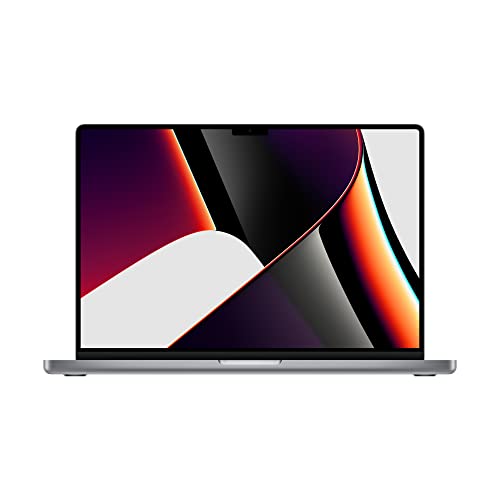
If you want the cleanest jump from “good laptop” to “proper professional tool,” this 16-inch M1 Pro model is the one that makes the case loudly. Apple silicon changes the feel of the machine in a way you notice within minutes. It wakes fast, stays cooler, and handles heavy sessions with a calm, almost smug confidence. The 10-core CPU, 16-core Neural Engine, and up to 32-core GPU are overkill for basic browsing, sure, but they are exactly what makes this model so satisfying for video editing, photography, music production, and big browser-heavy workdays.
The 16-inch Liquid Retina XDR display is a stunner, especially if you spend time grading photos, cutting footage, or just want text to look crisp and rich. Battery life is the other half of the story. This is the kind of machine that can take a morning in a coffee shop, survive a train ride, and still have enough left for the kitchen table later. The refurbished angle matters here because the 2021 16-inch Pro still feels modern in a way many Intel machines never quite did. If your budget can stretch, this is the safest premium buy in the group.
Pros
- M1 Pro performance feels fast, quiet, and efficient in daily use.
- Excellent battery life for a full-size pro laptop.
- 16-inch XDR display looks gorgeous for creative work and media.
- Handles demanding apps without the fan drama of older Intel units.
- Strong long-term value for serious Mac users.
Cons
- Costs much more than the older Intel refurbs.
- 16GB RAM is fine for many users, but heavy pro workflows may want more.
- Large chassis is less travel-friendly than 14-inch options.
Buy this if you care about performance first and want the kind of laptop that still feels fresh every time you open it. It suits creators, developers, and buyers who keep laptops for years rather than months. If you mainly need a document machine, it is probably more than you need, but for people who can feel the difference between “works” and “works beautifully,” this one lands hard.
To buy this product, click here.
3. Best For Storage: Apple Late 2021 MacBook Pro with Apple M1 Pro Chip, 16-Inch, 16GB RAM, 1TB SSD, Space Gray (Renewed)

This version of the 16-inch M1 Pro MacBook Pro follows the same strong formula as the previous pick, but the extra 1TB SSD changes the mood in a very practical way. Anyone who has lived the “storage panic” life knows the feeling. Photos pile up. Video projects grow. Downloads turn into clutter. Suddenly the laptop that looked roomy on paper feels tight in practice. With 1TB onboard, this model gives you far more breathing room for large files, scratch space, and offline libraries, which is a real gift if you work from local assets instead of the cloud.
The rest of the experience is classic M1 Pro goodness. It launches fast, keeps noise low, and handles demanding tasks without looking flustered. That extra storage makes it especially attractive for editors, designers, and developers who hate juggling external drives just to keep momentum going. It is also a great fit for someone who wants to buy once and relax for a while. The tradeoff is simple: you are paying for convenience, and you should only do that if you truly need the extra space. For the right buyer, though, the difference between 512GB and 1TB feels enormous by month three.
Pros
- 1TB SSD gives you serious room for projects, apps, and media files.
- M1 Pro performance stays smooth under pressure.
- Excellent display, battery life, and thermals.
- Great fit for creators who work with large local files.
- Less need for external storage right out of the gate.
Cons
- More expensive than the 512GB version.
- Still a large laptop, so portability is only average.
- 16GB RAM may feel limiting for very heavy multitasking compared with higher-memory configs.
This is the one for buyers who can already picture their folders getting messy. If you keep your work on the machine, move big photo libraries around, or edit video without wanting to babysit storage meters, it is worth serious attention. If you do not use much local storage, save the money and take the 512GB version instead. Same core experience, different level of breathing room.
To buy this product, click here.
4. Best Budget: Apple 2020 MacBook Pro with 2.0GHz Intel Core i5 (13-Inch, 16GB RAM, 512GB SSD Storage) – Space Gray (Renewed)

This 13-inch 2020 MacBook Pro is the kind of refurb that makes a lot of sense for buyers who want a safer middle ground than the cheapest old models. The 16GB of RAM is the standout here because it keeps the machine feeling more capable than many bargain laptops that choke once Chrome gets hungry. The 512GB SSD also helps the whole setup feel less cramped, which matters if you are storing documents, media, and everyday apps locally. For school, office work, light creative use, and general Apple ecosystem life, it can still pull its weight nicely.
What you do give up is the modern punch and grace of M-series Macs. The Core i5 is adequate, but it is the kind of chip that reminds you this laptop comes from the Intel era. A busy day can make the fan wake up, and battery life is respectable rather than exciting. Still, if your budget is tight and you want a 13-inch MacBook Pro with enough memory and storage to avoid constant annoyance, this one is a smart, practical play. It feels more complete than the stripped-down entry models.
Pros
- 16GB RAM is a real plus at this budget level.
- 512GB SSD keeps everyday storage comfortable.
- Compact 13-inch size is easy to carry.
- Good fit for students and office users.
- Usually one of the better-value full Pro refurbs.
Cons
- Intel performance and efficiency trail newer Apple silicon models.
- Can run warm during heavier workloads.
- Screen size feels cramped for split-screen multitasking.
Buy this if you want the cheapest MacBook Pro that still feels properly equipped. It is especially useful for writing, browsing, spreadsheets, and light creative work. If you expect it to behave like a newer M1 or M2 machine, frustration will creep in fast. For everyday use, though, it hits a respectable price-to-spec ratio that is hard to ignore.
To buy this product, click here.
5. Best For Creators: Apple MacBook Pro 2021 with Apple M1 Pro Chip (14-Inch, 16GB RAM, 512GB SSD) – Space Gray (Renewed)

The 14-inch M1 Pro MacBook Pro is the one that makes a lot of creative people grin the moment they pick it up. It has that rare mix of power and restraint. The screen is smaller than the 16-inch model, but the Liquid Retina XDR panel is still gorgeous, and the overall package feels more nimble in a backpack, on a lap, or on a tight desk beside a notebook and coffee cup. The port selection also matters more than people expect. If you are juggling SD cards, external monitors, and a charger, the broader connectivity here saves a lot of adapter fumbling.
Apple’s M1 Pro chip gives this machine the kind of responsive, cool-running performance that makes editing sessions feel less like a wrestling match. Photographers, filmmakers, music producers, and software folks will all appreciate the balance. The six-speaker audio system is a lovely bonus, too, because it makes the laptop feel richer and more polished than a plain office machine. This is one of the easiest recommendations if you want a true pro Mac that does not feel oversized. It is the laptop I would hand to someone who wants one machine that can travel, create, and keep up without drama.
Pros
- Excellent balance of power, size, and portability.
- Liquid Retina XDR display is a real treat for creators.
- Strong port selection reduces dongle dependence.
- Quiet, efficient performance from the M1 Pro chip.
- Great speakers and microphone setup for media work and calls.
Cons
- Smaller display may feel tight for users who love 16-inch workspaces.
- More expensive than older Intel alternatives.
- 16GB RAM is enough for many workflows, but heavy production users may want more headroom.
This is the best choice for buyers who want their MacBook Pro to feel genuinely premium without going full desktop replacement. It works especially well for people who move between office, home, and travel. If your heart is set on the largest screen possible, skip to the 16-inch options, but if you want a sharper, more portable sweet spot, this one is a standout.
To buy this product, click here.
6. Best Cheapest: Apple 2019 MacBook Pro with 1.4GHz Intel Core i5 (13-Inch, 8GB RAM, 128GB SSD) – Space Gray (Renewed)

This is the bare-bones MacBook Pro in the lineup, and that is exactly why it belongs here. For buyers who want the lowest entry cost possible and mostly need a Mac for browsing, writing, email, or basic coursework, it offers the familiar Pro shell without the financial sting of newer models. The Retina display still looks pleasant, the Touch Bar and Touch ID keep the experience feeling distinctly Apple, and the SSD makes booting and app launches feel brisk enough for everyday use.
But this is also the machine that asks for the most honesty from the buyer. Eight gigabytes of RAM and 128GB of storage can work, but they leave very little room for sloppy habits. Install a few big apps, keep lots of browser tabs open, or store media locally and the little comfort zone disappears fast. This is a laptop for light, disciplined use, almost like a simple commuter car. If that sounds fine, the value can be solid. If you know you are the type to hoard files and run many apps at once, keep moving.
Pros
- Lowest upfront cost among the MacBook Pro picks here.
- Compact and familiar 13-inch design.
- Retina display still looks clean for basic tasks.
- Touch ID adds convenience.
- Fast SSD helps the system feel responsive for simple use.
Cons
- 8GB RAM is tight for heavier multitasking.
- 128GB storage fills up quickly.
- Older Intel performance shows up fast under load.
Pick this only if your workload is light and your budget is strict. It is best for someone who wants the MacBook Pro look and feel at the lowest possible refurb price and is willing to live carefully with storage. If you want more room to grow, the better RAM and storage choices above are worth the extra stretch.
To buy this product, click here.
7. Best Alternative: Apple 2026 MacBook Neo 13-Inch Laptop with A18 Pro Chip: Built For AI and Apple Intelligence, Liquid Retina Display, 8GB Unified Memory, 512GB SSD Storage, 1080p FaceTime HD Camera, Touch ID; Indigo

This is the oddball in the list, but it earns a spot because some shoppers do not actually need the heavier MacBook Pro experience. They want a lightweight, modern Apple laptop that can handle everyday work, classroom tasks, casual creative chores, and the growing pile of AI-assisted features that keep appearing in Apple’s software ecosystem. The A18 Pro chip, 8GB of unified memory, and 512GB SSD make it sound very much like an everyday machine, yet the liquid retina display and long battery promise give it a premium polish that should appeal to buyers who value convenience.
Think of this one as the sleek cousin who walks into the room with a different vibe. It is probably not the best choice for demanding pro editing or heavy development work, but it can be a very sensible alternative for students, travelers, and people who want a fresh-feeling Mac without paying for more machine than they can use. The color options and lighter design add personality, which sounds minor until you spend hours staring at your laptop every day. If the goal is simple, reliable, modern Apple computing, this model deserves a look.
Pros
- Modern Apple silicon platform aimed at everyday speed and AI features.
- Light, colorful, and easy to carry.
- 512GB SSD is a comfortable amount for casual users.
- Good battery life for classes, travel, and long desk sessions.
- Liquid Retina display should look sharp for everyday media and work.
Cons
- Not a true MacBook Pro, so heavy pro workloads are a mismatch.
- 8GB RAM may feel tight for power users.
- Less suited to creators who need pro-class ports and sustained performance.
Choose this if your “refurbished MacBook Pro” search is really about getting a capable Apple laptop that feels fresh, portable, and modern. It is best for general use, not deep pro workflows. If you need raw editing power or a big-screen production machine, the Pro models above are the better lane.
To buy this product, click here.
8. Best Value: 2022 Apple MacBook Pro with Apple M2 Chip (13-Inch, 8GB RAM, 256GB SSD Storage) (QWERTY English) Space Gray (Renewed)

This 13-inch M2 MacBook Pro is a strong value pick for buyers who want modern Apple silicon without jumping all the way into the more expensive 14-inch or 16-inch class. The M2 chip gives it a noticeably smoother, more polished feel than older Intel models, and the active cooling means it can hold performance for long stretches rather than getting flaky halfway through a project. That matters for people who work in bursts, whether that means editing a presentation, knocking out a class project, or cleaning up photo batches after a weekend trip.
The 13.3-inch Retina display is bright and pleasant, and the camera and three-mic setup help it feel better prepared for video calls than many older refurbs. The real hook, though, is the combination of M2 efficiency and the MacBook Pro badge. You get the kind of battery life and smoothness that can make an old Intel model feel dusty within minutes. Storage is the catch, since 256GB is not generous, but for buyers who live mostly in cloud services and do not keep giant libraries locally, this model threads the needle nicely. It is practical without feeling cheap.
Pros
- M2 chip feels fast and efficient for everyday work.
- Active cooling helps sustain performance during longer sessions.
- Good battery life for a compact pro laptop.
- Bright Retina display and solid call quality.
- Better value than many larger Apple silicon refurbs.
Cons
- 256GB SSD is small for media-heavy users.
- 8GB RAM is adequate, but not generous.
- Design is older than the newer 14-inch and 16-inch Pro bodies.
This is the smart buy for someone who wants modern speed and decent battery life without stepping into premium territory. It works best for students, office users, and casual creatives who keep their files organized and their expectations realistic. If you need lots of internal storage or plan to run sprawling pro apps all day, a bigger M-series model is the better move.
To buy this product, click here.
9. Best Workhorse: Apple 2021 MacBook Pro with Apple M1 Pro Chip (16-Inch, 32GB RAM, 512GB SSD Storage) Space Gray (Renewed)

If the standard M1 Pro 16-inch model feels good, this 32GB version feels like the one that means business. The extra memory gives it a wider safety net for heavy multitasking, creative apps, coding environments, and those chaotic sessions where you have a browser, audio tool, and cloud sync all trying to shout at once. The 16.2-inch Liquid Retina XDR panel still delivers that rich, sharp look that makes long workdays less tiring, and the 120Hz ProMotion refresh rate adds a subtle smoothness that becomes strangely addictive once you get used to it.
There is also a real comfort factor here. The machine is built for long sessions, with a cooling system that stays impressively quiet, strong battery life, and enough performance overhead to avoid that nagging feeling that the laptop is being pushed to its ceiling. It is a terrific fit for people who buy a MacBook Pro as a work station first and a portable device second. The downside is the usual one for high-memory refurb units: you pay for headroom. If your tasks are lighter, this level of spec is more than you need. If your workflow is serious, though, the extra RAM can feel like a very smart insurance policy.
Pros
- 32GB RAM gives excellent multitasking headroom.
- Large 16.2-inch XDR screen is superb for long work sessions.
- Very strong battery life for a high-performance laptop.
- Quiet, efficient, and well suited to demanding workflows.
- Excellent for creative professionals and heavy users.
Cons
- More expensive than 16GB versions.
- Still a large laptop to carry daily.
- 512GB storage may feel modest for some power users.
Buy this if your laptop earns its keep every day and you want fewer compromises. It is ideal for editors, developers, designers, and anyone who keeps too many apps open for comfort. If your workload is tame, there are cheaper and lighter options above. If your laptop is the engine room for your work, this is the kind of refurb that can make sense for years.
To buy this product, click here.
How To Choose The Right Best Refurbished MacBook Pro
Pick The Right Screen Size
Screen size shapes the whole mood of the laptop. A 16-inch MacBook Pro feels like a portable desk, which is fantastic for video timelines, spreadsheets, and split-screen work. A 14-inch model lands in a sweet spot for portability and pro features. A 13-inch MacBook Pro is easier to carry and usually cheaper, but the workspace can feel cramped once you start juggling multiple windows.
Think About Apple Silicon Versus Intel
Apple silicon models, especially M1 Pro and M2, run cooler, last longer on battery, and feel snappier in everyday use. Intel models can still be a good value on the refurb market, especially if you want to save money or prefer the older design, but they are usually less efficient and louder under stress. For many buyers, this is the biggest fork in the road.
Match Memory To Your Workload
Eight gigabytes is passable for light use, but it can feel tight if you keep a lot of apps open. Sixteen gigabytes is a much safer baseline for most buyers. Thirty-two gigabytes is for people who truly push their machine with creative work, coding, or heavy multitasking. It is easy to overspend on RAM you never use, but it is just as easy to regret buying too little.
Do Not Ignore Storage Headroom
Storage fills up faster than people expect. Photos, video projects, local backups, and a growing app library can swallow 128GB or 256GB in a hurry. If you rely on cloud storage, a smaller SSD can work. If you keep media or large files locally, 512GB is a much calmer place to live, and 1TB is even better for long-term peace of mind.
Check Ports And Real-World Convenience
Some buyers only think about power and display quality, then get annoyed later when they have to live on dongles. Newer MacBook Pro models often bring back more useful ports, which is a blessing if you use SD cards, external monitors, or wired accessories. Think about your desk setup and travel habits, because convenience matters more after the purchase than it does in the spec sheet.
Balance Price Against How Long You Will Keep It
A cheaper refurb can be a smart win if you only need a machine for basic use. But if you plan to keep the laptop for years, spending more on Apple silicon or extra memory can pay off in smoother performance and fewer frustrations. The best buy is not always the lowest price, it is the model that still feels good six months after the excitement fades.
Best Refurbished MacBook Pro FAQ
Is A Refurbished MacBook Pro Worth It?
Yes, especially if you want Apple build quality without paying full retail. The value improves a lot when you choose a model with enough RAM and storage for your actual workload. A refurbished MacBook Pro can be a very smart buy if the seller is trustworthy and the specs match your needs.
Should I Buy Intel Or Apple Silicon?
For most people, Apple silicon is the better choice because it is faster, quieter, and more efficient. Intel models can still make sense if you want the lowest price or need a specific older setup, but the newer chips are generally the easier recommendation.
How Much RAM Do I Need?
For basic use, 8GB can work, but 16GB is the safer target for most shoppers. If you edit video, run virtual machines, code heavily, or keep many apps open at once, 32GB is worth a serious look. More memory helps the laptop stay smooth over time.
Is 256GB Storage Enough?
It can be, if you live in cloud storage and keep your files organized. For many buyers, though, 256GB fills up fast. If you plan to store photos, video, music libraries, or lots of apps locally, 512GB is the better comfort zone.
What Screen Size Is Best For Most Buyers?
The 14-inch model is often the best all-around size because it balances portability and workspace. The 16-inch is better for long editing sessions and split-screen work. The 13-inch is the easiest to carry, but it gives you less room to breathe.
Are Refurbished Intel MacBook Pros Too Old?
Not automatically. They can still be useful for lighter work and smaller budgets. The key is understanding that they are older machines with older behavior, meaning more heat, less battery efficiency, and less future-proofing than Apple silicon models.
What Mistakes Do Buyers Make Most Often?
The biggest mistake is buying based on price alone. Another common miss is choosing too little storage or RAM, then feeling boxed in after a few months. People also overlook screen size and port needs, which are the sort of details that seem small until they become part of your daily routine.
Final Verdict
The best refurbished MacBook Pro for most buyers here is the late-2021 16-inch M1 Pro model, because it delivers the most balanced mix of speed, battery life, display quality, and long-term usability. It feels like the point where the MacBook Pro finally clicks into a modern groove. If you want the strongest premium option, the 1TB 16-inch M1 Pro and the 32GB 16-inch M1 Pro are both excellent, especially for creators and heavy multitaskers who need more room to breathe. If your budget is tighter, the older Intel 16-inch and 13-inch models still offer real value, provided you understand their limits.
The real trick is matching the laptop to your habits. If you want the biggest screen and the least compromise, go 16-inch. If you care about portability and modern efficiency, pick a newer M-series machine. If your use is mostly browsing, writing, and everyday work, a budget refurb can still be a very satisfying purchase. The right choice is the one that feels smooth on a Tuesday afternoon, not the one that looks best on a spec sheet. Buy for your workload, your storage needs, and your comfort level, and the refurb route can feel like a very smart move.