Best Refurbished Gaming Monitors: 9 Top Picks in 2026
Refurbished gaming monitors are having a real moment because they let you chase fast refresh rates, sharper panels, and bigger screens without swallowing a brutal price tag. That is a pretty sweet trade when a clean used unit can land you the kind of specs that used to live far higher up the ladder. The catch is that refurbished shopping can feel a little like rummaging through a stack of arcade cabinets, some are hidden gems, some have quirks, and a few need a hard pass before you even power them on.
The biggest mistakes buyers make are simple. They chase the lowest sticker, ignore panel size versus resolution, or assume every refurbished listing is equally trustworthy. A good pick needs the right mix of condition, warranty support, refresh rate, response time, and image quality, plus a form factor that matches your desk and your games. Some players want a curved 32-inch screen that swallows their peripheral vision. Others want a compact 24-inch display that keeps competitive aim sharp and the desk uncluttered. The top overall choice here leans toward that sweet middle ground, but there is plenty of room for specialist picks depending on how you play.
If you are short on time, the comparison table below gives a quick way to size up the main contenders.
Best Refurbished Gaming Monitors Comparison Table
| Product | Best For | Main Strength | Key Specs |
|---|---|---|---|
| Samsung Odyssey G5 (G51F) | Best Overall | Balanced QHD speed and comfort | 27-inch, 1440p, 180Hz, 1ms, FreeSync |
| Sceptre 22-Inch Gaming Monitor | Best Budget | Low-cost entry to fast refresh | 22-inch, 1080p, up to 144Hz, speakers |
| Samsung Odyssey G55C | Best Curved 32-Inch | Immersive screen and strong contrast | 32-inch, 1440p, 165Hz, 1000R curve |
| Samsung Odyssey G5 Renewed | Best Renewed Big-Screen Value | Same curve-first feel with renewed savings | 32-inch, 1440p, 165Hz, 1000R curve |
| Acer K243Y | Best Simple Refurbished Pick | Easygoing everyday gaming and office use | 23.8-inch, 1080p, IPS, 75Hz |
| Sceptre C248W-1920RN | Best Curved Budget | Curved screen on a tight budget | 24-inch, 1080p, 75Hz, speakers |
| ASUS TUF VG259QM5A | Best For Competitive Play | Blazing-fast IPS motion handling | 24.5-inch, 1080p, 240Hz, 0.3ms |
| Acer Predator X27U | Best Premium | QD-OLED contrast and elite speed | 26.5-inch, 1440p, 240Hz, 0.03ms |
| Dell Optiplex Bundle | Best All-In-One Starter Setup | Monitor plus desktop bundle convenience | 24-inch monitor, i5, 16GB RAM, 512GB SSD |
For a closer look at how these monitors differ in daily use, the reviews below spell out the tradeoffs and the type of buyer each one suits best.
1. Best Overall: Samsung Odyssey G5 (G51F)

The Samsung Odyssey G5 (G51F) lands in that pleasing middle lane where a monitor feels quick without getting fussy. A 27-inch QHD panel gives you room to breathe, and the jump to 1440p makes maps, HUD elements, and distant targets look far cleaner than standard 1080p. For a lot of players, that sharper image is the first thing that makes a refurbished gaming monitor feel like a real upgrade rather than a sideways swap, especially if you have been staring at a tired 24-inch panel for years. Add the 180Hz refresh rate and you get motion that feels lively, almost springy, in shooters and racing games.
What makes this model especially easy to recommend is how balanced it feels in a real room. The height-adjustable stand is a small detail that matters a lot after a long session, and the Black Equalizer can be a lifesaver in dark scenes where enemy silhouettes love to hide. I can picture this being the monitor that gets used for a Saturday split between ranked matches and a late-night show binge, because it handles both without acting like a diva. If you want a refined, adaptable screen that does a lot right without wandering into luxury pricing territory, this one has serious charm.
Pros
- QHD resolution gives games a crisp, detailed look.
- 180Hz refresh rate feels very smooth in fast action.
- Height adjustment helps dial in a better setup.
- FreeSync support reduces tearing and uneven motion.
- Black Equalizer is genuinely useful in darker games.
Cons
- Still an LCD panel, so contrast cannot match OLED.
- 27 inches may feel small for buyers chasing huge immersion.
- 1080p console players may not fully use the QHD detail.
This is the monitor I would hand to most gamers first. It gives you speed, sharper-than-basic resolution, and enough comfort features to feel polished over time. If your desk space is moderate and your gaming mix includes shooters, action RPGs, and daily desktop use, it fits with very little drama. Buyers who want a dramatic curved screen or an OLED glow may keep shopping, but a lot of people will find this the cleanest all-around answer.
To buy this product, click here.
2. Best Budget: Sceptre New 22-Inch Gaming Monitor

This Sceptre 22-inch model is the sort of monitor that makes sense when you want a fresh gaming screen without feeding the wallet to the wolves. It keeps the essentials front and center, a Full HD panel, up to 144Hz refresh support, and a compact footprint that will not swallow a tiny desk. That matters more than people think. I have seen plenty of budget setups where the monitor looked fine on paper, then took over the whole workspace like a tenant with no manners. This one stays tidy.
The built-in speakers are a nice little bonus for a dorm room, spare room, or quick setup where a separate audio solution would just add clutter. The Blue-Light Shift feature also helps if you are the type who goes from a couple of matches to an entire evening without noticing the clock. It is not pretending to be a luxury display, and that honesty is part of its appeal. For casual players, younger gamers, or anyone building a no-frills second setup, this is a sensible low-commitment way into the refurbished gaming monitor pool.
Pros
- Very affordable entry point for gaming refresh rates.
- Compact 22-inch size works well on smaller desks.
- Built-in speakers reduce the need for extra gear.
- 144Hz support is a solid upgrade over basic office monitors.
- Minimal bezel design suits dual-monitor layouts.
Cons
- 1080p on 22 inches is practical, but not especially immersive.
- Image quality will trail stronger IPS or QHD rivals.
- Best for value, not for buyers chasing high-end visuals.
Buy this if your main goal is to get into fast-refresh gaming for the least pain possible. It is well suited to casual players, students, and secondary setups where budget and simplicity matter more than visual wow factor. If you already know you want a larger, sharper panel for years of main-screen duty, keep moving. For a cheap and cheerful refurb route, though, it is hard to beat the practicality.
To buy this product, click here.
3. Best Curved 32-Inch: Samsung Odyssey G55C

The 32-inch Odyssey G55C is the kind of monitor that makes a game feel like it has room to stretch its legs. The 1000R curve pulls you in fast, and on a screen this size it does a good job of filling the edges of your vision without feeling gimmicky. If you play open-world games, cinematic adventures, or anything where you like to sit back and soak in the scenery, this monitor has real presence. The QHD resolution helps keep that large panel from looking soft, which is exactly what you want at 32 inches.
It also brings a strong 165Hz refresh rate and 1ms response time, so the size does not come at the cost of motion clarity. That is the real trick here. Plenty of big monitors feel lovely in a story-rich game but sluggish in a quick firefight. This one keeps pace better than expected, and the Eye Saver Mode plus reduced flicker can make a long weekend marathon feel a lot less punishing. Picture it on a gaming desk with a controller in one hand and a drink sweating nearby, this monitor gives that whole scene a confident, wrapped-around feel that smaller displays cannot mimic.
Pros
- 32-inch size delivers strong immersion.
- 1000R curve feels dramatic without being awkward.
- QHD resolution keeps the large panel sharp.
- 165Hz refresh rate supports fluid gameplay.
- Eye Saver Mode is useful for long sessions.
Cons
- Takes up more desk space than smaller options.
- Curve preference is subjective, and some players prefer flat panels.
- Not the cheapest route into refurbished gaming monitors.
This is the one to choose if you want your display to feel like part of the game instead of a window onto it. It works best for single-monitor setups, console-friendly living rooms, and PC gamers who value immersion as much as speed. Buyers with cramped desks or a strict competitive focus may want a smaller screen, but for all-around spectacle, this Samsung has a lot of personality.
To buy this product, click here.
4. Best Renewed Big-Screen Value: Samsung Odyssey G5 Renewed

The renewed Odyssey G5 is a smart pick for anyone who likes the 32-inch Samsung curve-first formula but wants to squeeze extra value out of the refurb route. On paper, it tracks very closely with the G55C, QHD resolution, 1000R curvature, 165Hz refresh, and 1ms MPRT response time. In practical terms, that means you are getting the same kind of wraparound gaming feel and the same speed profile, but with a renewed label that can make the purchase more approachable for bargain-minded shoppers. That is a big part of the appeal.
This one makes sense for buyers who do not mind buying a renewed unit as long as the condition and return support are clear. I have seen people spend months staring at deal charts trying to chase the perfect hybrid of size and value, only to realize the monitor they wanted was a curved 32-inch all along. If that sounds familiar, this monitor speaks your language. HDR10 adds a little pop to bright scenes, while Eye Saver Mode and low flicker keep the experience easier on the eyes during those late-night sessions that always somehow become one more match.
Pros
- Large 32-inch curved format is highly immersive.
- QHD resolution gives useful clarity at this size.
- 165Hz and 1ms support responsive gameplay.
- Renewed pricing can improve overall value.
- Eye Saver Mode helps during long play sessions.
Cons
- Renewed condition can vary more than brand-new stock.
- Still a big desk commitment.
- Very similar to the G55C, so comparison is mostly about value and condition.
Choose this if you want the curved 32-inch Samsung experience and are comfortable with the refurb process. It is best for players who care more about screen presence and smooth motion than about chasing the latest panel tech. If you want the safest route, the brand-new G55C may feel simpler. If you want more size for the money and accept some renewal-related tradeoffs, this one is easy to like.
To buy this product, click here.
5. Best Simple Refurbished Pick: Acer K243Y
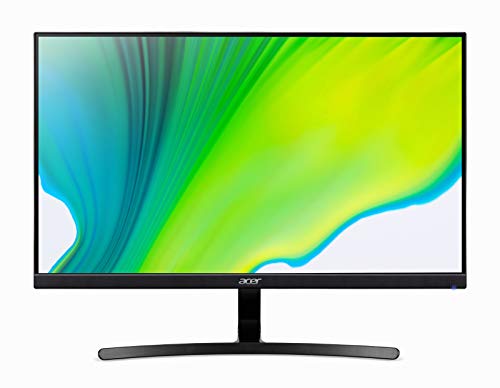
The Acer K243Y is the kind of monitor that does not try to seduce you with flashy numbers, it just shows up and gets the job done. At 23.8 inches with a Full HD IPS panel, it feels like an easygoing everyday display that can handle gaming, browsing, schoolwork, and streaming without making your setup feel overcomplicated. The 75Hz refresh rate is modest by gaming standards, but compared with a typical 60Hz office screen, it still gives movement a slightly cleaner, less sticky feel. For many casual players, that is enough to make a difference.
What I like most here is the certified refurbished angle. The listing promises limited or no wear, original accessories, and a 90-day warranty, which helps take the sting out of buying used tech. I can imagine this working perfectly in a bedroom setup where the monitor spends weekdays on spreadsheets and weekends on lighter games. It is not a speed demon, and it never claims to be. Instead, it leans into reliability, comfortable viewing, and an easy setup, and sometimes that is exactly what the room needs.
Pros
- Certified refurbished status adds peace of mind.
- IPS panel should deliver solid viewing angles.
- Compact 23.8-inch size is easy to fit on most desks.
- 75Hz is a mild but real step up from 60Hz.
- Good for mixed use, not only gaming.
Cons
- Not ideal for competitive players seeking very high refresh rates.
- 1080p is fine, but not especially crisp on larger screens.
- Feature set is basic compared with newer gaming models.
This is the monitor for practical buyers who value stable day-to-day use over spec-sheet fireworks. It suits younger gamers, casual players, and office-first setups that still need a little gaming flexibility after hours. If you are trying to build a straightforward refurbished workstation with a playable screen and a sensible footprint, this Acer is a dependable place to start.
To buy this product, click here.
6. Best Curved Budget: Sceptre C248W-1920RN

This Sceptre curved 24-inch monitor feels like a budget pick with a little swagger. The 1800R curve gives it some visual personality, and that curved wrap can make single-player games and movie nights feel more enveloping than a plain flat screen. It is still a 1080p, 75Hz panel at heart, so no one should mistake it for a hardcore tournament display, but that is kind of the point. It aims at affordability and comfort, and it sticks the landing better than many monitors in its lane.
There is also a nice practical angle here. HDMI, VGA, and built-in speakers make it flexible for older PCs, spare-room setups, or living-room desks where one extra cable can become one too many. I have a soft spot for products like this because they often end up in the places where people actually relax, a side desk in the den, a bedroom rig, or a second monitor beside a homework laptop. It may not make your jaw drop, but it has enough curve and enough convenience to feel a little more thoughtful than the cheapest flat panels.
Pros
- Curved screen adds immersion at a budget-friendly level.
- Built-in speakers simplify basic setups.
- HDMI and VGA increase compatibility with older gear.
- VESA mount support improves placement flexibility.
- Good value for casual gaming and media use.
Cons
- 75Hz is fine, but not fast by gaming standards.
- Color and motion performance will trail better IPS and high-refresh rivals.
- Built-in speakers are convenient, not impressive.
This is a good fit if you want a curved monitor that keeps costs low and setup simple. It shines for casual gamers, students, and secondary rooms where immersion matters a little more than raw speed. If you want a serious competitive display, skip it. If you want a low-stress curved refurb that feels a touch more polished than the absolute cheapest option, this Sceptre is worth a look.
To buy this product, click here.
7. Best For Competitive Play: ASUS TUF Gaming Series 5 VG259QM5A

The ASUS TUF VG259QM5A is built for players who notice the tiny stuff, the flick of a target, the instant a crosshair slides into place, the split-second softness that ruins a clean headshot. That is where the 240Hz refresh rate and 0.3ms response time start to matter. On a 24.5-inch Fast IPS panel, motion stays crisp and controlled, and the screen size itself is friendly to competitive aim because everything sits neatly in view. It is the kind of monitor that makes sense on a desk with a mouse pad that has seen some things.
ASUS also layers in the useful extras that competitive players quietly appreciate. G-SYNC compatibility and FreeSync Premium help keep the frame delivery smooth, while ELMB SYNC tackles ghosting and tearing together. That combination gives the monitor a sharp, focused feel that is easy to get used to once you have played a few matches on it. If your evenings are filled with shooters, fighting games, or fast esports titles, this screen has the right personality for the job. It may not be the flashiest display in the roundup, but it feels purpose-built, and that purpose is very clear.
Pros
- 240Hz refresh rate is excellent for fast-paced gaming.
- 0.3ms response time helps keep motion crisp.
- Fast IPS panel balances speed with good image quality.
- G-SYNC compatibility and FreeSync Premium widen compatibility.
- Great size for esports-focused desk setups.
Cons
- 1080p resolution is less sharp than QHD competitors.
- Best suited to competitive play rather than cinematic immersion.
- Refurbished or used availability can vary by listing.
This is the pick for gamers who care most about response and motion clarity. It works especially well in smaller setups where a 24.5-inch screen keeps your eyes centered and your aim tight. If you prefer richer detail, bigger screen size, or curved immersion, another monitor may feel better. If you want a serious speed-first display, this ASUS is right in the pocket.
To buy this product, click here.
8. Best Premium: Acer Predator X27U

The Acer Predator X27U is the flashy one in the group, the monitor that walks into the room and immediately starts stealing glances. QD-OLED gives it a very different character from the LCD models above, deep blacks, strong contrast, and color that can feel almost velvety in dark scenes. If you have ever played a moody sci-fi title and wished the shadows had more depth without losing detail, this is the sort of screen that makes that wish feel expensive in the best possible way. The 26.5-inch size also hits a sweet esports-friendly zone without feeling cramped.
Then there is the speed. A 240Hz refresh rate paired with 0.03ms response time is the kind of spec combo that makes motion feel uncannily clean, almost too smooth the first time you see it. That is a serious perk for competitive players, but the better story here is how well the panel handles both speed and spectacle. HDR10, DCI-P3 99 percent coverage, and Delta E under 2 make it appealing for anyone who cares about visual fidelity as much as input response. If you want the premium refurbished gaming monitor that still feels genuinely special, this is the one that can spoil you fast.
Pros
- QD-OLED contrast is stunning for games and media.
- 240Hz refresh and 0.03ms response are elite-grade.
- Color performance is excellent for a gaming monitor.
- Adjustable stand improves ergonomics.
- HDMI 2.1 and DisplayPort 1.4 add modern connectivity.
Cons
- Premium pricing is a real barrier for budget shoppers.
- OLED care habits matter more than on basic LCD panels.
- 26.5 inches may feel smaller than expected for the money.
Buy this if your top priority is picture quality paired with serious gaming speed. It is the best fit for enthusiasts, competitive players with premium tastes, and anyone who wants a monitor that makes every dark alley, neon splash, and muzzle flash feel richer. If your budget is tight, this is not the one to force. If you want the most luxurious display in this roundup, it is hard to look past.
To buy this product, click here.
9. Best All-In-One Starter Setup: Dell Optiplex Desktop Computer Bundle

This Dell bundle stands out for a very different reason. It is not a pure monitor play, it is a whole setup package that includes a 24-inch display alongside a renewed Optiplex desktop, keyboard, mouse, and headset. For a buyer who wants the easiest possible path from cardboard box to playing games or getting work done, that bundle convenience is a huge deal. The monitor itself is basic compared with the dedicated gaming displays in this roundup, but the overall package can make sense for someone building a first room setup or replacing several aging pieces at once.
The refurb story is reassuring too. The listing says the unit is professionally inspected and tested, with cleaned components and repackaging, plus a 90-day warranty. That is useful because bundle purchases can feel a little scattered if the seller is sloppy. Here, at least, there is a clear attempt to present a ready-to-go machine. I would think of this as the setup for a student moving into a dorm, a parent building a family PC corner, or someone who wants a monitor with the rest of the system already sorted. It is less about monitor performance and more about immediate convenience, which gives it a real niche.
Pros
- Includes desktop, monitor, keyboard, mouse, and headset.
- Good for buyers who want one purchase to cover everything.
- 16GB RAM and 512GB SSD improve general responsiveness.
- Windows 11 Pro is already installed.
- Refurbished testing adds some reassurance.
Cons
- The included monitor is not a serious gaming display.
- Gaming performance will be limited by the desktop hardware.
- Less focused than buying a monitor alone.
This is the right pick only if you want convenience above all else. It is better for beginners, casual users, or households that need a complete station than for buyers hunting a true gaming monitor upgrade. If your goal is competitive play, cinematic immersion, or a sharp standalone display, skip it. If your goal is to solve several setup problems in one shot, it has obvious appeal.
To buy this product, click here.
How To Choose The Right Best Refurbished Gaming Monitors
Screen Size And Desk Space
Size shapes the whole experience. A 24- to 25-inch display keeps everything close and focused, which is ideal for fast shooters and tight desks. A 27-inch panel gives you more breathing room and sharper 1440p detail, while a 32-inch curved screen creates a more immersive setup that can feel excellent for single-player games. Before buying, measure the depth of your desk and think about how far you usually sit, because a great monitor feels clumsy fast if it crowds your keyboard or pushes your eyes too close to the action.
Resolution Versus Refresh Rate
Refurbished gaming monitors often tempt shoppers with one headline spec, but the real trick is balance. 1080p is easier on older graphics cards and works fine on smaller screens. 1440p looks cleaner and feels more modern, especially at 27 inches and above. Refresh rate matters just as much if you play twitchy games, because 144Hz, 165Hz, and 240Hz all affect how smooth motion feels. A buyer with a midrange PC might get more value from 1440p at 165Hz than from chasing a 240Hz panel that their system cannot fully feed.
Panel Type And Image Quality
IPS panels usually bring better viewing angles and a more natural look for mixed use. Curved VA-style panels can feel deeper and more cinematic, especially in darker games, though some buyers notice slower black-to-gray transitions. OLED and QD-OLED sit at the premium end with striking contrast and rich color, but they also ask for a bigger budget and a little more care. Think about how you use the screen outside of games too. A monitor that doubles as your movie screen or work display may benefit more from color balance and comfort than from raw response speed.
Refurbished Condition And Warranty
Condition is where refurbished shopping gets real. A certified refurbished model with a clear warranty and original accessories usually feels safer than a barebones listing with vague language. Check whether the product has been tested, whether cosmetic wear is limited, and how long the return window runs. Small scratches are one thing. Panel defects, dead pixels, or unstable stands are another. A strong warranty can make a midrange refurb feel like a much smarter gamble, especially if you are buying a model that will be used daily.
Curved Or Flat
Curve preference is personal, and it matters more than people expect. Curved monitors can feel fantastic on 32-inch screens because they wrap the image around your view and reduce that distant-edge feeling. On smaller screens, the curve is often subtler, more about style than transformation. Flat panels usually win for strict competitive players, since they keep geometry more straightforward and can feel easier during rapid aim adjustments. If you split time between work and play, a flatter screen may feel more natural.
Connectivity And Console Use
Ports are easy to ignore right up until the night you need them. HDMI is the baseline for consoles and most PCs, while DisplayPort often unlocks the best refresh support on gaming rigs. If you want to use the monitor with older devices, a VGA port can still be useful, though it is more of a compatibility extra than a modern feature. Also think about built-in speakers. They rarely impress audio enthusiasts, but they can save space and make a simple refurb setup feel complete without extra purchases.
What To Avoid
The most common mistake is buying based on size alone. A huge screen with weak resolution can look soft, and a fast refresh rate means little if the panel is poor or the condition is questionable. Another mistake is ignoring the seller’s refurb policy. If the listing gives no confidence about testing or warranty, the low price can turn into a headache. The smarter move is to match the monitor to your PC power, your desk size, and your actual gaming habits, then choose the best-supported refurb option in that lane.
Best Refurbished Gaming Monitors FAQ
Are Refurbished Gaming Monitors Worth Buying?
Yes, if you choose carefully. Refurbished monitors can deliver much better value than brand-new models, especially when you want high refresh rates or a larger panel. The trick is buying from listings with clear condition details, testing language, and a return window. That is what keeps the bargain from turning into a gamble.
What Matters More For Gaming, Refresh Rate Or Resolution?
It depends on the games you play. Competitive players usually feel refresh rate more because motion looks smoother and input response feels tighter. Story-driven players often appreciate resolution more because the image looks cleaner and more detailed. If you play both, 1440p at 165Hz is a very practical middle ground.
Is 1080P Still Good Enough In 2026?
Absolutely, especially at 24 to 25 inches. A sharp 1080p panel can still look clean and play smoothly, and it is easier for many graphics cards to drive at high frame rates. At 27 inches and above, though, 1440p usually looks noticeably better.
Should I Buy A Curved Monitor For Gaming?
Curved monitors shine most on larger screens, where the wraparound effect feels natural and immersive. On 32-inch displays, the curve can be a real treat for single-player gaming. On smaller screens, the benefit is more subtle and often comes down to personal taste.
What Warranty Should I Expect With A Refurbished Monitor?
Warranty terms vary a lot by seller and product type. Certified refurbished items often include a short warranty period, while renewed or third-party refurbished listings may differ. Before buying, check the return policy, the warranty length, and whether accessories are included.
Can Refurbished Monitors Have Dead Pixels Or Image Issues?
They can, which is why seller quality matters. A well-tested refurbished monitor should arrive in good shape, but no refurb category is risk-free. If the listing does not explain condition standards or support options clearly, skip it and keep looking.
Do Built-In Speakers Matter On A Gaming Monitor?
They matter if you want a simple setup or need backup audio, but they are rarely the main reason to buy a monitor. Most built-in speakers are serviceable rather than impressive. They are handy in dorms, bedrooms, and minimal desk setups where convenience outweighs audio quality.
Final Verdict
The best all-around choice here is the Samsung Odyssey G5 (G51F) because it hits the sweet spot so many gamers are chasing: sharp QHD resolution, a fast 180Hz refresh rate, and a comfortable 27-inch size that works well on most desks. It feels like the safest recommendation for buyers who want a refurbished gaming monitor that can handle both fast action and everyday use without demanding a giant commitment. If your taste runs bigger and more immersive, the 32-inch Samsung curved models bring a lot of atmosphere. If you want to spend less, the Sceptre 22-inch and curved 24-inch picks keep the door open without making the budget groan.
The premium and specialist options are strong too. The ASUS TUF VG259QM5A is the speed-first choice for esports fans, while the Acer Predator X27U is the luxury pick for players who want OLED-style contrast and elite motion clarity. That is the real lesson with refurbished gaming monitors. The best deal is not the cheapest one, it is the one that fits your desk, your games, and your tolerance for risk. Match the panel size to your space, match the resolution to your hardware, and choose the refurb listing that gives you the clearest support. That is how you turn a used-screen purchase into a genuinely smart buy.