Best Refurbished iPads: 9 Great Options in 2026
Buying a refurbished iPad is a bit like rummaging through a clean, well-run record shop. The good stuff is there, the prices are friendlier, and if you know what to look for, you can walk out with a tablet that still feels slick, snappy, and very Apple. A lot of shoppers start here because they want the iPad experience without paying fresh-off-the-line money, whether that means a school tablet, a couch companion for streaming, or a light work machine for email and notes.
The trap is grabbing the cheapest listing and calling it a day. Storage can be too tight, battery health can be a gamble, and older chips can start wheezing the moment you open a few apps at once. The smartest buyers pay attention to screen size, chip generation, accessory support, and how much life is left in the software pipeline. Different people want different things too. One buyer wants a bargain that handles Netflix and browsing. Another wants a newer model for Apple Pencil work, sharper cameras, and smoother multitasking. That split is exactly why the top pick here stands out so clearly.
Below, the best refurbished iPads are sorted for real-world use, from ultra-budget basics to stronger all-around picks and a premium option for people who want more headroom. If you are short on time, the comparison table gives a quick read on the main differences before you jump into the full reviews.
Best Refurbished iPads Comparison Table
| Product | Best For | Screen Size | Main Strength |
|---|---|---|---|
| Apple iPad, 10.2-Inch, Wi-Fi, 32GB, Space Gray (Renewed) | Best Overall Value | 10.2-inch | Balanced price, familiar design |
| Apple iPad Early 2018, 9.7-inch, Wi-Fi, 32GB (Renewed) | Best Budget | 9.7-inch | Lowest entry cost |
| Apple iPad 8th Generation, 10.2-inch, Wi-Fi, 128GB (Renewed) | Best for Storage | 10.2-inch | More room for apps and media |
| Apple iPad 2020, 10.2-inch, Wi-Fi, 32GB (Renewed) | Best Value Upgrade | 10.2-inch | Modern core performance |
| Apple iPad 11-inch, A16 Chip, 128GB | Best Larger Screen | 11-inch | Fastest everyday performance |
| Apple iPad Air 5, 10.9-inch, WiFi + Cellular, 256GB (Renewed) | Best Premium | 10.9-inch | M1 power and accessory support |
| Apple 2021 iPad, 10.2 inch, Wi-Fi, 64GB (Renewed Premium) | Best Renewed Premium | 10.2-inch | Better front camera and newer chip |
| Apple 2019 iPad 10.2-inch, Wi-Fi, 128GB (Renewed) | Best Extra Storage Budget | 10.2-inch | Storage-heavy bargain |
| Apple iPad with WiFi, 32GB, Silver (2017 Model) (Renewed) | Best Ultra Budget | 9.7-inch | Cheapest Apple tablet option |
If you want the finer details, the reviews below spell out where each iPad shines and where the tradeoffs start to show.
1. Best Overall: Apple iPad, 10.2-Inch, Wi-Fi, 32GB, Space Gray (Renewed)

This renewed 10.2-inch iPad hits that sweet spot a lot of buyers are chasing. It keeps the familiar home-button layout, includes Touch ID, and still feels easy to live with for everyday browsing, streaming, note-taking, and light app work. The A10 Fusion chip is older, sure, but for basic tasks it still has enough snap to make the tablet feel friendly rather than fussy. That matters when the goal is something you can pick up, tap open, and use without a mini science project.
Where it really earns the top spot is balance. The 10.2-inch size is big enough for recipes, school apps, and split-screen reading sessions, yet not so bulky that it becomes a nuisance on a tray table or in a backpack. The 32GB storage is the main compromise, and that is real. If you plan to load a lot of games, offline video, or chunky creative apps, you will feel the squeeze. Still, for a household tablet, a kid’s homework machine, or a casual everyday iPad, this one lands in a very comfortable lane, and the price-to-usability ratio is hard to ignore.
Pros
- Friendly 10.2-inch size works well for streaming, reading, and casual multitasking.
- Touch ID keeps logins quick and familiar.
- Headphone jack and Lightning support make it easy to use older accessories.
- Stereo speakers are solid for a tablet at this level.
- Great entry point for buyers who want the classic iPad feel without overspending.
Cons
- 32GB fills up fast if you download a lot of media or apps.
- A10 Fusion is fine for basics but can feel dated with heavier workloads.
- Camera quality is serviceable, not exciting.
If your main goal is a reliable refurbished iPad that handles the usual stuff without drama, this one is the safest all-around recommendation. It is the kind of tablet that gets used every day because it stays out of the way, and that is a bigger compliment than it sounds. Buyers who need serious storage or stronger multitasking should step up to a newer model, but plenty of shoppers will be perfectly happy staying here.
To buy this product, click here.
2. Best Budget: Apple iPad Early 2018 (9.7-Inch, Wi-Fi, 32GB) – Space Gray (Renewed)

For buyers watching every dollar, this 9.7-inch renewed iPad makes a very straightforward case. It is old enough to sit near the bottom of the price ladder, but still feels like a real Apple tablet rather than a throwaway bargain-bin gadget. The A10 Fusion chip gives it enough life for web browsing, video calls, email, and casual streaming, and the Retina display still brings that crisp, clean iPad look that people expect the moment they open the box. It is a little like finding a denim jacket that has already broken in nicely, comfortable from the start.
There are limits, of course. The 32GB storage is tight, and the older hardware means you will want to keep expectations reasonable. This is the kind of iPad that shines in simple roles, like keeping a child occupied, acting as a bedside screen, or handling your music, books, and browser tabs. One good real-world scenario is a family that wants a spare tablet for travel days, airport layovers, or the kitchen counter. Another is a student who needs a cheap screen for worksheets and streaming lectures. In those cases, the modest hardware starts to look pretty smart.
Pros
- Very affordable way to get into the iPad ecosystem.
- Retina display still looks clean and bright for everyday use.
- Lightweight and easy to carry around the house or on trips.
- Touch ID makes unlocking simple and quick.
- Good fit for casual browsing, reading, and video playback.
Cons
- Limited 32GB storage is a real constraint.
- Older design and hardware show their age in demanding apps.
- Not the best choice for long-term heavy use.
This is the pick for shoppers who care more about reaching the lowest entry cost than about headroom. It works best as a secondary tablet or a light-duty daily driver. If you know you will be opening a lot of apps, storing a mountain of photos, or expecting smooth performance for years, you will probably want to move up the list. If your goal is simple and cheap, though, this one does the job with surprising dignity.
To buy this product, click here.
3. Best For Storage: Apple iPad (10.2-Inch, Wi-Fi, 128GB, 8th Generation) – Space Gray (Renewed)
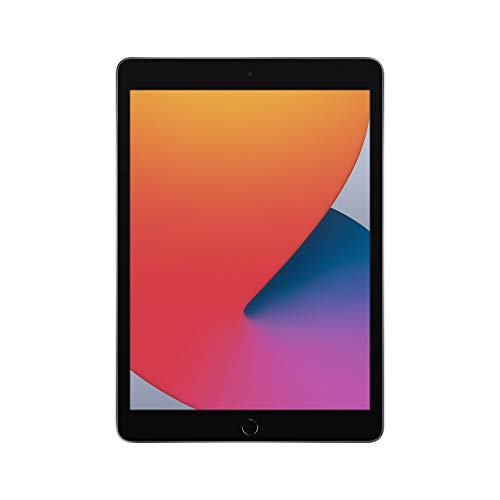
Storage changes everything, and this 8th-generation model makes that painfully obvious in the best way. With 128GB on board, it is far less likely to hit that annoying “delete something before installing this app” wall. For a lot of families, that alone makes it worth a look. The A12 Bionic chip is also a noticeable step up from older A10-based models, so the tablet feels smoother under pressure, especially when you are juggling school apps, browser tabs, and streaming all at once.
This one makes a particularly nice sense for people who keep their iPad loaded with downloaded movies, big game libraries, or photos from a long vacation. Picture a kid heading into a weekend road trip with no Wi-Fi and a bunch of offline shows. Or a parent using the tablet as a shared household device, where cluttered storage quickly becomes everybody’s problem. That is where the 128GB cushion feels calm and practical. The 10.2-inch display, Touch ID, and support for Apple Pencil and Smart Keyboard round out a package that still feels familiar, but with more breathing room than the basic models.
Pros
- 128GB storage gives you far more room to work with.
- A12 Bionic chip feels snappier than older basic models.
- Apple Pencil and Smart Keyboard support add flexibility.
- 10.2-inch display is a comfortable size for schoolwork and streaming.
- Good middle ground for families and students.
Cons
- Costs more than the lowest-budget refurbished options.
- Still uses Lightning instead of USB-C.
- Battery life is fine, but this is not the newest platform here.
This is the smart buy for anyone who knows storage matters. It gives you room to breathe, and that can be the difference between loving a tablet and constantly managing it. Buyers who only use a browser and a handful of apps may not need this much space, but anyone who treats the iPad like a mini computer will appreciate the extra capacity almost immediately.
To buy this product, click here.
4. Best Value Upgrade: Apple iPad 2020 (10.2-Inch, Wi-Fi, 32GB) – Space Gray (Renewed)
This refurbished 2020 iPad feels like a smart step up for buyers who want something a little fresher without jumping into premium territory. It keeps the 10.2-inch size that so many people enjoy, but the A12 Bionic chip gives it a cleaner, quicker feel than the older A10 models. That matters in small but noticeable ways. Apps open with less hesitation, scrolling is smoother, and the tablet has more breathing room when you are bouncing between browsing, streaming, and messaging.
The 32GB storage is still the caution flag here, and it is worth taking seriously. If your tablet habit is all about downloading lots of games or stockpiling video, you will want a bigger drive. But for a more typical mix of schoolwork, YouTube, reading, and the occasional note-taking session, this model has a nice rhythm. It is the kind of device that makes sense for a college student who wants a dependable class tablet, or a parent who wants a home screen that does a little of everything without feeling fragile. It is practical, and in the refurbished market, practical often wins.
Pros
- A12 Bionic chip gives it better everyday speed than older budget models.
- 10.2-inch display stays easy to use and easy to carry.
- Good fit for school, streaming, and light productivity.
- Still supports Apple Pencil and Smart Keyboard accessories.
- A nice middle-ground option for buyers who want newer feel without premium cost.
Cons
- 32GB storage can feel cramped fast.
- Design still follows the older home-button formula.
- Not the strongest choice for intensive multitasking.
If you want a refurbished iPad that feels more current than the cheapest options, this is a solid lane to live in. It is especially good for everyday users who value smoothness more than bells and whistles. Shoppers who need lots of storage should keep moving, but anyone who wants an easy, balanced tablet with a nicer engine under the hood will probably feel very at home here.
To buy this product, click here.
5. Best Larger Screen: Apple iPad 11-Inch: A16 Chip, 11-Inch Model, Liquid Retina Display, 128GB, Wi-Fi 6, 12MP Front/12MP Back Camera, Touch ID, All-Day Battery Life – Blue

This is the modern muscle pick in the group. The A16 chip gives it a quick, polished feel that older refurbished models simply cannot match, and the 11-inch Liquid Retina display makes the whole device feel lively. If you have ever watched a movie on an aging tablet with dull colors and a slow touch response, this will feel like fresh air. Everything moves with more confidence, from switching apps to editing photos to hopping into a FaceTime call with a bright, centered front camera.
It also suits a wider set of real-world buyers than you might expect. A commuter can toss it in a bag and read or watch during a train ride. A student can open notes, browsing, and a writing app without the tablet acting tired. A home user can use it for recipes, Zoom calls, and family photos and still have plenty of room for downloads thanks to the 128GB base storage. The USB-C connector is another quality-of-life win, since it fits more modern accessories and is less annoying than juggling older cables. This is one of those models that feels like it was built to keep up for years, not just to survive the week.
Pros
- A16 chip delivers fast, modern performance.
- 128GB storage is a far more comfortable starting point.
- USB-C is easier to live with than older charging setups.
- 11-inch Liquid Retina display is sharp and pleasant for media.
- Strong cameras and Wi-Fi 6 add everyday convenience.
Cons
- Costs more than the refurbished budget-friendly models.
- May be more tablet than casual users actually need.
- Accessory choices can add to the total spend quickly.
Buy this if you want the least compromise and the most speed. It is a strong fit for people who use tablets as daily work tools, sketch pads, or media hubs and do not want the old-tablet drag that can sneak up on cheaper models. If your needs are light and simple, this is more machine than you may need. If your tablet gets used hard, though, this one has the headroom to make that feel easy.
To buy this product, click here.
6. Best Premium: Apple 2022 iPad Air 5, 10.9-Inch, WiFi + Cellular, 256GB – Space Gray (Renewed)

The iPad Air 5 is the polished, grown-up option in this lineup. The M1 chip gives it a serious performance cushion, and that changes the feel immediately. App launches are brisk, multitasking is more relaxed, and creative work has room to breathe. If someone plans to use an iPad for note-taking, photo edits, drawing, document work, and a healthy amount of media, this is the model that starts feeling less like a tablet and more like a lean little workstation.
The 10.9-inch Liquid Retina display looks sharp and balanced, and the 256GB storage on this renewed unit is a huge comfort if you keep lots of files, apps, or offline content around. Cellular support is another perk for people who move a lot, such as contractors, freelancers, or students who spend time between campus and coffee shops. One scene comes to mind quickly. A designer on a train, Pencil in hand, opening large files without that sluggish stutter that ruins the moment. Another is a business traveler using the tablet for documents, maps, and email without hunting for Wi-Fi every ten minutes. That is the level this model plays at.
Pros
- M1 chip brings excellent speed and long-term headroom.
- 256GB storage is generous for serious users.
- Cellular support adds flexibility away from Wi-Fi.
- USB-C and Apple Pencil 2 support are big quality-of-life upgrades.
- Strong choice for productivity and creative work.
Cons
- Much pricier than the basic refurbished iPads.
- Overkill for simple streaming or browsing needs.
- Accessories can make the total cost climb quickly.
This is the recommendation for buyers who want a premium iPad experience and do not want to keep upgrading every couple of years. It is especially appealing for students, professionals, and creatives who will push the tablet a little harder. If you only need a screen for casual use, you can save a lot by moving down the list. If you want the best blend of power, storage, and flexibility, the Air 5 is a beauty.
To buy this product, click here.
7. Best Renewed Premium: Apple 2021 iPad (10.2 Inch, Wi-Fi, 64GB) – Silver (Renewed Premium)
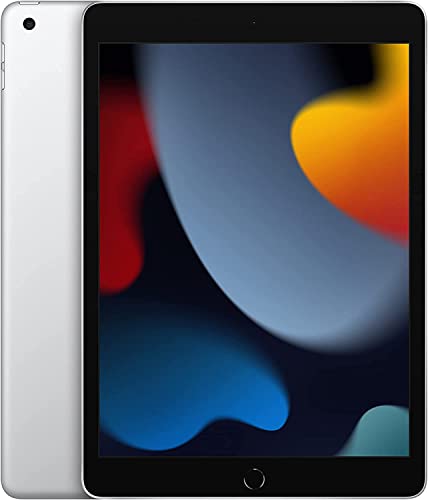
This renewed premium model is a tidy upgrade for people who want a familiar iPad shape but with a little more polish under the hood. The A13 Bionic chip gives it a smoother feel than the older A10 and A12-based budget models, and the 12MP ultra wide front camera with Center Stage is a real quality-of-life boost for video calls. That is one of those features that seems small until you use it during a family call, a class meeting, or a work check-in and realize you are no longer stuck awkwardly leaning into frame.
The 64GB storage is a nice middle point. It is enough for a good chunk of apps, photos, and offline content without the tighter squeeze of 32GB. The 10.2-inch Retina display keeps things comfortable for reading and media, while the renewed premium designation suggests a slightly more careful refurbishment tier than the most basic listings. A real-world example here is a parent who wants a dependable household iPad with a better front camera for school video chats. Another is a remote worker who wants a simple, stable tablet for calls, notes, and calendar work. That is the kind of buyer this model flatters.
Pros
- A13 Bionic chip gives it a meaningful speed bump.
- Center Stage front camera is excellent for video calls.
- 64GB storage is more forgiving than 32GB options.
- 10.2-inch display is a comfortable everyday size.
- Renewed Premium tier appeals to buyers who want a bit more confidence in condition.
Cons
- Still shares the older design language.
- Not as powerful as the newer Air or A16 models.
- May cost enough that some shoppers will consider a bigger jump instead.
This is a smart pick for buyers who want a better camera, better chip, and a smoother refurb experience without leaping all the way to premium pricing. It suits families, students, and home office use particularly well. If your work lives in spreadsheets and huge creative files, go higher. If you mainly want a cleaner, fresher, and more trustworthy everyday iPad, this one deserves a close look.
To buy this product, click here.
8. Best Extra Storage Budget: Apple 2019 iPad 10.2-Inch, Wi-Fi, 128GB – Space Gray (Renewed)
This one is a nice little sleeper pick. It gives you the older A10 Fusion chip, but the 128GB storage changes the practical value a lot. For a buyer who just wants more room without paying for newer hardware they may never fully use, it makes perfect sense. The 10.2-inch screen keeps the familiar iPad shape, and the lighter, straightforward design means it slips easily into school bags, kitchen drawers, and travel kits without becoming a burden.
One of the best ways to think about this model is as a storage-first bargain. If you are the person who keeps a bunch of downloaded podcasts, a pile of ebooks, and a few larger apps installed at all times, the extra capacity saves you from constant cleanup. Another nice fit is a shared family tablet where different people want different things on it, from games to lessons to media. The hardware is not flashy, and that is fine. Sometimes the best refurbished buy is the one that quietly prevents headaches later. That is the role this iPad fills better than most.
Pros
- 128GB storage is a major advantage at this price level.
- 10.2-inch display keeps it comfortable for many uses.
- Good choice for shared family use or offline content.
- Still supports the core Apple tablet experience.
- Solid value if storage matters more than raw speed.
Cons
- A10 Fusion is older and less future-proof.
- Not ideal for demanding multitasking or creative work.
- Does not feel as polished as newer refurbished options.
Buy this if your biggest frustration is running out of space, not running out of speed. It is a practical, no-nonsense choice for people who use an iPad in ordinary ways and want enough storage to stop thinking about it. If you want a fresher chip or better long-term performance, other models in this roundup make a stronger pitch. If your priority is a roomy, affordable tablet, this one gets the job done without fuss.
To buy this product, click here.
9. Best Ultra Budget: Apple iPad With WiFi, 32GB, Silver (2017 Model) (Renewed)

This is the bargain hunter’s bargain. The 2017 model sits at the cheapest end of the refurbished pile, and that makes it appealing for buyers who simply want an Apple tablet at the lowest possible entry point. It is a 9.7-inch device with Wi-Fi only, so it is very much a straightforward, old-school iPad experience. For basic reading, streaming, browsing, and keeping a child entertained on a weekend trip, it still has enough charm to matter.
The catch is exactly what you would expect. The 32GB storage is tight, the hardware is older, and this model is best thought of as a light-duty companion rather than a daily powerhouse. Picture a bedside tablet that only needs to open a news app and a video app. Or a grandparent who wants something simple for FaceTime and photos without learning a new interface. Those are the kinds of real-world jobs it can still handle without complaint. But if your life involves big games, lots of app switching, or heavy note-taking, you will feel the age pretty quickly. That is the tradeoff, plain and simple.
Pros
- Lowest-cost path into a refurbished iPad.
- Simple, familiar 9.7-inch layout.
- Fine for light media, reading, and browsing.
- Good secondary tablet for occasional use.
- Very easy to understand and set up.
Cons
- 32GB storage fills up very fast.
- Older hardware limits how long it will feel quick.
- Not the best choice for heavy app use or long-term growth.
This is for buyers who care most about price and are willing to accept the limitations that come with it. It can be a perfectly reasonable pick for a backup tablet, a travel screen, or a low-intensity home device. If you want better longevity, more storage, or a little more pep, several other options in this roundup are worth the extra spend. If the goal is to keep the wallet as happy as possible, though, this one gets the nod.
To buy this product, click here.
How To Choose The Right Best Refurbished iPads
Start With How You Actually Use It
The best refurbished iPad is the one that matches your habits, not the one with the flashiest spec sheet. If you mainly watch shows, browse recipes, and answer email, a basic 9.7-inch or 10.2-inch model can be plenty. If you plan to use split screen, Pencil tools, or heavier apps, a newer chip starts to matter fast. A lot of people overspend on power they never touch, while others save a few dollars and end up frustrated within a month.
Pay Attention To Storage First
Storage is the sneaky problem that bites most refurbished buyers. Thirty-two gigabytes disappears fast once you install a few apps, download a show for a flight, and take a bunch of photos. If you are the kind of person who hates constant cleanup, 64GB is a much safer floor, and 128GB starts to feel comfortable. Families and students often regret going too small long before they regret spending a little more.
Choose Screen Size For The Way It Feels In Hand
A 9.7-inch iPad is lighter and easier to toss into a small bag, which is nice for travel and casual use. A 10.2-inch model feels more balanced for schoolwork and media. An 11-inch or 10.9-inch model gives you more room for typing, drawing, and multitasking, but it can feel a touch more serious and a touch less pocketable in daily life. Think about whether you want a couch companion or a mini workstation.
Check Apple Pencil And Keyboard Support
For students, note-takers, and people who like handwriting, accessory support is a big deal. Some older models work with the first-generation Apple Pencil, while newer options open the door to better keyboard and Pencil setups. If you are hoping to write essays, sketch diagrams, or annotate PDFs, do not treat accessory support like an afterthought. It can change the whole feel of the tablet.
Think About Battery Life And Refurb Condition
Battery age is one of the main reasons refurbished tablets can feel wildly different from one another. A well-inspected unit from a trusted refurbisher can feel perfectly fine for daily use, while a poorly handled listing can turn into a charger-chasing annoyance. Look for seller reputation, warranty coverage, and clear refurbishment terms. A tablet that arrives in good shape is worth more than a lower sticker if it saves you from battery grief later.
Match The Chip To Your Patience Level
Older chips like the A10 Fusion are fine for browsing, video, and simple apps, but they are not the best fit if you get impatient with lag. A12, A13, M1, and A16-class devices bring a much smoother feel and better staying power. If this iPad will be used every day, a stronger chip can make the difference between “good enough” and “I actually enjoy using it.”
Do Not Ignore Charging And Ports
Some refurbished iPads still use Lightning, which is fine if your home already has those cables everywhere. Others use USB-C, which is more convenient if you want to share chargers with newer gear. Port choice sounds boring until you are in a hurry and realize you do not want to dig through a drawer for the one cable that fits. Small annoyances add up, especially on a device you plan to use often.
Best Refurbished Ipads FAQ
Are Refurbished Ipads Worth Buying?
Yes, if you buy carefully. A refurbished iPad can deliver the same core Apple experience for much less money, especially if you are willing to choose a model that is a generation or two behind the newest release. The key is buying from a listing with clear condition details, good seller support, and enough storage for your needs.
What Refurbished Ipad Is Best For Most People?
For most shoppers, a balanced 10.2-inch model with at least 64GB or 128GB storage is the safest lane. It gives you enough screen space for media and school tasks, enough power for everyday use, and enough familiarity that setup stays simple. The best overall pick in this roundup is a strong example of that sweet spot.
How Much Storage Do I Really Need?
If you mainly stream and browse, 32GB can work, but it is tight. For school, family sharing, or a decent app library, 64GB is a better minimum. If you want offline movies, bigger games, or a long-lived device that does not feel cramped, 128GB is much more comfortable.
Is A Newer Chip Really That Important?
It matters more than people expect. A newer chip usually means smoother app switching, better gaming, faster photo editing, and a tablet that feels less sluggish after a few years. If your use is light, an older chip can still be fine. If you plan to keep the iPad around for daily use, a stronger chip is worth paying attention to.
Should I Buy The Cheapest Refurbished Ipad Available?
Only if your needs are very simple. The lowest-cost models can be fine for reading, streaming, or occasional use, but they also tend to have the least storage and the oldest hardware. That can become frustrating faster than expected. A slightly more expensive model often feels far better to live with.
What Should I Check Before Ordering?
Look at storage, chip generation, screen size, accessory support, seller reputation, and any warranty details. If those line up with your needs, the odds of a good purchase go way up. The product page can look nice, but your real experience depends on the boring details hiding underneath.
Can Refurbished Ipads Handle School And Work?
Absolutely, as long as you choose the right model. For notes, browsing, PDFs, and video calls, even some older refurbished iPads can do a respectable job. For heavier multitasking, creative work, or daily productivity, newer chips and more storage make life easier. Match the tablet to the workload and it can be a very smart buy.
Final Verdict
The best refurbished iPad for most people in this lineup is the Apple iPad, 10.2-Inch, Wi-Fi, 32GB, Space Gray (Renewed). It offers the most balanced mix of price, size, and everyday usability, which is exactly what a lot of buyers want from a refurbished tablet. If you need the cheapest path in, the early 2018 model is the bargain play. If storage matters more, the 128GB 8th-generation iPad is a much calmer choice. And if you want serious performance, the iPad Air 5 and the A16-based 11-inch model are the premium routes that feel noticeably more modern.
The real trick is matching the tablet to your habits. A light media device does not need the same hardware as a student workhorse or a travel-friendly productivity machine. Think about how often you will use it, how many apps you will keep installed, and whether you care more about value, storage, or speed. That little bit of honesty saves a lot of buyer’s remorse. Pick the model that fits your day-to-day life, and a refurbished iPad can feel like one of the smartest purchases you make this year.