Best Refurbished Standing Desks: 9 Top Picks in 2026
Shopping for refurbished standing desks usually starts with one simple goal: get the height-adjustable setup without paying full-new-item money. That sounds easy until the choices start piling up. Size, motor noise, stability at full height, memory presets, and desktop layout all matter more than they first seem, especially if your desk is carrying dual monitors, a laptop, and the kind of cable tangle that appears by lunch. The wrong pick can wobble, feel cramped, or turn sit-stand breaks into a daily annoyance.
The smartest buyers focus on the stuff that affects real use. How steady does the frame feel when the desk is raised? Is the motor smooth enough for shared spaces? Does the desktop fit your gear without turning into a crowded little island? Different shoppers want different things, too. Some want the biggest surface possible. Others care more about a compact footprint, a quieter lift, or the easiest assembly after a long workday. The top overall pick here stands out because it balances size, stability, and everyday usability without feeling fussy.
If your time is tight, the comparison table below gives a quick way to sort the strongest options. Click any desk name to jump straight to its full review.
Best Refurbished Standing Desks Comparison Table
| Product | Best For | Main Strength | Desk Size |
|---|---|---|---|
| Veken 55 Inch Large Electric Standing Desk | Best Overall | Big surface with strong balance of stability and value | 55 inches |
| ErGear Height Adjustable Electric Standing Desk | Best for Reliability | Quiet motor, steel frame, and 4 memory presets | 48 x 24 inches |
| Cubiker Standing Desk | Best Value | Strong specs at a friendly entry price | 48 x 24 inches |
| DUMOS 40 Inch Electric Standing Desk | Best Compact Pick | Smaller footprint with quick setup | 40 x 24 inches |
| COMHOMA Standing Desk | Best Mobile Option | Tilting top and wheels for flexible use | Portable design |
| FEZIBO Standing Desk | Best for Smooth Daily Use | Balanced features and easy assembly | 48 x 24 inches |
| Furmax Electric Standing Desk | Best for Accessories | Cable tray and hooks help keep the desktop tidy | 45 x 24 inches |
| Huuger Electric Standing Desk | Best for Built-In Power | Charging station with USB-C and strong load support | 47 x 24 inches |
| DUMOS 63 Inch Electric Standing Desk | Best Large Surface | Wide desktop for multi-monitor setups | 63 inches |
For a closer read on what separates these desks, the reviews below walk through the practical differences that matter at a real workstation.
1. Best Overall: Veken 55 Inch Large Electric Standing Desk

One reason this desk earns the top spot is the way it handles the everyday grind without feeling oversized or overcomplicated. The 55-inch desktop gives you breathing room for a monitor pair, a laptop stand, a notebook, and the little things that tend to creep across a work surface by 3 p.m. The motor runs quietly, which is a big deal if your desk sits in a shared room or near a sleeping kid, and the memory presets keep the sit-to-stand routine from becoming a tiny daily chore. It feels like the kind of desk that disappears into the background, which is exactly what a good workstation should do.
It also has the kind of stability people notice after a week, not after a five-minute demo. A standing desk can look solid and still give that little shimmy when it reaches full height, and that gets old fast when you’re typing through a long meeting. Veken’s steel frame helps here, and the cable management adds a cleaner finish than a lot of budget desks manage. If your workspace has that familiar tangle of charger cords, webcam cables, and lamp leads, this model brings some calm to the mess. It is a strong fit for home offices, hybrid workers, and anyone who wants a roomy desk that still feels approachable, which is a nice balance indeed.
Pros
- Generous 55-inch surface gives space for dual monitors and daily work gear.
- Quiet motor keeps height changes from feeling loud or disruptive.
- Memory presets make sit-stand switching quick and painless.
- Steel frame adds reassuring stability at higher positions.
- Built-in cable management helps the desk stay visually tidy.
Cons
- The two-piece desktop may be a turnoff for buyers who want a single solid slab.
- Not the best match for very tight rooms or dorm-style setups.
- Assembly is straightforward, but the larger top still takes some handling.
This is the desk I would point most people toward first if they want a sensible mix of size, control, and value. It has enough workspace for serious home-office use without drifting into bulky territory, and it feels especially right for someone setting up a “real” desk rather than a temporary one. If your priority is a dependable everyday standing desk that can handle long work sessions, this one hits the sweet spot.
To buy this product, click here.
2. Best for Reliability: ErGear Height Adjustable Electric Standing Desk

The ErGear desk feels like the dependable sedan of this lineup. It does the job cleanly, quietly, and without making a show of itself. The 48 x 24 inch footprint is easy to fit into a spare room or a corner office, and the four memory presets are a genuine convenience for anyone who shifts between seated work, standing work, and a couple of preferred in-between positions. The lift range is practical, the motor is smooth, and the desk has a sturdy, grounded feel that gives it a more mature personality than some starter standing desks.
What stands out most is the way this model aims for long-term trust. The steel frame and aerospace-grade lifting columns give it a serious backbone, and the low-VOC materials are a quiet bonus for buyers who care about indoor air quality. Picture a worker who sits through editing sessions in the morning, then stands for calls in the afternoon. Or a student who switches between laptop work, sketching, and gaming. The desk handles that kind of rhythm without drama. It is not flashy, but it is the kind of purchase that can vanish into your routine and stay there for years, which is often exactly what people want from a standing desk.
Pros
- Four memory presets make repeated height changes easy.
- Compact 48 x 24 size fits well in smaller home offices.
- Quiet electric lift feels smooth during daily use.
- Steel frame adds confidence at full height.
- Low-VOC materials are a thoughtful touch for indoor spaces.
Cons
- The desktop size may feel tight for larger multi-monitor layouts.
- Design is practical rather than stylish.
- No built-in storage or power extras.
Buy this one if you want a straightforward standing desk that behaves well every day and does not ask for much in return. It suits buyers who care more about dependable movement and stable performance than bells and whistles. If your setup is modest and your main goal is a smooth, durable sit-stand routine, ErGear is easy to like.
To buy this product, click here.
3. Best Value: Cubiker Standing Desk
Cubiker earns its place because it keeps the important parts of a standing desk where they should be: a smooth lift, decent desktop room, and a frame that feels sturdier than the price suggests. The 48 x 24 size is familiar and easy to live with, especially if you want enough surface for dual monitors without swallowing an entire room. The motor runs under 45 dB, so it does not punch through calls or distractions, and the three memory presets make it feel a bit more polished than a bare-bones starter model. There is a quiet satisfaction in tapping a button and watching the desk settle into your preferred height without a fuss.
It also suits the kind of buyer who wants a sensible workhorse more than a statement piece. A lot of people shopping for refurbished standing desks are trying to make a budget stretch, maybe for a first apartment office or a side room that became a hybrid work zone overnight. Cubiker plays that role nicely. The industrial-grade steel frame, rated stability, and low-VOC materials help the desk feel less like a compromise and more like a practical win. It is the sort of desk that gets the job done in a way that still feels reasonably calm and grown-up, which matters when your workspace is already busy enough.
Pros
- Strong feature set for the money.
- Quiet motor is friendly for shared spaces.
- Three memory presets keep switching simple.
- Sturdy frame supports typical dual-monitor work setups well.
- Rounded edges and smooth desktop feel comfortable for daily use.
Cons
- The two-piece desktop construction may not appeal to everyone.
- Not as spacious as larger premium options.
- Looks functional rather than refined.
This is a smart buy for anyone trying to keep costs under control while still getting a real electric standing desk experience. It is especially appealing for first-time buyers, students, and remote workers who want reliable sit-stand movement without overpaying for extras they may never use. If value matters more than prestige, Cubiker lands in a very nice spot.
To buy this product, click here.
4. Best Compact Pick: DUMOS 40 Inch Electric Standing Desk

The DUMOS 40-inch model is the desk I would point to for someone who keeps saying, “I want a standing desk, but I do not have much room.” That smaller footprint is the whole point. It fits into bedrooms, apartments, and secondary office nooks where a bigger desktop would feel like a kitchen table invading the place. The 40 x 24 layout still gives enough room for a monitor, laptop, keyboard, and a few daily essentials, and the electric lift brings the same sit-stand rhythm people want from larger desks. The quiet motor helps too, especially if your work area sits close to a shared living space.
Where this desk really earns points is convenience. The tool-free assembly is a nice relief if you do not feel like spending an evening surrounded by screws and cardboard. The three memory presets are easy to appreciate once you start moving between focus work and breaks, and the reinforced steel frame helps the desk feel respectable rather than flimsy. I can imagine this fitting a smaller bedroom office where a person works during the day and wants the room to still feel like a room afterward. That kind of flexibility matters, and DUMOS gets it.
Pros
- Compact size works well in smaller rooms.
- Tool-free assembly keeps setup simple.
- Quiet height adjustment suits shared spaces.
- Three memory presets make switching easy.
- Solid weight support for a smaller desk.
Cons
- Desktop area is limited for larger workstation setups.
- Not ideal for users who need multiple big monitors.
- The dual-panel top may be less appealing than a seamless surface.
Choose this one if your main challenge is space, not ambition. It is a practical fit for students, apartment dwellers, and anyone who wants the benefits of a standing desk without surrendering half the room. If your setup is modest and your priority is keeping things neat and compact, this desk does exactly that.
To buy this product, click here.
5. Best Mobile Option: COMHOMA Standing Desk
COMHOMA is a different kind of standing desk, and that is exactly why it deserves a spot here. Instead of acting like a fixed workstation, it leans into mobility and flexibility. The wheeled base makes it easy to move from room to room, and the tiltable desktop is surprisingly useful if your day involves more than one type of task. Typing in the morning, sketching after lunch, then watching a video or reading in the evening feels much easier on a surface that can shift angle. It has a very “real life” vibe, which I like. Not everyone needs a static office brick planted in one spot.
The height range also helps it stand out, since it runs a bit taller than many typical desks. That gives taller users a little more room to breathe, and the locking wheels keep it steady once you settle it in place. It is a natural fit for a laptop-only setup, a walking pad routine, or a room that has to serve multiple purposes. Picture someone who works from the bedroom in the morning, then rolls the desk near the window for reading in the afternoon. Or a creator who wants a simple surface for drawing and note-taking. COMHOMA handles those shifts with less friction than a fixed desk would.
Pros
- Wheels make repositioning easy.
- Tilting desktop adds flexibility for reading, sketching, and laptop use.
- Taller height range is useful for a broader range of users.
- Locking wheels help keep the desk stable once parked.
- Works well in multi-use rooms.
Cons
- Not the best pick for heavy multi-monitor workstation use.
- More niche than a standard fixed standing desk.
- The mobile design may not suit everyone’s taste.
This is the desk for buyers who want flexibility more than a traditional office look. It makes a lot of sense for apartment living, light work, or walking pad setups where movement is part of the routine. If your desk needs to travel, tilt, or pull double duty, COMHOMA gives you options other models simply do not.
To buy this product, click here.
6. Best for Smooth Daily Use: FEZIBO Standing Desk

FEZIBO feels polished in the ways that matter most to everyday users. The motor is quiet, the adjustment range is practical, and the three memory presets mean you can build a sit-stand rhythm without thinking too hard about it. That kind of ease matters more than people expect. If you are in meetings all day, or just trying to avoid the annoying little break in concentration that comes from fiddling with desk height, a smooth lift matters a lot. This model handles that quietly, almost politely, which is a nice quality in a workhorse desk.
It also brings a slightly more thoughtful materials story, since the FSC-certified wood option and multiple size and color choices make it easier to match a room without making the office feel like an afterthought. The 48 x 24 size is a comfortable middle ground, especially for a dual-monitor or laptop-plus-monitor setup. A lot of desks in this category aim for durability alone and stop there. FEZIBO adds a touch of refinement, from the pre-assembled components to the fast setup. It is the sort of desk that suits a buyer who wants their workstation to feel calm, organized, and easy to live with, which can make a long workday feel less jagged.
Pros
- Quiet, smooth motor keeps transitions subtle.
- Three memory presets simplify routine use.
- Strong stability at height.
- Multiple color and size choices improve room matching.
- Assembly is quick and friendly for non-handy buyers.
Cons
- Desktop size may feel average for power users with lots of gear.
- Not the cheapest option in the group.
- Splice top may not satisfy buyers who prefer a seamless panel.
If you want a desk that feels easy from the first day and still holds up to regular use, FEZIBO is a strong pick. It makes sense for home offices, study spaces, and work areas where quiet movement and tidy setup matter a great deal. Buyers who value a smooth everyday experience will probably be happy here.
To buy this product, click here.
7. Best for Accessories: Furmax Electric Standing Desk

Furmax stands out because it seems to understand the clutter problem that follows almost every workstation. The cable management tray and hooks for headphones or bags are small touches, but they make a real difference once the desk is loaded with a monitor, chargers, and the usual pile of desk life. The 45 x 24 size lands in a practical middle zone, giving you enough surface without sprawling across the room. It is a sensible shape for a home office where every inch matters, and the motor’s quieter operation keeps the daily height changes from sounding like a garage tool.
The other thing this desk does well is make setup feel manageable. The included guide, video support, and pre-embedded screw holes remove some of the usual assembly friction, which is welcome if you have ever stared at a flat-pack box and sighed loudly before even opening the hardware bag. The 4 memory presets also give it a little more polish than basic entry models. I can picture this working especially well for someone who likes a tidy desk and keeps a headphone stand, a bag hook, or a cable tray on their wish list. That kind of practical order can make a workspace feel a lot less chaotic, and Furmax leans into that nicely.
Pros
- Cable tray and hooks help keep the desk organized.
- Four memory presets are handy for daily switching.
- Good balance of size and usefulness.
- Quiet motor is suitable for home use.
- Assembly support feels thoughtful and beginner-friendly.
Cons
- Desktop comes in two parts.
- Not the largest surface in the lineup.
- Style is practical more than premium.
Buy this if you know your desk tends to collect mess and you want a little help keeping things in line. It is a good fit for users who care about daily organization, from remote workers to gamers with a lot of accessories. If cable clutter drives you up the wall, Furmax brings useful relief.
To buy this product, click here.
8. Best for Built-In Power: Huuger Electric Standing Desk

Huuger feels like the desk for people who are already tired of hunting for outlets. The built-in power station is the headline feature here, and it is a genuinely useful one if your desk hosts a laptop, monitor, phone charger, lamp, and maybe a tablet dock. Having four AC outlets, a USB port, and a Type-C connection right on the desk cuts down on the little daily scramble that happens around a floor plug. It also keeps the workspace visually cleaner, especially when paired with the cable manager. For buyers who like their desk to feel self-contained, that setup is a treat.
It is more than a convenience desk, though. The motor is very quiet, the frame looks built for real use, and the load support is strong enough to inspire confidence for heavier setups. The 47 x 24 size is easy to live with, and the anti-collision feature adds a practical safety layer that families and busy rooms can appreciate. I can see this being especially handy in a home office that doubles as a charging station, or in a work nook where everything needs to stay within arm’s reach. That kind of integrated functionality can make a desk feel smarter without becoming complicated, and Huuger pulls that off well.
Pros
- Built-in outlets and USB-C reduce cable chaos.
- Very quiet motor is great for shared spaces.
- Strong load support and stability.
- Anti-collision feature adds peace of mind.
- Easy one-touch memory presets improve convenience.
Cons
- Power features may be unnecessary for minimal setups.
- Desk surface is useful, but not massive.
- Black finish may show dust more easily.
This is a smart choice for buyers who want their desk to do more than raise and lower. It is especially appealing for tech-heavy workstations, charging stations, and people who dislike reaching under the desk for outlets. If convenience is your love language, Huuger speaks it fluently.
To buy this product, click here.
9. Best Large Surface: DUMOS 63 Inch Electric Standing Desk
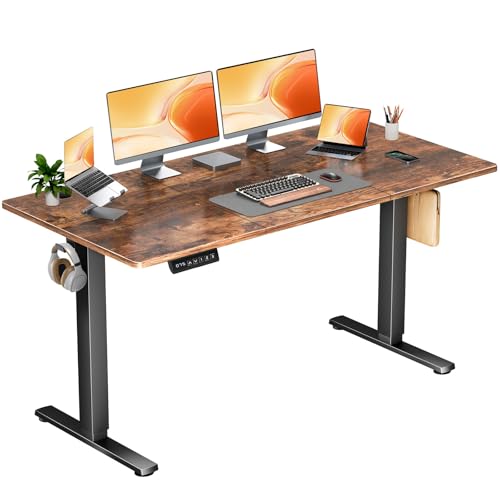
If your setup has outgrown a normal desk, this is the one that finally gives your gear some elbow room. The 63-inch desktop is the whole story here. It is wide enough for multiple monitors, a laptop, speakers, notes, and the random objects that tend to invade a serious workstation over time. That extra spread can be a blessing for people who work with large screens, content creators, or gamers who like space to breathe. A cramped desktop can make even good equipment feel messy. This desk solves that problem with brute width and a sturdy frame.
The rest of the package keeps pace nicely. The motor is quiet, the height range is practical, and the memory presets mean you do not have to micromanage every change. The desk also feels built for heavier duty use, with a stable T-leg design that helps it stay grounded at full height. I picture this in a room where one person edits video, another runs a dual-monitor office setup, or someone simply wants to spread out without fighting for surface area every afternoon. If your workday feels like a small command center, this desk gives that chaos a proper landing pad, and that is a satisfying thing to see.
Pros
- Huge 63-inch surface is ideal for multi-monitor setups.
- Quiet height transitions keep the desk unobtrusive.
- Three memory presets make daily use simple.
- Strong frame support helps with heavier setups.
- Tool-free assembly is a welcome bonus for a large desk.
Cons
- Too large for many bedrooms and small offices.
- The wide desktop may feel excessive for minimalist users.
- Two-piece construction may bother buyers seeking one seamless top.
Pick this one if your main complaint is lack of space. It is best for buyers with serious desktop needs, not for anyone trying to save square footage. If your monitors keep crowding each other and your notes are always sliding off the edge, the extra width here will feel like a breath of fresh air.
To buy this product, click here.
How To Choose The Right Best Refurbished Standing Desks
Buying a refurbished standing desk is a little like choosing a used car for your home office. The frame can look fine at first glance, but the details tell the story. You want smooth lifting, decent stability, and a desktop that fits the way you really work, not the way you imagine working on a perfect Monday morning. A desk that feels good for two hours can still become annoying by Friday if the controls are clunky or the surface is too cramped.
1. Measure Your Workspace First
Start with the room, not the product page. A 63-inch desk sounds fantastic until you realize the door swing, chair clearance, and walking space all get cramped. Measure the wall, the depth available, and the height of nearby shelves or windows. Smaller rooms usually do better with 40 to 48-inch tops, while larger home offices can handle 55 inches or more without feeling crowded.
2. Match The Desktop Size To Your Gear
Think about the way your desk actually gets used. A laptop, monitor, and notebook need far less room than a dual-monitor setup with speakers, a dock, and a lamp. Buyers often overestimate how much space they need, then underestimate how quickly clutter grows. If you like to spread out papers or keep a second screen nearby, a wider surface can save a lot of irritation.
3. Check Stability At Full Height
This is where cheap-looking standing desks can turn annoying fast. A desk that feels fine at sitting height may wobble once it rises, especially with heavier monitors. Look for steel frames, T-leg or reinforced bases, and load ratings that match your setup. If you use a monitor arm, the desk needs even more backbone since arms can amplify shake in a weak frame.
4. Look At Motor Noise And Memory Presets
A quiet motor matters more than many buyers expect. If you work near other people, take calls often, or keep different hours than the rest of the house, a loud lift can become a small but constant nuisance. Memory presets are worth paying for too. They make the stand-up routine feel effortless, and that makes it more likely you will actually use the desk the way it was intended.
5. Consider Assembly And Long-Term Maintenance
Some desks are friendly right out of the box, while others ask for more patience than they deserve. If you are not handy, tool-free or pre-labeled assembly can save a ton of frustration. Also think about parts support, replacement policies, and how easy it would be to live with a two-piece desktop. A straightforward setup is often the difference between a desk that gets used and one that stays in the box too long.
6. Decide Which Extras Actually Matter
Built-in outlets, cable trays, hooks, drawers, and tilting tops can all be useful, but only if they fit your routine. A power strip built into the desk is great for tech-heavy setups. Drawers help if you hate desktop clutter. A tilting top makes sense for reading or drawing. The mistake is buying extras that sound clever but never get touched after week one.
7. Balance Budget Against Daily Comfort
With refurbished or value-oriented standing desks, the cheapest option is not always the best deal if the lift is rough or the frame feels shaky. A midrange desk with smoother movement and better stability can be a far better long-term buy than a bargain model that annoys you every afternoon. The goal is a desk that makes movement easy, because that is the feature that actually changes your workday.
Best Refurbished Standing Desks FAQ
What Should I Look For First In A Refurbished Standing Desk?
Start with stability and height range. If the desk wobbles or does not reach a comfortable standing height, the rest of the features matter less. After that, check the desktop size, motor noise, and whether the controls include memory presets.
Are Two-Piece Standing Desk Tops A Problem?
Not necessarily. Many desks in this category use a two-piece top to keep shipping and assembly manageable. The tradeoff is mostly cosmetic. If you want a seamless look, a single-piece top is nicer, but many split tops still work perfectly well for daily use.
How Much Desk Width Do I Need?
For a laptop-only setup, a compact desk can work just fine. If you use one monitor, 40 to 48 inches is usually comfortable. Dual-monitor users often prefer 48 to 55 inches, and heavier workstation builds may feel best at 63 inches or more.
Do Memory Presets Really Matter?
Yes, especially if you switch between sitting and standing several times a day. Presets make the desk easier to use and reduce the little friction that can keep people from changing positions. That convenience can make a real difference over time.
Are Standing Desks Good For Walking Pad Setups?
They can be, as long as the desk height range works with your walking pad and the frame stays stable while you move. Compact desks and mobile desks are especially handy here. Look for enough clearance and a motor that adjusts smoothly.
Is A Quieter Motor Worth Paying More For?
Usually, yes. A quiet motor is one of those features you barely notice until it is missing. If you share your space, take video calls, or work odd hours, a smoother and quieter lift can make the whole desk feel more pleasant to use.
What Is The Biggest Mistake Buyers Make?
The most common mistake is choosing based on price alone. A desk can look like a good deal but still feel flimsy, cramped, or noisy. The better move is to match the desk to your room, your equipment, and the way you actually work every day.
Final Verdict
The Veken 55 Inch Large Electric Standing Desk is the best overall choice in this group because it gives most buyers the easiest balance of size, steadiness, and everyday usefulness. It has enough room for a real workstation, enough stability to feel trustworthy, and enough convenience features to make sit-stand life feel natural instead of fussy. If you want a desk that can anchor a home office without becoming a hassle, this is the one I would put at the top of the list.
The rest of the lineup covers some very useful territory. ErGear is a strong reliability pick, Cubiker brings standout value, and DUMOS offers a compact option for tighter rooms. Huuger is the sleeper hit for buyers who want built-in power, while the large 63-inch DUMOS is the obvious pick for anyone who needs serious surface area. In the end, the best refurbished standing desks are the ones that fit your room, your gear, and your habits without making work feel more complicated than it already is. Pick the desk that matches your daily rhythm, and the rest tends to fall into place.