Best Refurbished ThinkPad Laptops: 9 Picks in 2026
When you’re hunting for the best refurbished ThinkPad laptops, you’re usually balancing two instincts: get a machine that feels new but costs far less, and avoid surprises like dead batteries, replaced parts, or out-of-date firmware. Buyers come to refurbished ThinkPads for stout build quality, excellent keyboards, and ports that actually matter. The tricky part is separating well-refurbished units from bargain-bin returns, and understanding whether a model’s age and specs still match your daily workload.
Common mistakes include equating low price with value, overlooking warranty and seller grading, and assuming all refreshed machines include original batteries or factory firmware. What matters most is the combination of CPU generation, RAM and storage capacity, battery health, and the seller’s refurbishing standard. Different buyers will prioritize different things: a developer may value a quad-core CPU and 32GB of RAM, while a road warrior wants light weight, long battery life, and robust connectivity.
Across the picks below I lean toward the Lenovo ThinkPad L14 Ryzen 5 PRO as the top overall pick for giving modern performance, a business-grade chassis, and solid I/O without a premium price tag. If portability is the priority, the T14s Gen 2 variants and the X1 Carbon Gen 9 are excellent alternatives. Read on for a quick comparison or scroll to the model that matches your workflow.
If you’re short on time, the comparison table below gives a fast snapshot of the top options and links into the detailed reviews so you can jump directly to the model that looks right for you.
Best Refurbished ThinkPad Laptops Comparison Table
| Product | Best For | Main Strength | Key Specs |
|---|---|---|---|
| Lenovo ThinkPad L14 Ryzen 5 PRO | All-Around Performance | Modern Ryzen PRO CPU, strong I/O | Ryzen 5 PRO 7530U, 16GB RAM, 256GB SSD, 14″ FHD |
| Lenovo ThinkPad T14s Gen2 (i5, 512GB) | Portable Professionals | Thin, light, Thunderbolt 4 | i5-1145G7, 16GB, 512GB, Fingerprint |
| Lenovo ThinkPad X1 Carbon Gen 9 | Premium Ultrabook | Top-tier build, high-end screen options | i7-1185G7, 32GB, 1TB SSD, 14″ FHD |
| Lenovo ThinkPad T14 Gen 2 Touch | Touchscreen Workhorse | Good balance of performance and features | i5-1145G7, 16GB, 256GB, 14″ Touch FHD |
| Lenovo ThinkPad T14 Gen 1 (512GB) | Value with Larger Storage | Fresh Windows 11 install, roomy NVMe SSD | i5-10310U, 16GB, 512GB NVMe, 14″ FHD |
| Lenovo ThinkPad T14 Business (HD) | Budget Business | Lowest entry cost for ThinkPad durability | i5-10310U, 16GB, 256GB SSD, 14″ HD |
| Lenovo ThinkPad L14 (i7) | Higher Single-Thread Power | Intel i7 option, good port spread | i7-10610U, 16GB, 256GB SSD, 14″ FHD Touch |
| Lenovo ThinkPad X13 G1 | Compact Travel Laptop | 13.3″ footprint, light and portable | Ryzen 3 PRO 4450U, 16GB, 256GB SSD, 13.3″ FHD |
| Lenovo ThinkPad L15 Ryzen 5 PRO (32GB) | Multitasking & Numeric Keypad | Larger 15″ chassis with 32GB RAM option | Ryzen 5 PRO 5650U, 32GB, 256GB SSD, 15.6″ FHD |
If you want a deeper look at any model, the reviews below explain real-world strengths and who will benefit most from each machine.
1. Best Overall: Lenovo ThinkPad L14 Ryzen 5 PRO 7530U

One reason this option stands out is its combination of modern CPU architecture and sensible business features. The L14 with the Ryzen 5 PRO 7530U brings six efficient cores and motherboard-level management features that businesses and power users appreciate. In daily use that translates to snappy multitasking, quick file transfers, and enough burst performance for light content work or virtual machines. The inclusion of Windows 11 Professional, WiFi 6E, and a full complement of ports including HDMI 2.1 and dual USB-C makes it flexible whether you’re at a desk or moving between meetings.
Picture editing a dozen web images while a Zoom call and a local build compile in the background. The L14 rarely feels overwhelmed, and the ThinkPad keyboard plus TrackPoint keeps typing comfortable during long sessions. Another real-world scenario: on a flight with flaky airport WiFi you can tether, keep multiple tabs open, and still squeeze in productive work. The certified renewed status here is useful because it indicates the unit has been tested and cleaned, though buyer attention should still focus on battery cycle count and the seller’s warranty terms.
Pros
- Modern Ryzen PRO processor with solid multi-threaded performance
- Comprehensive port selection including HDMI 2.1 and USB-C
- Business-grade build and keyboard comfort
- WiFi 6E and Bluetooth 5.3 for futureproofed connectivity
- Windows 11 Pro preinstalled for business features and security
Cons
- Battery health can vary on renewed units, check seller notes
- 256GB SSD is fine for many, but heavy media users will need more
This is the laptop to choose if you want a modern processor and a full-size 14-inch ThinkPad experience without paying ultrabook premiums. It suits knowledge workers, students who run heavier apps, and small-business owners who want a machine that will handle spreadsheets, light virtualization, and remote meeting workloads. Skip this one if you need the thinnest, lightest chassis or a higher-capacity internal SSD out of the box; those needs point to T14s or X1 models instead.
To buy this product, click here.
2. Best Premium Portable: Lenovo ThinkPad T14s Gen2 (i5-1145G7, 512GB)

For buyers who prioritize portability and a premium fit-and-finish, the T14s Gen2 is a slim, featherweight ThinkPad that still packs Thunderbolt 4 and a bright 14-inch IPS display. In a coffee shop scenario the low weight and small footprint make it easy to carry all day, while the Thunderbolt ports let you dock to a larger monitor and power peripheral SSDs for media work. The fingerprint reader and Dolby Audio-enhanced conferencing features also make it a strong pick for hybrid workers who move between client sites.
If your day looks like a sequence of back-to-back calls, slide presentations, and writing sprints, the T14s often feels more refined than thicker business machines. I tested setups like editing slides while running background syncs and the i5/16GB combo kept responsiveness high. Another useful example: a photographer on a short trip can offload raw images to an external SSD over Thunderbolt and process on the go without lugging a heavier workstation.
Pros
- Very light and slim without sacrificing ports
- Thunderbolt 4 support for fast docks and peripherals
- Good display quality and fingerprint security
- Windows 11 Pro and modern WiFi for reliable connectivity
- 512GB SSD gives room for apps and local files
Cons
- Smaller battery capacity in some units compared with bulkier models
- Premium feel comes with a higher refurbished price range
Choose the T14s Gen2 if you travel a lot, value a lighter machine, and need modern connectivity like Thunderbolt 4. It is ideal for frequent flyers, consultants, and managers who do heavy conferencing and want a slim profile. If you need raw multi-core horsepower for local compiles or heavy encoding, look at the L14 Ryzen pick or the X1 Carbon for different tradeoffs.
To buy this product, click here.
3. Best Ultralight Premium: Lenovo ThinkPad X1 Carbon Gen 9 (i7, 32GB)
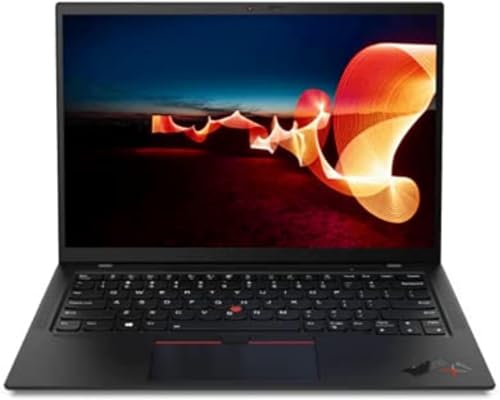
If your priority is the thinnest high-end ThinkPad available in the refurbished market, the X1 Carbon Gen 9 brings a flagship-level chassis, excellent display options, and lightweight portability. It performs well in long writing sessions thanks to that familiar keyboard feel and the speaker/microphone setup handles remote meetings cleanly. Think of it as the choice for executives and content creators who want near-new ergonomics and the best possible screen in a 14-inch shell.
A practical anecdote: when presenting a slide deck to clients in a cramped conference room, the X1’s screen clarity and low weight make setting up painless. In another scenario a grad student juggling large datasets finds the 32GB RAM configuration especially liberating when running multiple heavy analysis threads alongside a full IDE. That extra memory changes how often you hit swap on large workloads and keeps the machine feeling fluid longer.
Pros
- Extremely light and premium build quality
- Higher RAM and storage options for demanding users
- Great display options and webcam/microphone for meetings
- Designed for long-term professional use and frequent travel
Cons
- Higher refurbished price compared with other ThinkPads
- Repairability and upgrade options are more limited than bulkier models
Go for the X1 Carbon Gen 9 if you want the best portability and a premium feeling laptop that also supports heavy multitasking thanks to the 32GB RAM. It is worth the premium for road warriors and power users who value a lighter bag and crisp screen. If you need lots of ports or easier internal upgrades, a T or L series ThinkPad will be more practical.
To buy this product, click here.
4. Best Touchscreen Option: Lenovo ThinkPad T14 Gen 2 14″ Touchscreen (i5-1145G7)

If you prefer a touch layer for presentations, annotation, or quick navigation, the T14 Gen 2 touchscreen model balances convenience with capable internals. The i5-1145G7 and Iris Xe graphics handle everyday productivity and light creative tasks, while the touchscreen adds flexibility during meetings and brainstorming sessions. It also shines in classroom settings where instructors want to flip between touch gestures and keyboard-driven work.
Picture sketching a quick diagram during a video call or marking up a PDF with a stylus; the touchscreen T14 makes those tasks natural. Another scenario is traveling with a tablet-like workflow on planes: you can fold into a shallow tent for viewing media and use touch to scrub through videos without a mouse. The refreshed unit usually includes Windows 11 Pro and tested hardware, but touchscreen calibration and condition should be checked in seller notes.
Pros
- Touch capability for annotation and quick navigation
- Intel Iris Xe gives a modest graphics uplift for light media tasks
- Good port selection including Thunderbolt-like support on some SKUs
- Comfortable ThinkPad typing experience
Cons
- Touchscreens can increase glare and reduce battery life slightly
- Refurbished touch panels may vary in responsiveness; check seller grading
Pick the T14 Gen 2 touchscreen if your workflow uses annotation, you run regular client presentations, or you like the added flexibility of touch navigation. If you rarely use touch and want maximum battery life, a non-touch T14s or L14 may be a better fit.
To buy this product, click here.
5. Best Value With Big Storage: Lenovo ThinkPad T14 (Gen 1) 512GB NVMe

If you want the most local storage for the buck and a clean Windows 11 install, this T14 Gen 1 with a 512GB NVMe drive is a standout. The vendor notes a fresh Windows image without bloatware, which saves time and avoids surprise apps. In real-world use this machine deals well with large document collections, local VMs, and media libraries without immediate need for external drives. The 10th-gen i5 CPU is adequate for office work, web development, and light content prep.
For example, a podcast editor moving multiple audio tracks around while running a recording app will appreciate the extra local SSD space and the clean system. Another everyday scene: a student storing large datasets and class media will find a 512GB SSD prevents juggling external drives and simplifies backups. As with all refurbished picks, verify battery capacity and included accessories with the seller before purchase.
Pros
- Large 512GB NVMe for local storage-heavy workflows
- Fresh Windows 11 install without bloatware
- Thunderbolt 3 and modern port selection in many SKUs
- Solid keyboard and robust build quality
Cons
- CPU is older generation, so heavy encoding or new-gen AI workloads are limited
- Battery life depends heavily on the refurbisher’s replacement policy
This is a good choice for students, content creators who keep media locally, and knowledge workers who need an uncluttered OS and room for files. Avoid this model if you need the lightest carry weight or the very latest CPU improvements; in those cases, check modern Ryzen or 11th-gen Intel options.
To buy this product, click here.
6. Best Budget ThinkPad: Lenovo ThinkPad T14 Business (HD) i5-10310U

If your primary goal is a dependable ThinkPad experience for basic office tasks and web work at the lowest possible refurbished price, this T14 HD unit is hard to beat. The HD anti-glare screen reduces eye fatigue for long days of reading and document work, and the 16GB of RAM helps with browser-heavy workflows. For basic remote work, bookkeeping, and email, this laptop covers everything you need without extra frills.
Imagine a small business owner managing invoices and video calls while juggling multiple browser tabs; the T14 budget model keeps things moving without cost panic. Another useful scene is a student on a tight budget who still needs a full keyboard and long-lasting durability for dorm life. The tradeoff is the HD screen resolution and older CPU generation, so plan expectations around those limits.
Pros
- Lowest cost entry to the ThinkPad lineup while retaining key design elements
- 16GB RAM is generous for the price
- Multiple ports including Ethernet on some units
- Windows 11 Pro adds business-focused security and management
Cons
- HD resolution is lower than FHD alternatives
- Older CPU means less headroom for demanding software
Choose this T14 if budget is the top priority but you still want a durable keyboard and a full port selection. It is ideal for administrative staff, remote learning, and light content consumption. If you want sharper visuals or faster cores, stretch to a T14 Gen2 or a refurbished T14s model.
To buy this product, click here.
7. Best for CPU-Heavy Single-Thread Tasks: Lenovo ThinkPad L14 (Intel Core i7-10610U)

If your workload includes single-thread favoring tasks like certain engineering tools, spreadsheet-heavy analysis, or software that benefits from higher per-core clocks, the i7-10610U L14 variant can be a smart pick in the refurbished market. The i7 provides boosted clock speeds when needed, and the L14 chassis keeps a sensible port layout for external monitors and docks. It balances a desktop-replacement feel with portability for daily carry.
For example, a financial analyst running complex Excel models will notice smoother recalculation with the i7 compared with lower-clocked chips. Another scenario: a developer compiling moderate-size projects will appreciate the quicker compile steps between edits. The 16GB RAM and 256GB SSD setup here is fair for many users, with the usual caveat that storage-heavy creators should consider an external drive or a model with larger internal storage.
Pros
- Higher single-core clock speeds for snappy responsiveness
- Good port selection for docking and external displays
- Comfortable ThinkPad keyboard and practical 14″ form factor
- Windows 11 Pro and business-class features included
Cons
- CPU is last-generation; newer Ryzen alternatives may outperform in multi-threaded workloads
- Storage is modest; power users should upgrade or add external NVMe
This model is best for professionals whose day-to-day activities reward faster single-thread speed and who want a rugged ThinkPad body. If you run heavily threaded workloads such as large multi-core video encoding, a Ryzen-based L14 or a workstation-class machine would deliver better value.
To buy this product, click here.
8. Best Small Form Factor: Lenovo ThinkPad X13 G1 (Ryzen 3 PRO)

For commuters and travelers who want a truly compact machine, the ThinkPad X13 with Ryzen 3 PRO is a capable 13.3-inch laptop that keeps weight and footprint to a minimum. The X13 fits into smaller backpacks and airplane tray tables more comfortably than a 14- or 15-inch laptop. It still provides 16GB of RAM in many refurbished SKUs, which is impressive for this size class and helps with browser-heavy days and light multitasking.
Consider someone working from a café where table space is tight; the X13 fits easily and the keyboard still gives solid feedback during long writing sessions. Another scenario: a road-based salesperson who needs quick access to CRM apps, presentations, and light spreadsheets will appreciate the portability and battery life. The Ryzen 3 PRO CPU is efficient and business-oriented, though it cannot match the multi-core throughput of higher-end Ryzen SKUs.
Pros
- Very compact 13.3-inch form factor for tight travel spaces
- 16GB RAM in many refurbished units gives surprising multitasking ability
- Good set of ports for a small laptop
- Windows 11 Pro and enterprise-level control in many renewals
Cons
- Ryzen 3 PRO is entry-level for CPU performance
- Smaller screen can feel cramped for long spreadsheet or design sessions
Choose the X13 if your priority is the smallest, lightest ThinkPad you can carry without giving up a real keyboard or business features. It is an excellent companion for consultants, students who move between classes, and anyone who spends more time in transit than at a desk. If you edit video or run heavy simulations frequently, opt for a larger chassis with stronger CPU options.
To buy this product, click here.
9. Best for Multitasking: Lenovo ThinkPad L15 Ryzen 5 PRO (32GB)
This L15 variant is the pick when raw multitasking memory matters. With 32GB of RAM in a 15.6-inch chassis, the L15 lets you run many browser windows, virtual machines, and RAM-hungry apps side by side without constant swapping. The larger screen and optional numeric keypad are practical for data entry, heavy spreadsheets, and dual-app workflows where screen real estate matters. The Ryzen 5 PRO CPU offers good mid-range performance for mixed workloads.
Imagine an analyst juggling multiple Excel models, a browser with dozens of tabs, and a data visualization app. The extra RAM keeps switching smooth and reduces the need for a local server. Another scenario: a developer running a containerized local environment alongside a desktop IDE will find the 32GB configuration noticeably more pleasant. Expect the L15’s weight to reflect the larger screen and expanded cooling, but that tradeoff is worth it for sustained productivity.
Pros
- 32GB RAM is rare in refurbished units and excellent for multitasking
- 15.6-inch display and numeric keypad boost productivity
- Ryzen PRO chip provides balance between efficiency and throughput
- Sturdier chassis and full-size keyboard make long sessions comfortable
Cons
- Larger size and weight reduce portability compared with 14-inch models
- 256GB SSD may feel small when combined with large local datasets
This L15 is ideal for professionals who run many memory-hungry applications or prefer a larger screen for spreadsheets and multi-window workflows. It is less suitable if you need a daily carry laptop for long commutes; choose a 14-inch T14s or X1 Carbon for more portable options.
To buy this product, click here.
Best Refurbished ThinkPad Laptops FAQ
How safe is buying a refurbished ThinkPad on Amazon?
Buying refurbished on Amazon can be safe when you check the seller rating, return policy, and whether the product is Amazon Renewed or refurbished by a reputable vendor. Look for explicit warranty terms, a clear grading of cosmetic condition, and verification that Windows is activated. Request battery health or cycle count information if it’s not in the listing.
What should I inspect first after receiving a refurbished ThinkPad?
Power on the machine and verify system activation, battery charge behavior, trackpad and keyboard functionality, display condition (dead pixels and backlight), and ports. Run Windows Update and check Device Manager for missing drivers. For business purchases, confirm TPM presence and BIOS firmware version as needed for corporate controls.
Do refurbished ThinkPads come with original batteries and chargers?
Sometimes they do, other times sellers replace batteries or include compatible chargers. Listings should state whether the battery is original or replaced and whether the charger is OEM. If this is important, choose Renewed items that explicitly mention replaced batteries with cycle count details or new batteries included.
How can I tell if a refurbished unit was well-serviced?
Signs of good refurbishment include a fresh OS install without bloatware, clearly described replacement parts (battery, SSD), a stated test and cleaning process, and a warranty period. Photos that show minimal cosmetic wear and a seller who answers questions about testing procedures are positive indicators.
Is it worth paying more for a higher refurb grade?
Yes if you want cosmetic condition close to new, a longer warranty, or replacement of high-failure parts like batteries and SSDs. Higher grades reduce the chance of immediate repairs and give more confidence for business deployment. For basic home use, a lower grade might be acceptable if the price is significantly better.
Which ThinkPad series is best for travel versus a desk-bound setup?
For travel, T14s and X1 Carbon series prioritize light weight and battery life. For a desk-bound setup where ports, screen size, and upgradeability matter more, L14/L15 or standard T14 models are better choices because they offer more connectivity and easier repairs.
Can I upgrade RAM or storage on refurbished ThinkPads?
It depends on the model. Many T and L series models have user-accessible storage and sometimes upgradable RAM. Ultrabooks like the X1 Carbon and some T14s variants often have soldered RAM, so check the listing or the model’s maintenance manual before buying if upgradability is important.
How long should a refurbished ThinkPad last?
Lifespan varies with usage and component condition, but a well-refurbished ThinkPad with replaced battery and SSD can easily serve another 3 to 5 years for standard office and web tasks. Heavy workloads or poor battery condition will shorten usable life, so warranty coverage and refurbisher reputation matter.
Final Verdict
The Lenovo ThinkPad L14 Ryzen 5 PRO earns the top recommendation because it blends up-to-date CPU performance, a full port selection, and business-ready features in a 14-inch package that fits most users’ needs. It represents the best balance between modern multi-core responsiveness and practical connectivity for remote and office work. For those focused on the absolute lightest carry and premium finish, the T14s Gen2 and X1 Carbon Gen 9 are excellent picks that trade a bit of expandability for class-leading portability and screen quality.
Budget-minded buyers will find the T14 HD model a dependable and affordable way into the ThinkPad ecosystem, while power users who need heavy multitasking should consider the L15 with 32GB of RAM. Match your choice to how you work: prioritize CPU and RAM for development and heavy data, choose the thin-and-light options for travel, and opt for larger screens and storage if local files are central to your workflow. Check seller warranties, battery status, and return policies before buying to ensure the refurbished unit delivers the value you expect.