Best Refurbished Microsoft Surface: 9 Top Picks in 2026
Buying a refurbished Surface feels a bit like shopping for a sharp secondhand watch. The frame is still elegant, the screen still has that smooth Microsoft glow, and the trick is separating the sleeper deals from the tired ones. People usually start looking at a refurbished Microsoft Surface because they want premium build quality without paying for a brand-new badge, or because they need a portable Windows machine that still feels polished in hand. The catch is that a glossy listing can hide a weak battery, a cramped spec sheet, or a model that looks great on paper but feels old the moment you open a few tabs and a video call.
The smartest buyers focus on the stuff that matters in real life: screen size, keyboard comfort, port selection, battery health, and whether the model can still keep up with modern apps. Some readers want a light little machine for travel and coffee-shop work. Others want a proper laptop replacement with enough RAM and storage to avoid that sluggish, jammed-up feeling. If you want the safest all-rounder, the refurbished Surface Laptop 5 at the top of this list has the cleanest balance of speed, polish, and everyday comfort, while the budget-friendly picks lean harder into portability and price.
If you are short on time, the comparison table below gives a quick snapshot of the top options so you can narrow things down fast.
Best Refurbished Microsoft Surface Comparison Table
| Product | Best For | Main Strength | Key Specs |
|---|---|---|---|
| Surface Laptop 5 13.5″ Renewed | Best overall balance | Fast, polished, and easy to live with | Core i7, 16GB RAM, 256GB SSD, 13.5″ touchscreen |
| Surface Laptop Go 2 Renewed | Budget shoppers | Light, simple, and affordable | Core i5, 16GB RAM, 256GB SSD, 12.4″ touchscreen |
| Surface Laptop 4 13.5″ Renewed | Value buyers | Classic Surface feel for less | Core i7, 16GB RAM, 256GB SSD, 13.5″ touchscreen |
| Surface Pro 11 Refurbished | Premium 2-in-1 users | New-gen performance and flexibility | Snapdragon X Plus, 16GB RAM, 512GB SSD, 13″ touchscreen |
| Surface Pro 7 12.3″ Renewed | Tablet-first users | Portable pen-friendly design | Core i5, 8GB RAM, 128GB SSD, 12.3″ touchscreen |
| Surface Laptop 4 13.5″ 512GB Renewed | Storage and multitaskers | More room for files and apps | Core i7, 16GB RAM, 512GB SSD, 13.5″ touchscreen |
| Surface Pro 7+ with Keyboard | Detachable 2-in-1 fans | Flexible use with included type cover | Core i5, 8GB RAM, 128GB SSD, 12.3″ touchscreen |
| Surface Laptop Go Renewed | Travel and note-taking | Very light and easy to carry | Core i5, 16GB RAM, 256GB SSD, 12.4″ touchscreen |
| Surface Laptop 4 Platinum Renewed | Workhorse laptop users | Balanced power in a sleek chassis | Core i7, 16GB RAM, 512GB SSD, 13.5″ touchscreen |
If you want the finer details, the reviews below show which refurbished Surface fits each type of buyer best.
1. Best Overall: Microsoft Surface Laptop 5 13.5” Touch-Screen – Intel Core i7-16GB – 256GB SSD Windows 11 Pro (Renewed)

This is the easy recommendation for most people chasing a refurbished Microsoft Surface that feels immediately trustworthy. The Surface Laptop 5 keeps the familiar slim body, lovely 13.5-inch PixelSense touchscreen, and a fast 12th gen Core i7 that still feels lively for work, streaming, writing, and a stack of browser tabs that would make a lesser machine wheeze. It has that soft, premium typing feel Surface fans love, and the balance of 16GB RAM with 256GB SSD storage makes it a practical everyday setup rather than a flashy spec sheet with no substance.
What makes it so appealing is how little friction it creates in normal use. Open the lid, sign in with Windows Hello, and get going. It has the kind of clean laptop behavior that suits students, remote workers, and anyone who wants a tidy machine for docs, spreadsheets, meetings, and travel. Refurbished units are tested, cleaned, and repackaged, and the inclusion of a minimum warranty helps calm the nerves that usually come with buying renewed gear. It is not the cheapest Surface here, but it is the one that feels easiest to recommend with a straight face.
Pros
- Fast 12th gen Core i7 performance handles everyday multitasking smoothly.
- 13.5-inch PixelSense touchscreen looks sharp and feels comfortable for long sessions.
- 16GB RAM gives it plenty of breathing room for work apps and many browser tabs.
- Windows Hello and fingerprint sign-in add convenient, modern security.
- Clean, lightweight design makes it easy to carry without feeling flimsy.
Cons
- 256GB storage may feel tight if you keep large photo, video, or project libraries.
- Port selection is fairly limited, so some users will want a hub.
- Refurbished condition can vary slightly from seller to seller.
Choose this one if you want the safest all-round refurbished Surface for daily work and a premium feel that still holds up in 2026. It sits right in the sweet spot where performance, display quality, and portability meet without a lot of drama. People who need big local storage or heavy creative horsepower may want to step up to a larger SSD or a newer Copilot+ model, but for most buyers this is the cleanest blend of value and polish.
To buy this product, click here.
2. Best Budget: Microsoft Surface Laptop Go 2 12.4″ Laptop, Core i5, 256GB SSD, 16GB RAM | Touchscreen, Windows 11 Pro (Renewed)

The Surface Laptop Go 2 lands in that practical little pocket where affordability meets a genuinely pleasant Surface experience. It is smaller, lighter, and easier to toss into a backpack than the bigger Laptop models, which makes it a smart pick for commuters, students, and anyone who does a lot of work in transit. The 12.4-inch touchscreen is compact but friendly, and the 16GB RAM here is a nice surprise at this level because it helps the machine stay usable when a few apps start competing for attention.
In a coffee-shop scenario, this is the kind of laptop that slips out, powers on fast, and disappears into the background while you answer email or polish a presentation. It is also a sensible choice for casual home use, especially if you value a lighter machine more than a giant display. The Core i5-1135G7 is not a bruiser, but it gets the job done for typical browsing, office work, video calls, and streaming. Think of it as a friendly everyday Surface rather than a powerhouse, and it starts making a lot more sense.
Pros
- Compact, lightweight design is easy to carry all day.
- 16GB RAM is generous for a budget-minded renewed machine.
- 256GB SSD gives more breathing room than many entry-level laptops.
- Touchscreen adds flexibility for browsing and quick navigation.
- Good fit for students, commuters, and casual home users.
Cons
- Smaller display is less comfortable for side-by-side multitasking.
- Core i5 performance is fine, but not ideal for heavy workloads.
- Keyboard and trackpad feel more compact than on larger Surface laptops.
This is the pick for buyers who want to spend less without dropping into bargain-bin laptop territory. It works best for lighter workflows and anyone who cares more about portability than raw muscle. If you regularly juggle big spreadsheets, editing work, or lots of local files, a larger Surface model will feel less cramped. For basic productivity, though, this one has a nice, easygoing rhythm.
To buy this product, click here.
3. Best Value: Microsoft Surface Laptop 4 13.5” Touch-Screen – Intel Core i7-16GB – 256GB SSD Windows 11 Pro (Renewed)
The Surface Laptop 4 is the classic sweet-spot buy for shoppers who want a familiar Surface shape without paying newer-model money. It still gives you the elegant 13.5-inch PixelSense touchscreen, the comfy keyboard, and the 3:2 aspect ratio that makes web pages, documents, and email threads feel roomier than you expect. The 11th gen Core i7 and 16GB RAM combination is still very capable for everyday work, and it keeps the system feeling responsive enough to avoid that annoying pause-and-wait shuffle.
This model makes a lot of sense for people who live in office apps, school portals, and browser-heavy workflows. Picture a workday with a video call in the morning, spreadsheets in the afternoon, and a few YouTube breaks in between. The Laptop 4 keeps that flow moving without fuss. It also has a decent port mix for a slim machine, including USB-C, USB-A, a headphone jack, and Surface Connect, which saves some accessory headaches. If the Surface Laptop 5 feels a little too pricey, this is the version many buyers should eyeball first.
Pros
- Strong value for buyers who want Surface quality at a lower cost.
- 13.5-inch 3:2 touchscreen is excellent for documents and web work.
- 16GB RAM supports smooth multitasking for office and school tasks.
- Useful port selection for a slim laptop.
- Refurbished units keep the premium feel without the new-device premium.
Cons
- Older than the Laptop 5, so it lacks some of the newer refinements.
- 256GB storage may fill up fast if you save lots of media locally.
- Integrated graphics keep it away from serious creative or gaming work.
Buy this if you want a polished Surface that feels modern enough for daily work and smart enough for your wallet. It is especially strong for writers, analysts, students, and remote workers who spend their day in browser tabs and office apps. If you want the newest chip or a bigger SSD, look elsewhere. If you want a dependable, good-looking laptop that still has some snap, this one is an easy recommendation.
To buy this product, click here.
4. Best Premium: Microsoft Certified Refurbished Surface Pro 11 (2024), 13″ Touchscreen 2-in-1, Snapdragon X Plus, 16GB RAM, Inateck Bluetooth Backlit Keyboard, Warranty (Black, 16GB RAM, 512GB SSD)

This is the one that feels most future-facing. The Surface Pro 11 brings the modern Copilot+ era into the refurbished lane, and that matters if you want a 2-in-1 that can genuinely shift between tablet mode and laptop mode without feeling like a compromise. The Snapdragon X Plus chip, 16GB RAM, and 512GB SSD give it a much more premium spec mix than older Surface Pros, and the included keyboard adds real-world value because detachable systems can get expensive fast once you start piecing the setup together.
There is a certain delight in using a Surface Pro this way. At a desk, it behaves like a compact laptop. On the couch, it becomes a quick-reading tablet. On a train or in an airport lounge, it feels like a neat little slab of productivity that does not hog space. The official Microsoft warranty is a nice confidence boost too. This is the premium pick for buyers who want mobility, a cleaner storage cushion, and a more modern platform for the long haul. It is the expensive one here, but it also feels the most like a current-generation machine.
Pros
- Modern Snapdragon X Plus platform is built for strong efficiency and responsiveness.
- 512GB SSD gives much more breathing room than most other picks.
- 2-in-1 design works well for both laptop and tablet use.
- Included keyboard adds strong value for a premium bundle.
- Official Microsoft warranty makes the refurbished purchase feel safer.
Cons
- Much pricier than the laptop-style Surface options.
- Detachable use is flexible, but not as comfortable as a true clamshell for long typing sessions.
- Some Windows apps can still be better behaved on traditional x86 laptop hardware.
This is the best fit for buyers who want a high-end refurbished Surface and care about flexibility as much as performance. It works beautifully for note-taking, travel, light creative work, and hybrid desk use. If your main goal is straightforward laptop work, the value may be easier to find in the Laptop 4 or Laptop 5. If you want the most modern Surface experience in this roundup, this is the one.
To buy this product, click here.
5. Best Tablet-First: Microsoft Surface Pro 7 12.3in Intel Core i5 10th Gen 8GB RAM 128GB SSD Platinum (Renewed)
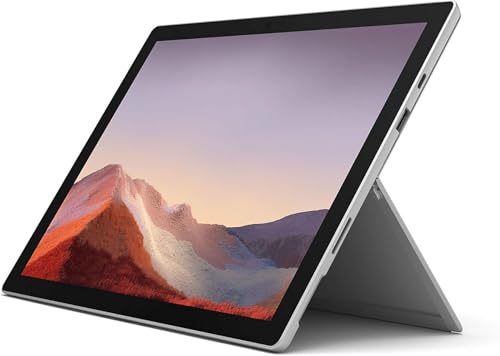
The Surface Pro 7 remains a charming little shape-shifter. It is the kind of device that makes sense if you like writing on a tablet stand, reading with a pen, or flipping between a laptop setup and a touch-first experience. The 12.3-inch PixelSense display is crisp and sharp, and the 2736 x 1824 resolution gives it a real sense of visual polish even now. It feels especially nice in tighter spaces, like a kitchen counter, a couch cushion, or the narrow tray table on a flight.
The tradeoff is obvious, though. With 8GB RAM and 128GB storage, this is more of a light-duty work machine than a heavy multitasker. That said, for note-taking, streaming, light office work, and basic browsing, it still carries itself well. The port variety is surprisingly helpful, and the front and rear cameras make it a sensible choice for quick video chats or casual scanning tasks. If you want the classic Surface tablet vibe and can live within its limits, this one still has a lot of personality.
Pros
- Classic Surface Pro form factor is excellent for tablet-style use.
- Sharp 12.3-inch display looks crisp for reading and note-taking.
- Good port variety for a compact device.
- Lightweight and easy to move from room to room.
- Strong fit for casual work, classes, and media use.
Cons
- 8GB RAM and 128GB storage feel modest by current standards.
- No keyboard included in the listing, so total cost can rise.
- Older chip is fine for basics but not ideal for demanding multitasking.
This is the buy for someone who wants the classic Surface Pro feel more than raw power. It is a good match for students, note-takers, and anyone who wants a compact touch device that can still handle basic productivity. If you need room for big files or a more cushioned multitasking experience, look higher up the list.
To buy this product, click here.
6. Best For Storage: Microsoft Surface Laptop 4 13.5” Touch-Screen – Intel Core i7-16GB – 512GB SSD Windows 11 Pro (Renewed)
For shoppers who hate micromanaging storage, this version of the Surface Laptop 4 feels like a relief. The jump to a 512GB SSD changes the daily experience in a very real way. You can keep more files local, let applications breathe, and still have enough space left over for photos, downloads, and the random desktop clutter that always shows up by week three. The 13.5-inch touchscreen, 16GB RAM, and Core i7 processor keep the rest of the package nicely aligned.
There is a subtle luxury to a laptop that simply does not complain all the time. Open a few creative apps, keep a couple of large files around, and move through your day without staring at the storage meter. That is where this model earns its keep. It is especially appealing for professionals, students with large project folders, or anyone who wants a refurbished Surface that feels a little less constrained. The design is still slim and elegant, which makes the larger SSD feel like a practical upgrade instead of a bulky compromise.
Pros
- 512GB SSD offers much more usable space than the 256GB versions.
- 16GB RAM keeps multitasking smooth and composed.
- 13.5-inch touchscreen delivers a polished work surface.
- Good choice for people who store lots of files locally.
- Still lightweight enough for travel and commuting.
Cons
- Usually costs more than smaller-storage Surface Laptop 4 models.
- Older than the Surface Laptop 5, so it lacks newer generation polish.
- Still not the best fit for demanding graphics work.
This one is worth buying if storage anxiety is your pet peeve. It is a better fit than the 256GB Surface Laptop 4 for users who keep media, documents, and work files on the machine rather than living in the cloud. If you want the lowest possible entry price, skip it. If you want more room to breathe, this model is a very sensible step up.
To buy this product, click here.
7. Best Detachable 2-In-1: Microsoft Surface Pro 7+ 12.3″ Core i5 2.4GHz 8GB RAM 128GB SSD 1S2-00001 (Etch) With Keyboard Type Cover

This Surface Pro 7+ bundle gets a lot right because it includes the Type Cover, which immediately changes the value equation. A detachable Surface without a keyboard can feel incomplete in a hurry. With the cover included, this becomes a more ready-to-use setup for typing, travel, and quick productivity bursts. The 12.3-inch display keeps the familiar Surface Pro shape, and the 3:2 panel gives you that nice vertical headroom that makes reading and document work feel less cramped than it would on a standard widescreen laptop.
It is the kind of machine that fits real life in small bursts. A parent wants to answer emails while dinner is in the oven. A student wants to annotate a PDF between classes. A consultant wants a slim travel device that can still serve as a keyboarded laptop in a hotel room. That is the lane this device fits. The Core i5 and 8GB RAM are enough for the basics, but the real win is the flexibility plus the included keyboard, which makes the whole package feel much more complete than the bare tablet listings.
Pros
- Type Cover included, which improves value and usability right away.
- Lightweight 2-in-1 design works well for tablet and laptop modes.
- 12.3-inch 3:2 display is great for productivity and reading.
- Good port selection for a compact device.
- Flexible enough for travel, note-taking, and casual office work.
Cons
- 128GB storage is on the small side for long-term use.
- 8GB RAM limits heavier multitasking.
- Performance is fine for basics, but not for demanding workloads.
Buy this if you want a portable Surface that feels like a complete kit out of the box. It is a better fit than the standalone Surface Pro 7 for people who know they will type regularly. If your work depends on lots of files, heavy browser use, or larger software installs, one of the 16GB models above will feel more relaxed.
To buy this product, click here.
8. Best Lightweight: Microsoft Surface Laptop Go 12.4″ Laptop, 16GB RAM, 256GB SSD, Platinum (Renewed) | Touchscreen, Intel Core i5-1035G1

This Surface Laptop Go is for people who want a featherweight machine they barely notice in a bag. It is one of those laptops that makes sense the second you pick it up. The 12.4-inch touchscreen keeps the footprint small, and the 16GB RAM helps soften the usual compromises that come with compact devices. The Core i5-1035G1 is older, but for web work, email, note-taking, and streaming, it still has enough life to be useful rather than decorative.
I like this one for travel days and grab-and-go routines. Imagine slipping it into a crowded tote before a train ride or opening it on a tiny desk at a short-term rental. That is the appeal. It is not trying to be a desktop replacement. It is trying to be easy, and in that role it does a fine job. The 256GB SSD also gives it a little more breathing room than some budget models, which matters when you do not want to bounce off storage limits every other week.
Pros
- Very portable and easy to carry around.
- 16GB RAM helps keep the system responsive for light work.
- 256GB storage is a sensible match for a compact laptop.
- Touchscreen makes quick navigation easy.
- Good fit for travel, email, and general everyday use.
Cons
- Older processor is not ideal for demanding multitasking.
- Smaller screen can feel tight for long work sessions.
- Not the best choice for power users or creators.
This pick shines for shoppers who value convenience above all else. It is a nice fit for light office work, students who commute, and anyone who needs a second machine that is easy to grab and go. If you want more punch or a roomier display, the Surface Laptop 4 or 5 is the better bet. If you want something delightfully easy to live with, this one has real charm.
To buy this product, click here.
9. Best Workhorse: Microsoft Surface Laptop 4 – i7-1185G7 16GB RAM, 512GB SSD, 13.5″ High-Performance Touchscreen Windows 11, Lightweight With Sleek Design Platinum (Renewed)

This Platinum Surface Laptop 4 is a very solid all-around work machine for buyers who want a bit more storage headroom and a familiar Surface profile. The i7-1185G7, 16GB RAM, and 512GB SSD combination gives it a steady, practical feel that suits office work, multitasking, and everyday productivity. The 13.5-inch touchscreen keeps the form factor tight and elegant, while the lighter chassis makes it the kind of laptop that does not feel like a burden on a commute or a work trip.
It has the old reliable vibe that a lot of Surface shoppers actually want. One minute it is on a desk with a Bluetooth mouse and a spreadsheet open. The next it is folded up and shoved into a bag before a late train. That kind of flexible, no-fuss behavior is why people keep circling back to Surface Laptop models in the refurbished market. If you want more storage than the 256GB variants and you do not need the very newest chip, this one fills the role well without getting flashy about it.
Pros
- 512GB SSD gives extra breathing room for files and apps.
- 16GB RAM supports smooth multitasking for most users.
- Lightweight design makes it easy to carry.
- 13.5-inch touchscreen has the classic Surface look and feel.
- Strong fit for office work, browsing, and everyday productivity.
Cons
- Still an older generation than the Surface Laptop 5.
- Windows 11 Home listing may matter to buyers who want business features.
- Not built for heavy gaming or demanding creative workloads.
Choose this if you want a dependable refurbished Surface that feels roomy enough for real work without jumping all the way to premium pricing. It is especially appealing for users who know they will keep lots of files locally and want a familiar, slim laptop that stays out of the way. If you want the newest platform, the Surface Laptop 5 edges it out. If you want a practical workhorse, this one is easy to like.
To buy this product, click here.
How To Choose The Right Best Refurbished Microsoft Surface
Decide Whether You Want A Laptop Or A Detachable 2-In-1
Surface Laptop models feel like classic clamshell notebooks, which is ideal if you type a lot, keep your machine on a desk, or want the least amount of fuss. Surface Pro models behave more like tablets that can become laptops, which is great for note-taking, sketching, reading, and travel. If you picture yourself watching movies in bed one minute and typing a report the next, a Pro makes sense. If you picture long writing sessions and lots of Zoom calls, the Laptop line usually feels better.
Look Closely At RAM And Storage
For refurbished Surface buying, 16GB RAM is the sweet spot. It gives you enough room for browsers, office apps, meetings, and streaming without that cramped, stuttering feel that can make an older laptop drag. Storage matters too. A 128GB model can work for very light use, but 256GB is safer, and 512GB feels much more relaxed if you keep files locally. People often regret buying too little storage because the laptop itself may feel fine while the storage fills up fast.
Match Screen Size To How You Actually Work
The 13.5-inch Surface Laptop display is the most balanced choice for most buyers. It gives you more room than the smaller models without turning the device into a brick. The 12.4-inch and 12.3-inch options are better for travel and quick sessions, but they can feel tight for split-screen work. If your day is full of document editing, browser tabs, and spreadsheets, the larger display usually saves your eyes a little grief by late afternoon.
Check The Port Setup Before You Buy
Many Surface machines keep ports lean, which is lovely for the silhouette and less lovely when you need to connect drives, monitors, or wired accessories. USB-C is handy, USB-A still matters for older gear, and Surface Connect can be useful in its own ecosystem. If you plan to use external displays, card readers, or wired headphones, look at the exact port layout and decide whether you need a dock or hub right away.
Think About Battery And Refurbished Condition
Refurbished is a great way to save money, but battery health can vary more than on new gear. A machine may look spotless and still feel less impressive if the battery has already had a long life. That is why warranty coverage, seller reputation, and condition notes matter so much. A great refurb should feel clean, stable, and predictable. If the listing is vague about condition or return support, that is usually a warning flare, not a tiny detail.
Choose The Right Performance Tier For Your Workload
For email, writing, streaming, and light office work, older Core i5 and Core i7 Surface models are still perfectly usable. For heavier multitasking, bigger spreadsheets, or a machine that needs to age more gracefully, newer chips and higher storage help a lot. If you want a laptop to feel fresh for years, the newer Surface Laptop 5 and Surface Pro 11 stand out. If you want a smart discount and your work is lighter, the older Surface Laptop 4 and Surface Pro options can be excellent buys.
Best Refurbished Microsoft Surface FAQ
Is A Refurbished Microsoft Surface Worth It?
Yes, if you want premium design and good Windows performance without paying full new-device pricing. The key is buying from a refurbished listing with warranty support, tested condition, and specs that still match your workload. A good refurb can feel like a very smart shortcut into the Surface lineup.
Which Refurbished Surface Is Best For Most People?
The Surface Laptop 5 is the easiest all-round recommendation here because it balances speed, screen quality, portability, and overall comfort. It feels modern without jumping into the highest price tier, which is exactly what many shoppers want from a refurbished buy.
Should I Buy A Surface Pro Or Surface Laptop?
Pick a Surface Laptop if you want the most comfortable typing setup and the simplest daily workflow. Choose a Surface Pro if you want tablet flexibility, pen-friendly use, or a device that can shift between reading, drawing, and quick productivity. The right answer depends on how often you type versus how often you touch and write by hand.
How Much Storage Do I Need In A Refurbished Surface?
For light use, 128GB can work, but it leaves little room for growth. For most buyers, 256GB is the safer target. If you keep large files, install lots of software, or want a machine that feels roomy for longer, 512GB is the better long-term choice.
Is 8GB RAM Enough On A Refurbished Surface?
8GB RAM can still handle basic browsing, email, and simple office work. That said, 16GB is a much safer choice if you keep lots of tabs open, work in multiple apps, or want the machine to feel smoother over time. For a Surface buy in 2026, 16GB is the smarter target for most people.
What Should I Check Before Buying Refurbished?
Look at the seller rating, warranty length, battery condition if it is listed, storage capacity, and whether the device comes with accessories you need. Also check whether the machine has the ports and keyboard setup you expect. A polished listing is nice, but a clear warranty and sensible specs matter more.
Are Older Surface Models Still Good In 2026?
Yes, as long as you buy with realistic expectations. Older Surface Laptop 4 and Surface Pro 7 models still make sense for productivity, note-taking, and casual home use. They are less exciting than newer models, but they can offer excellent value if your tasks are straightforward.
Do I Need A Keyboard With A Surface Pro?
For occasional tablet use, maybe not. For regular work, absolutely yes. A Surface Pro without a keyboard can feel incomplete for long typing sessions, and the extra cost often sneaks up on buyers. Bundles that include the Type Cover or keyboard are usually easier to live with.
Final Verdict
The best refurbished Microsoft Surface for most buyers is the Surface Laptop 5. It hits the sweetest balance in this roundup, with strong everyday speed, a lovely 13.5-inch touchscreen, and enough RAM to keep the machine feeling polished rather than merely functional. If you want the safest all-around pick, that is the one I would put on the short list first. It is the refurbished Surface that feels least like a compromise and most like a smart upgrade.
From there, the choice gets easier once you match the device to your habits. The Surface Laptop Go 2 is the budget-friendly pick for light, portable use. The Surface Laptop 4 512GB models are the better move for buyers who want more storage breathing room. If you want the most premium 2-in-1 experience, the Surface Pro 11 stands out with modern hardware and a more future-ready feel. The main trick is to avoid buying on looks alone. Check storage, RAM, keyboard needs, and battery confidence, then pick the Surface that fits the way you actually work, because that is where refurbished shopping pays off.