Best Refurbished Laptops Under 200: 9 Top Picks in 2026
Shoppers hunting for refurbished laptops under 200 usually have one thing in mind, getting a machine that can handle email, browsing, schoolwork, and video calls without draining the wallet. That search can turn messy fast. A lot of buyers grab the cheapest listing they see, then discover a dim screen, a tired battery, or a machine that feels fine for 10 minutes and sluggish for the rest of the day. The smarter move is to focus on the pieces that actually shape daily use, like the processor generation, RAM, SSD size, display quality, keyboard feel, and whether the laptop is a Chromebook, a Windows business machine, or something better suited to casual work.
Different buyers want different things from a refurbished laptop. A parent might want a sturdy Chromebook that boots quickly and keeps homework simple. A student may care more about battery life and a keyboard that does not feel like a punishment. A remote worker might prefer a business laptop with real ports, a full HD screen, and enough memory to keep a dozen tabs open without coughing. The best pick in this roundup is the Dell Latitude 5410, because it hits that sweet spot of everyday speed, practical ports, and a clean 14-inch full HD panel that feels far more grown-up than the bargain-bin stuff.
If you are short on time, the table below gives you a quick side-by-side look at the strongest options.
Best Refurbished Laptops Under 200 Comparison Table
| Product | Best For | Main Strength | Key Specs |
|---|---|---|---|
| Dell Latitude 5410 | Best Overall Value | Balanced performance and usability | 14-inch FHD, Core i5, 16GB RAM, 512GB SSD |
| Apple MacBook Air MJVE2LL/A | Best Budget Mac | Lightweight macOS experience | 13.3-inch display, Core i5, 8GB RAM, 128GB SSD |
| Lenovo ThinkPad T460 | Best Entry-Level Windows Pick | Classic ThinkPad keyboard and simple upgrades | 14-inch display, Core i5, 8GB RAM, 256GB SSD |
| Lenovo 300e Gen 2 | Best Ultra-Budget Chromebook | 2-in-1 flexibility | 11.6-inch touchscreen, Celeron N4020, 4GB RAM, 32GB SSD |
| Acer Chromebook 315 | Best Big-Screen Chromebook | Large display and long battery life | 15.6-inch display, Celeron N4020, 4GB RAM, 64GB eMMC |
| Dell Latitude 7490 | Best Storage Value | 512GB SSD at a business-laptop price | 14-inch HD, Core i7, 16GB RAM, 512GB SSD |
| Dell Latitude 7420 Touchscreen | Best Premium Refurbished Option | Fast performance and touchscreen convenience | 14-inch FHD touch, Core i7, 16GB RAM, 512GB SSD |
| Lenovo ThinkPad T490s | Best Lightweight Business Laptop | Portable ThinkPad build | 14-inch FHD, Core i7, 16GB RAM, 512GB SSD |
| HP 17 Inch Laptop | Best Large-Screen Pick | Huge display and roomy keyboard | 17.3-inch FHD, Ryzen 5, 20GB RAM, 512GB SSD |
If you want the finer details, the reviews below explain what each laptop does well and where it gives a little ground.
1. Best Overall: Dell Latitude 5410

The Dell Latitude 5410 feels like the kind of machine that quietly gets things done all day without acting dramatic about it. The 10th Gen Core i5-10310U is not flashy, but paired with 16GB of RAM and a 512GB SSD, it has enough breath in the tank for email, browser-heavy work, spreadsheets, and a few background apps without the usual stutter that cheap refurbished laptops can bring to the party. The 14-inch Full HD display is another real advantage. It keeps text crisp, makes documents easier to read, and avoids the washed-out feeling that smaller HD panels often deliver.
It is also the kind of laptop that fits real life instead of an idealized spec sheet. A student working in the library, a remote worker jumping between Google Docs and Zoom, or a parent handling household tasks on a laptop that actually starts up quickly all get something useful here. The mix of USB-A, USB-C, HDMI, and Ethernet is the sort of practical detail people appreciate after the first week, especially when the day turns messy and you need to plug into a monitor or a wired network without hunting for adapters. For a refurbished buy, that kind of convenience is gold.
Pros
- Solid everyday speed from the 10th Gen Core i5 and 16GB RAM.
- Full HD 14-inch screen feels much nicer than basic 1366 x 768 panels.
- 512GB SSD gives plenty of breathing room for files and apps.
- Useful port mix, including HDMI and Ethernet.
- Business-laptop build tends to age better than consumer bargain models.
Cons
- Not the cheapest option in this roundup.
- Still an older platform, so heavy creative workloads are a stretch.
- Refurbished condition can vary by seller batch.
This is the one I would steer most buyers toward if they want a sensible refurbished Windows laptop that still feels reasonably modern. It is best for people who need a dependable workhorse and care more about smooth day-to-day use than chasing headline-grabbing specs. If you only plan to browse, stream, write, and handle basic office tasks, it lands in a very comfortable lane. To buy this product, click here.
2. Best Budget Mac: Apple MacBook Air MJVE2LL/A
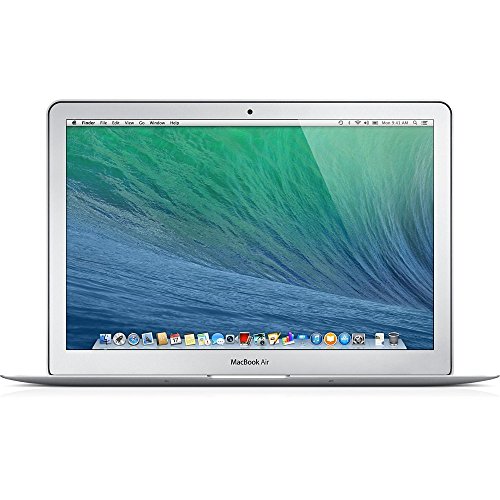
The 2017-era MacBook Air still has a loyal fan base for a reason. It is slim, quiet, and a little bit soothing to use in a way that many older laptops are not. The 13.3-inch display is compact, the keyboard has a familiar low-profile feel, and macOS keeps the experience tidy for people who like a cleaner workspace with fewer distractions. For light productivity, web work, streaming, and note-taking, it still has enough charm to feel like a real laptop rather than a compromise machine.
That said, this is a buy for a specific kind of shopper. If someone wants a Mac for basic everyday use and prefers portability over raw power, this is an appealing route. Picture a commuter pulling it out on a train seat or a student tossing it into a backpack for class. The 8GB of RAM helps it stay usable for the basics, but the 128GB SSD is a tight squeeze, so file hoarders and media collectors will feel that pinch quickly. It is also an older Intel-based Mac, so anyone expecting modern Apple Silicon snap will be disappointed fast.
Pros
- Light, familiar, and easy to carry around.
- Retina display still looks sharp for everyday work.
- macOS offers a simple and polished user experience.
- Great for browsing, writing, and streaming.
- Feels more premium than many budget Windows refurb units.
Cons
- 128GB storage fills up quickly.
- Older Intel hardware is not built for demanding work.
- Battery life and performance depend heavily on refurbishment quality.
This one makes sense for buyers who want the MacBook feel at a lower entry point and can live with modest storage. It is less suited to anyone juggling lots of big files, editing video, or expecting a modern powerhouse. For simple school or home tasks, though, it still has a nice rhythm to it. To buy this product, click here.
3. Best Entry-Level Windows Pick: Lenovo ThinkPad T460
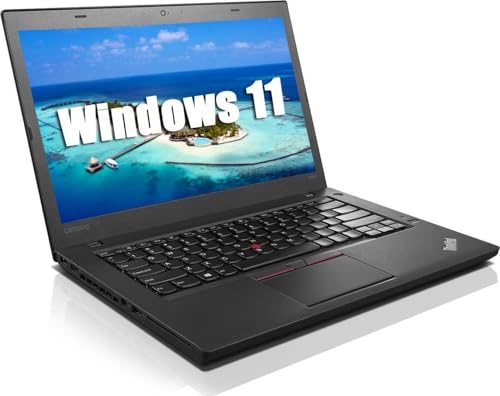
The ThinkPad T460 is the sort of refurbished laptop people buy when they care about the keyboard first and everything else second. And honestly, that is a pretty sensible instinct. The T460 family has a long reputation for sturdy construction, sensible port selection, and a typing experience that feels natural rather than mushy. With a Core i5-6300, 8GB of RAM, and a 256GB SSD, it is not a speed demon, but it can handle web work, documents, spreadsheets, and light multitasking without turning into a little furnace on the desk.
It fits neatly into the use case where someone needs a dependable machine for school, basic office work, or home browsing and does not want to spend time fussing over it. Think of a teenager opening it on a kitchen table to finish homework while a parent checks the bills next to them. It is also easy to imagine this laptop as a backup machine in a small office, ready for email and internal systems when a newer computer is off doing something else. The age shows in the processor, sure, but the overall package still has a practical honesty to it.
Pros
- Excellent ThinkPad keyboard for long typing sessions.
- 256GB SSD is enough for basic work and light file storage.
- Solid port variety for a laptop in this class.
- Dependable business-laptop build.
- Usually easy to live with for browsing and office tasks.
Cons
- Older processor limits heavier multitasking.
- 8GB RAM is fine, but not generous.
- Display quality is functional rather than exciting.
This is a smart choice for buyers who want a low-drama Windows laptop and care about typing comfort more than flashy visuals. It is a bit rough around the edges compared with newer refurb options, but the price positioning and ThinkPad character keep it relevant. If your day is mostly browser tabs, documents, and forms, it still earns a look. To buy this product, click here.
4. Best Ultra-Budget Chromebook: Lenovo 300e Gen 2

The Lenovo 300e Gen 2 is tiny, light, and very much built for simple Chromebook life. That means fast access to Google Docs, web browsing, video calls, and classroom-style use without the complexity of a full Windows machine. Its 11.6-inch touchscreen and 2-in-1 design make it feel flexible in a way some small laptops do not, especially when you want to flip it around for reading, casual streaming, or quick taps instead of full keyboard work. For very basic needs, that kind of flexibility can feel surprisingly handy.
This is the laptop that makes sense in a backpack, on a couch, or on a counter in a busy home where the machine gets passed around for quick tasks. It is not built for heavy lifting, and the 32GB storage ceiling means you should think of it as a browser-first tool rather than a file warehouse. Still, for a child in school, a traveler who wants something feather-light, or anyone who needs a backup laptop for cloud-based work, it can punch above its weight in usefulness. The Japanese keyboard layout is worth checking carefully, though, since that detail matters more than people realize until they sit down to type.
Pros
- Very affordable compared with most refurbished laptops.
- 2-in-1 touchscreen design adds flexibility.
- Chrome OS keeps setup simple and quick.
- Small size makes it easy to carry anywhere.
- Good for browser-based tasks and schoolwork.
Cons
- 32GB storage is extremely limited.
- Keyboard layout may not suit everyone.
- Not a strong pick for heavy multitasking or offline apps.
Buy this if your needs are light and your budget is tight. It works best for cloud-based work, younger students, and people who want something tiny and simple rather than powerful. If your day is mostly tabs, forms, and videos, it gets the job done without much fuss. To buy this product, click here.
5. Best Big-Screen Chromebook: Acer Chromebook 315

The Acer Chromebook 315 lands in that nice middle spot where it feels roomy without getting bulky in a way that ruins the day. The 15.6-inch Full HD display is the star here, especially for people who stare at spreadsheets, email threads, and lecture videos all afternoon. A bigger screen can make a low-powered machine feel much more comfortable, and that is exactly what happens here. Chrome OS keeps the whole thing straightforward, and the Intel Celeron chip is fine for browsing, streaming, and document work as long as expectations stay realistic.
This is a sensible buy for households that want a shared laptop for school and entertainment. Picture a kitchen counter with a homework session happening while someone else checks recipes or watches a show in another tab. The battery life claims are attractive too, especially for people who need a machine that can sit through a long day without living on the charger. The main caution is simple: this is still a budget Chromebook, so if someone expects rapid app switching or serious local storage, they will hit the wall fast. For web-first living, though, it is easy to appreciate.
Pros
- Large 15.6-inch Full HD screen is easy on the eyes.
- Chrome OS is fast and low-maintenance.
- Long battery life helps with school or travel use.
- Good for streaming, browsing, and classroom work.
- Numeric keypad adds convenience for everyday tasks.
Cons
- Basic Celeron performance limits heavier multitasking.
- 64GB eMMC is modest storage.
- HD instead of sharper premium-level display features.
This Chromebook is best for buyers who want a larger screen and do not need laptop muscle. If your work lives in the browser and your files mostly stay in the cloud, it is a pleasant, practical choice. To buy this product, click here.
6. Best Storage Value: Dell Latitude 7490

The Dell Latitude 7490 stands out because it pairs a still-credible Core i7-8650U with 16GB of RAM and a roomy 512GB SSD. That combination makes it a practical choice for buyers who care more about storage space and responsiveness than chasing the newest chip. It is the sort of laptop that can sit in a backpack all day, open at a coffee shop, and keep up with browser tabs, office work, and streaming without feeling like it has fallen behind before lunch. The business-laptop design also means it usually has the sturdy, no-nonsense feel people expect from the Latitude line.
The main tradeoff is the display. A 14-inch HD panel at 1366 x 768 is workable, but it is the weak link here, especially if someone spends long hours reading text or comparing documents. That said, some buyers will happily accept the screen compromise if they need a machine with generous storage and a decent processor. Think of someone downloading a lot of files for work or keeping offline documents around for travel. In that setting, the 512GB SSD is a huge quality-of-life perk, and the laptop becomes much easier to live with than smaller, tighter refurb units.
Pros
- 512GB SSD is excellent at this level.
- 16GB RAM supports comfortable multitasking.
- Business chassis is usually durable and practical.
- Core i7-8650U still handles routine work well.
- Good choice for buyers who store lots of files locally.
Cons
- HD screen is the weakest part of the package.
- Older processor is not ideal for demanding software.
- Display sharpness may bother frequent readers.
This is best for shoppers who want lots of storage and a dependable Windows setup, and who can live with a modest display. If the machine will mostly sit on a desk or be used for practical work, it gives a lot of value for the money. To buy this product, click here.
7. Best Premium Refurbished Option: Dell Latitude 7420 Touchscreen

The Latitude 7420 is the most polished-feeling machine in this set, and you can feel that pretty quickly. The 11th Gen Core i7-1165G7 is stronger than the older business chips in the cheaper options, the 16GB of RAM keeps multitasking smooth, and the 512GB SSD gives it the kind of breathing room that makes daily use feel easy. The FHD touchscreen is the cherry on top, especially for people who like to tap through menus, scroll documents with a finger, or just enjoy a more interactive setup during meetings and presentations.
This is the laptop for someone who wants a refurbished machine that still feels close to a current business tool. A consultant on the move, a remote worker juggling spreadsheets and calls, or someone doing a lot of presentations can all benefit from the extra polish. The connectivity story is strong too, with Thunderbolt 4 and HDMI making it easier to dock or hook into a monitor setup. The tradeoff is price, because this is clearly positioned above the true budget crowd. If the budget can stretch, though, the experience is noticeably smoother and more modern than the older refurb units.
Pros
- Fast 11th Gen Core i7 performance.
- Touchscreen adds real convenience.
- FHD display is sharp and comfortable for long use.
- 512GB SSD and 16GB RAM make it highly capable.
- Thunderbolt 4 support is excellent for docking.
Cons
- Costs more than the more basic refurbished options.
- May be more laptop than casual users need.
- Still a refurbished unit, so cosmetic condition can vary.
This is the best fit for buyers who want a more premium refurbished business laptop and are willing to pay extra for the experience. If you work from a desk, travel often, or simply dislike sluggish hardware, it feels like a rewarding step up. To buy this product, click here.
8. Best Lightweight Business Laptop: Lenovo ThinkPad T490s

The ThinkPad T490s is what happens when portability and business comfort get along nicely. It keeps the classic ThinkPad feel, which means a good keyboard, a sensible 14-inch FHD screen, and a slim profile that is easy to carry without thinking too hard about it. The Core i7-8665U, 16GB of RAM, and 512GB SSD create a well-balanced setup for office work, remote meetings, and general productivity. It is not trying to be a flashy showpiece. It is trying to be the laptop you can trust at 8 a.m. and still trust at 5 p.m.
That balance matters more than people think. A sales rep living out of a backpack, a student moving between campus buildings, or a hybrid worker splitting time between home and office will appreciate how manageable it feels. It also avoids some of the clunkier traits that older business laptops carry around like dead weight. The main reason it does not rank even higher is price, since it sits above the truly budget-friendly refurb crowd. Still, if someone wants a lighter, more refined business machine and values the ThinkPad formula, this one has a lot going for it.
Pros
- Lightweight enough for frequent travel.
- ThinkPad keyboard remains a major selling point.
- 16GB RAM and 512GB SSD keep work smooth.
- FHD display is a welcome upgrade over low-res panels.
- Strong fit for office and school productivity.
Cons
- More expensive than basic refurbished models.
- Older i7 is capable, but not exciting.
- Not ideal for graphics-heavy tasks.
This is the right pick for buyers who want a lightweight Windows laptop that feels dependable and easy to carry. If the goal is smooth writing, easy mobility, and a familiar business-laptop experience, it delivers exactly that. To buy this product, click here.
9. Best Large-Screen Pick: HP 17 Inch Laptop

The HP 17-inch model is a different flavor entirely, and that is exactly why it belongs here. Instead of chasing small, lightweight convenience, it goes big on screen size, keyboard comfort, and workspace. The 17.3-inch FHD panel feels expansive in a way that can make long work sessions less cramped, and the Ryzen 5 7430U brings far more energy than the low-end chips in the cheapest refurb picks. Add 20GB of RAM and a 512GB SSD, and the laptop suddenly feels more like a home office tool than a bare-minimum machine.
This is the laptop for people who sit in one place and want room to breathe. A home user juggling family photos, budgeting, and streaming in one afternoon will like the large display. So will anyone who hates squinting at a 14-inch screen for hours. The flip side is obvious. This is larger, heavier, and far outside the true under-200 lane, so it only makes sense for buyers who are prioritizing comfort and are willing to spend much more than the roundup headline suggests. For the right person, though, it can feel luxurious in a very practical way.
Pros
- Huge 17.3-inch FHD display is excellent for long sessions.
- Ryzen 5 7430U offers strong everyday performance.
- 20GB RAM is unusually generous.
- Full-size keyboard with numeric keypad is very practical.
- Good for home office, family use, and multitasking.
Cons
- Far above a true under-200 budget.
- Large size hurts portability.
- More laptop than many casual users really need.
This is the pick for buyers who want a roomy laptop and are willing to pay for it. If portability is low on the priority list and screen comfort matters most, it can be a very satisfying machine. To buy this product, click here.
How To Choose The Right Best Refurbished Laptops Under 200
Pick The Right Operating System First
The first fork in the road is simple: Chromebook or Windows. Chromebooks are great if your life lives in the browser, inside Google Docs, Gmail, streaming, and school portals. They boot quickly, stay easy to manage, and usually behave better on modest hardware. Windows refurb laptops offer more software flexibility, which matters if you need desktop apps, local files, or a more traditional work setup. A lot of buyers get this choice backwards and then spend weeks fighting a machine that was never built for their routine.
Do Not Ignore The Display
Screen quality changes the whole mood of a laptop. A 14-inch or 15.6-inch Full HD panel is far easier to live with than a low-resolution HD screen, especially if you read a lot or keep windows split side by side. This matters more than people expect. One buyer might be fine with a basic screen for quick email checks. Another might stare at that same panel for six hours and feel like their eyes are sanding a floor. If the laptop is for school or work, a sharper display usually pays off fast.
Match RAM And Storage To Your Real Use
Refurbished laptops can look great on paper and still feel cramped if the memory and storage are too small. For Chrome OS, 4GB RAM can work for light use. For Windows, 8GB is a practical floor, and 16GB is where things start feeling properly smooth. Storage matters too. A 128GB SSD can disappear quickly once you install a few apps and download files. A 256GB or 512GB SSD gives you more breathing room and tends to age better in real life.
Check The Keyboard And Port Layout
This sounds boring until you spend a whole afternoon typing on a keyboard you hate. ThinkPad models are loved for a reason, and business laptops often win on key feel, travel, and layout. Ports matter as well. HDMI is useful for monitors and TV hookups, USB-C is becoming essential, and Ethernet still saves the day in offices and dorms with shaky Wi-Fi. A laptop can look like a bargain and still cost you time if it needs adapters for every little thing.
Think About Battery Health And Refurbishment Quality
Refurbished gear is a little like buying a good used car. The badge helps, but the condition report matters more. Battery health, cosmetic wear, keyboard condition, and seller reputation all affect how happy you will be later. Two laptops with similar specs can feel very different if one arrived with a tired battery and the other came back from refurbishment in much better shape. If the listing is vague, look carefully at what is actually included and how the seller describes the renewal process.
Be Honest About Your Performance Needs
Not every refurbished laptop needs to be a mini workstation. If you mostly browse, stream, and write, a lighter machine can be perfect. If you plan to keep many tabs open, run video calls, and work with large files, it is worth spending more for stronger hardware. This is where a lot of disappointment starts. People buy for the dream version of their workload, then live with the real one every day. Choose the laptop that matches your actual habits, not the version of yourself who suddenly became a video editor last Tuesday.
Use Price As A Signal, Not The Whole Story
In refurbished shopping, the cheapest listing is rarely the best value. Sometimes a slightly pricier laptop gives you a better screen, more storage, a stronger processor, or a much nicer keyboard. That extra money can be the difference between a machine that gets used happily and one that gets shoved in a drawer. The sweet spot is usually the model that saves money while still feeling smooth in the hand, and that balance is what this roundup tries to surface.
Best Refurbished Laptops Under 200 FAQ
Are Refurbished Laptops Under 200 Good For School?
Yes, if the workload is mostly documents, browsing, video calls, and cloud apps. Chromebooks are especially strong for school use because they are simple and fast to manage. For students who need Windows software, a refurbished business laptop with at least 8GB of RAM and an SSD is the safer route.
Should I Buy A Chromebook Or A Windows Laptop?
Choose a Chromebook if your tasks live online and you want the easiest setup. Choose Windows if you need desktop programs, more file flexibility, or a familiar laptop that can do a wider range of jobs. Chrome OS is simpler. Windows is more versatile.
How Much RAM Is Enough For A Refurbished Laptop?
For basic Chromebook use, 4GB can be enough. For Windows laptops, 8GB is the practical minimum, and 16GB feels much better for multitasking. If you keep a lot of browser tabs open or work with heavier files, extra memory helps the laptop stay smooth longer.
Is A Smaller SSD A Dealbreaker?
It can be. A 128GB SSD works for light use, but it fills up quickly once you add apps, photos, and downloads. If you want less hassle, 256GB is a better comfort zone, and 512GB is ideal for buyers who keep local files on the machine.
What Should I Watch Out For In Refurbished Listings?
Look for battery condition, screen resolution, RAM, storage type, and the exact processor model. Also check whether the keyboard layout, charger, or operating system matches your needs. A listing can look great until you notice a low-resolution panel or a tiny SSD that leaves almost no room to breathe.
Are Older Business Laptops Still Worth It?
Yes, many of them are. Dell Latitude and ThinkPad models often have better keyboards, sturdier builds, and more useful ports than cheap consumer laptops. They can age well for everyday productivity, especially if the refurbishment is solid and the specs are sensible.
Is Battery Life Reliable On Refurbished Laptops?
It depends on the unit and the refurbishment quality. Batteries age over time, so a refurbished laptop may not match the original factory endurance. If portability matters, check seller notes closely and favor models with efficient chips and lower screen power demands.
Can I Expect Gaming Or Heavy Editing On These Laptops?
Not really, at least not comfortably. These laptops are best for office work, school, browsing, streaming, and light multitasking. A few can handle casual games or simple edits, but that should be a bonus, not the main plan.
Final Verdict
If you want the safest all-around pick in this roundup, the Dell Latitude 5410 is the one that makes the most sense. It balances a capable processor, 16GB of RAM, a roomy SSD, and a crisp 14-inch Full HD display in a way that feels genuinely useful day after day. It is the kind of refurb laptop that disappears into your routine, which is exactly what a good workhorse should do. For buyers who want a cheaper route, the Lenovo ThinkPad T460 and Apple MacBook Air MJVE2LL/A each make a strong case, though they ask for more compromise. If Chrome OS is your lane, the Acer Chromebook 315 and Lenovo 300e Gen 2 cover two very different ends of the budget spectrum.
The broader lesson is simple. Match the laptop to the way you actually work. If you need a light office companion, the ThinkPad and Latitude models are the safest bets. If you want a larger, easier screen, the HP 17-inch model is comfortable, though it sits well outside a strict under-200 target. If you care about premium touches and can stretch the budget, the Latitude 7420 and ThinkPad T490s feel noticeably more polished. Pick the model that fits your habits, not the one with the flashiest spec sheet, and the refurbished market can deliver real value without the usual headache.