Best Refurbished 4K Monitors: 9 Top Picks in 2026
The hunt for a refurbished 4K monitor usually starts with a simple wish: sharper text, cleaner motion, and a screen that makes long work sessions feel less like a grind. Maybe your old display looks muddy beside today’s laptops, or maybe you want a bigger canvas for spreadsheets, video timelines, and a late-night gaming session that actually looks crisp. The trap is grabbing the cheapest 4K panel you can find and then living with washed-out color, awkward ergonomics, or a stand that wobbles every time you bump the desk.
The best refurbished 4K monitors tend to balance three things that matter in real life: panel quality, comfort, and the right feature set for your desk. Some buyers want a no-drama office screen with eye-care tools and strong text clarity. Others want richer color and a little more speed for gaming or content creation. A few just want a bigger panel that can sit in a small apartment without eating the whole room. That is why the top pick here leans toward an all-around sweet spot, while other selections are better fits for budget shoppers, larger workspaces, USB-C laptop setups, and buyers who want 32-inch breathing room.
If you are short on time, the comparison table below gives a quick look at the strongest options and where each one fits best.
Best Refurbished 4K Monitors Comparison Table
| Product | Best For | Screen Size | Main Strength |
|---|---|---|---|
| Dell 27 Plus 4K Monitor S2725QS | Best overall balance of speed, clarity, and comfort | 27-inch | 120Hz 4K IPS with strong color and comfort features |
| LG 27US500-W UltraFine Monitor | Budget-minded buyers who still want solid 4K quality | 27-inch | Clean IPS image with HDR10 and easy desktop control |
| LG 27UP650K-W UltraFine Monitor | Office work and light creative use | 27-inch | Height, tilt, and pivot flexibility with DisplayHDR 400 |
| LG 32UR500K-B UltraFine Monitor | Users who want a larger 32-inch 4K screen | 32-inch | Big workspace with built-in speakers |
| Dell 32 Plus 4K Monitor S3225QS | Premium-feeling all-round performance | 31.5-inch | 120Hz, VA contrast, and stronger color coverage |
| ViewSonic VX2776-4K-MHDU | USB-C laptop setups and cleaner cable management | 27-inch | 65W USB-C charging over one cable |
| Samsung 32 UJ59 Series | Multitaskers and general home office use | 32-inch | Strong multitasking tools and good all-purpose feature mix |
| LG 32UR550K-B UltraFine Monitor | Value shoppers who still want a 32-inch panel | 32-inch | Adjustable stand and easy everyday use |
| ViewSonic VX3276-4K-MHD | Readers, office workers, and home entertainment | 32-inch | Eye-care focus with simple presets |
For a closer look, the reviews below spell out the tradeoffs that matter most in day-to-day use.
1. Best Overall: Dell 27 Plus 4K Monitor S2725QS

The Dell 27 Plus 4K Monitor lands in that rare sweet spot where it feels equally at home beside a work laptop, a PS5, or a compact productivity desk. The 27-inch size keeps the pixel density sharp, so text looks crisp and photos feel clean without forcing you to lean back and squint. Add 120Hz refresh, FreeSync Premium, and an IPS panel with 99% sRGB coverage, and you get a monitor that feels lively instead of flat. That matters more than people expect. A spreadsheet on a good 4K panel feels different from a spreadsheet on a bargain-bin display. The lines stay neat, the whites stay cleaner, and the whole screen has that “expensive but calm” look that makes long sessions easier.
What also helps here is the comfort story. Dell’s ComfortView Plus reduces blue light without muddying the image, which is handy for evening work or those marathon weekends where the monitor is basically the only light source in the room. The built-in speakers are a pleasant bonus for basic calls and casual streaming, and the ash white finish gives the monitor a softer, more modern presence than the usual black slab. It is the kind of monitor that quietly behaves all day, then still feels lively enough when you launch a game after work.
Pros
- 120Hz refresh rate makes scrolling and motion feel smooth.
- IPS panel with 99% sRGB gives color a clean, balanced look.
- ComfortView Plus is useful for long work sessions.
- Built-in speakers add convenience for everyday use.
- Compact 27-inch size fits tighter desks well.
Cons
- Integrated speakers are handy, but they will not replace good external audio.
- 27 inches may feel a bit small for buyers who want a big cinematic workspace.
- VA-style deep black contrast fans may prefer another panel type.
This is the monitor I would point most buyers toward first because it avoids the usual compromises that make refurbished-style shopping frustrating. It is quick, comfortable, and sharp without trying too hard. If your days mix documents, browser tabs, and a few hours of entertainment, it fits that rhythm beautifully. Buyers who want a larger 32-inch canvas may still look elsewhere, but for most desks, this is the cleanest all-around call.
To buy this product, click here.
2. Best Budget: LG 27US500-W UltraFine Monitor

The LG 27US500-W is the sort of monitor that makes budget shopping feel less like a sacrifice. It keeps the essentials in place: 27-inch 4K resolution, an IPS panel, HDR10 support, and 90% DCI-P3 coverage. That is enough to make everyday text sharp and color-rich without pushing the price into “why not buy a bigger TV?” territory. If you have spent too many hours staring at a fuzzy old 1080p screen, the jump here is immediate. Icons look more precise, photo edges look cleaner, and even simple web browsing gets a tidy, high-resolution feel that is easier on the eyes.
This model makes sense for a home office where the monitor needs to stay calm and functional. The borderless design keeps the footprint looking modern, and the Onscreen Control software is one of those small conveniences that becomes oddly addictive once you use it. Split your workspace, tweak the layout, and stop fumbling through monitor menus like it is 2009. The tilt-adjustable stand is basic rather than fancy, but it covers the core need. That is the heart of the appeal here. It gives you the 4K upgrade most people actually want, without extra fluff getting in the way.
Pros
- Strong entry-level value for a 4K IPS monitor.
- HDR10 and 90% DCI-P3 help content look richer than basic office screens.
- Borderless design keeps it visually neat on a desk.
- Onscreen Control makes multitasking easier.
- 27-inch size is compact and practical for smaller workspaces.
Cons
- 60Hz refresh is fine for work, but less exciting for motion-heavy use.
- Stand adjustments are limited compared with more ergonomic models.
- Speakers are not part of the package, so plan for headphones or external audio.
This is the safe buy for shoppers who want a solid 4K screen and do not need flashy gaming specs or a big 32-inch panel. It is particularly good for students, hybrid workers, and anyone upgrading an aging office display. If you want a monitor that gets the basics right and keeps the budget under control, this one lands very well.
To buy this product, click here.
3. Best For Office: LG 27UP650K-W UltraFine Monitor

The LG 27UP650K-W feels built for the person who wants a desk that behaves itself. It keeps the 27-inch 4K IPS formula, then adds a more adjustable stand with height, tilt, and pivot support. That alone makes it easier to get the screen sitting at the right spot for a full workday, and anyone who has spent years stacking books under a monitor knows how valuable that is. The image quality is also stronger than a bare-bones office panel, thanks to DisplayHDR 400 support and up to 95% DCI-P3 coverage. Files look crisp, charts look cleaner, and movies after work carry a little more punch.
Where this monitor really earns its place is the little mix of smart features that fit real routines. Reader Mode and Flicker Safe help during long stretches, while the Switch App makes it easy to split the screen into a tidy multitasking layout. It is the monitor for someone who jumps between documents, video calls, and a streaming window during lunch. Black Stabilizer and Dynamic Action Sync are a nice bonus for casual gaming, but the real win is how smoothly the monitor slides between work and downtime without feeling awkward. It does a lot, and it does it in a way that feels practical rather than gimmicky.
Pros
- Highly adjustable stand helps with ergonomics.
- DisplayHDR 400 gives the panel extra punch for media.
- 95% DCI-P3 coverage supports richer color.
- Reader Mode and Flicker Safe are useful for long sessions.
- Switch App makes multitasking less of a hassle.
Cons
- 60Hz refresh keeps it firmly in productivity territory.
- Not the best choice for buyers who want a larger screen.
- Gaming perks are present, but they are secondary here.
Pick this if your monitor is basically your workbench and you want it to feel easy on the neck, easy on the eyes, and easy to organize. It is a strong option for office users, writers, remote workers, and anyone who values stand flexibility more than flashy specs. If comfort and layout control matter more than speed, this one has a lot going for it.
To buy this product, click here.
4. Best 32-Inch: LG 32UR500K-B UltraFine Monitor
Some desks simply feel better with a 32-inch screen, and the LG 32UR500K-B leans into that big-slab comfort nicely. That extra size gives documents more breathing room, makes side-by-side windows easier, and turns long evenings of streaming into a much more relaxed experience. The 4K resolution keeps the large panel sharp enough that it does not drift into that blurry “too big for the pixels” zone, which is the main reason a lot of oversized monitors disappoint. Here, the image has room to spread out without losing its edge.
This model also adds built-in stereo speakers, which are useful for casual viewing and quick Zoom calls. They are not a miracle cure for thin monitor audio, but they save desk space and cut down on cable clutter. OnScreen Control makes it easier to manage the layout, while the adjustable stand helps if you need to angle the panel for a standing desk or a shared workspace. The overall feel is straightforward and mature. It is not trying to shout for attention. It is just giving you more screen to work with, and sometimes that is exactly the right move.
Pros
- 32-inch size gives a roomy, comfortable workspace.
- 4K resolution keeps the larger panel sharp.
- Built-in speakers add convenience.
- Good for multitasking and media viewing.
- Clean borderless design looks polished.
Cons
- 60Hz refresh is basic for fast motion.
- Takes up more desk space than 27-inch options.
- Not the best fit for buyers who want a speed-focused monitor.
This is the monitor for someone who keeps one eye on the calendar, one eye on a video call, and one eye on a giant pile of browser tabs. It suits home offices, casual entertainment setups, and buyers who feel cramped on 27 inches. If you have the room and want the bigger feel without stepping up to an even pricier premium model, this is a solid pick.
To buy this product, click here.
5. Best Premium: Dell 32 Plus 4K Monitor S3225QS

The Dell 32 Plus 4K Monitor feels like the polished version of a very good idea. You get the roomy 31.5-inch footprint that makes multitasking feel breezier, then Dell adds a VA panel, 120Hz refresh, and 95% DCI-P3 coverage to make the experience look richer and move smoother. That combination matters. VA panels tend to bring deeper contrast than many IPS office screens, so darker scenes in movies or games have a bit more weight. It makes the display feel more cinematic, especially if your desk also doubles as a media corner after work.
ComfortView Plus is still here, which is useful for buyers who stay in front of the screen from morning to night. The ash white finish keeps it from looking like a bulky black office relic, and the integrated speakers are again more convenient than spectacular. The real story is the balance between size, motion, and color. This is the monitor for a buyer who wants a premium-feeling all-purpose panel and is willing to pay a little more for a better overall experience. The 120Hz refresh helps everything from window dragging to game menus, and the response time keeps the display feeling quick enough for modern mixed use.
Pros
- Large 31.5-inch screen feels spacious and immersive.
- 120Hz refresh gives it a smoother feel than standard office monitors.
- VA panel adds stronger contrast.
- 95% DCI-P3 and 99% sRGB support rich color output.
- ComfortView Plus helps with long work sessions.
Cons
- Costs more than the simpler 27-inch options.
- VA viewing behavior may not suit everyone who wants IPS-style consistency.
- Large size is not ideal for cramped desks.
Buy this if you want a refined big-screen monitor that feels more premium than a basic office panel. It is especially appealing for mixed work and entertainment setups where image depth and smoother motion matter. If you are upgrading from a simple 60Hz display and want the desk to feel noticeably better every day, this one delivers that feeling fast.
To buy this product, click here.
6. Best USB-C: ViewSonic VX2776-4K-MHDU
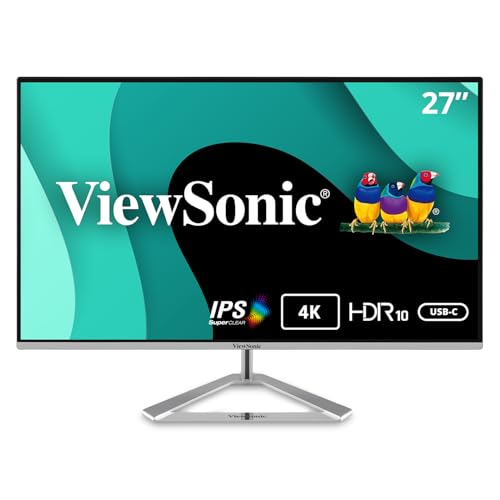
The ViewSonic VX2776-4K-MHDU is a great fit for anyone who has ever looked at a desk full of cables and muttered a quiet curse. Its 65W USB-C support is the headline feature, because it lets a compatible laptop handle video, data, and charging through a single cord. That can make a tiny workspace feel much cleaner in a hurry. The 27-inch 4K IPS panel gives you the usual sharp text and detailed visuals, while HDR10 support adds a bit more depth for streaming and casual media. It is refurbished-friendly thinking in monitor form, really. Simple, practical, and focused on making day-to-day setup easier.
Because this model is a renewed unit, it deserves a little extra attention from buyers who want to keep expectations realistic. The upside is value and utility. The downside is that you are leaning on a previous-owner unit, so the condition can vary more than a brand-new display. Still, the feature mix is excellent for a laptop-first user. Flicker-Free technology and a blue light filter help with comfort, and the port selection covers USB-C, HDMI, and DisplayPort, which keeps it flexible for work and play. If your ideal setup is a MacBook or Windows ultrabook with minimal clutter, this one makes a very convincing case.
Pros
- USB-C with 65W charging keeps the desk tidy.
- 27-inch 4K IPS panel offers sharp clarity.
- HDR10 support improves depth for media.
- Flexible connectivity works with laptops, PCs, and Macs.
- Renewed pricing can make it a smart value move.
Cons
- 60Hz refresh is ordinary for fast-paced gaming.
- Renewed condition may vary more than new stock.
- Standout image quality is good, but not class-leading.
This is the choice for buyers who care more about convenience than flashy specs. If one cable from laptop to monitor sounds like a tiny dream, this is your lane. It works especially well for students, remote workers, and mobile professionals who dock and undock often. If you want a clean desk and strong everyday utility, it fits beautifully.
To buy this product, click here.
7. Best For Multitasking: Samsung 32 UJ59 Series

The Samsung UJ59 is one of those monitors that quietly gets a lot done. The 32-inch 4K panel gives you a wide canvas for documents, browser windows, spreadsheets, and side-by-side work, which is exactly the sort of thing that makes a hectic afternoon feel a little less chaotic. Samsung’s upscaling and “a billion color shades” pitch help the picture feel vivid enough for media and general creativity. It is not trying to be a gaming-first monster, but it does include FreeSync, low input lag mode, and game mode, so it can handle casual play without turning into a drag.
What makes it particularly handy is the multitasking flexibility. Picture-by-Picture and Picture-in-Picture are genuinely useful if you like keeping a laptop and desktop, or a work PC and a streaming box, on the same screen. That sounds boring until you actually use it during a busy day and realize you are not constantly switching inputs like a treadmill of annoyance. The slim bezels and matte black design keep it looking clean, and the Y-shaped stand adds a bit of character. It feels like a monitor built for people who like order, not fuss.
Pros
- 32-inch screen is excellent for multitasking.
- Picture-by-Picture and Picture-in-Picture are genuinely useful.
- FreeSync and low input lag help casual gaming.
- Upscaling makes lower-resolution content look better.
- Clean, professional look fits office setups well.
Cons
- VA panel behavior may not satisfy every color purist.
- 60Hz refresh is basic by modern standards.
- Stand ergonomics are more limited than some competitors.
If your days revolve around multitasking, this monitor earns its keep quickly. It works well for people who like two windows open side by side, or who need one screen for work and another source for reference material. Buyers chasing faster gaming performance or more advanced ergonomics may look elsewhere, but for practical, everyday juggling, it is strong.
To buy this product, click here.
8. Best Value: LG 32UR550K-B UltraFine Monitor

The LG 32UR550K-B feels like one of the smarter value plays in this group because it gives you a 32-inch 4K canvas without loading on a bunch of unnecessary extras. The screen is large enough to make work feel more spacious, and the 90% DCI-P3 coverage plus HDR support help media look lively. If you have ever tried editing a document, watching a show, and checking email on a cramped display, the appeal here is obvious. You simply have more room to breathe, and that changes the whole mood of the desk.
LG also includes the Switch App, which makes this model surprisingly versatile for users who want organized screen layouts. The adjustable stand is a real plus too, since height, tilt, and pivot control make it easier to dial in a comfortable position. That matters more than flashy spec sheets. It is the kind of monitor that gets out of the way and lets you work. The built-in audio is nice for basic use, and gaming extras like Dynamic Action Sync and Black Stabilizer add some extra flexibility. It is not a specialist display. It is a capable all-rounder with a useful size advantage.
Pros
- 32-inch 4K panel offers lots of working space.
- Adjustable stand improves comfort.
- Switch App helps with screen organization.
- HDR and 90% DCI-P3 give content good color depth.
- Strong all-around feature set for mixed use.
Cons
- 60Hz refresh is standard, not exciting.
- Larger footprint requires more desk room.
- Audio is convenient, but still basic.
This one makes the most sense for buyers who want the benefits of a big 4K display without jumping into premium pricing. It suits home offices, family desks, and casual entertainment spaces nicely. If your priority is value per inch, this is one of the easiest recommendations in the lineup.
To buy this product, click here.
9. Best For Easy Reading: ViewSonic VX3276-4K-MHD
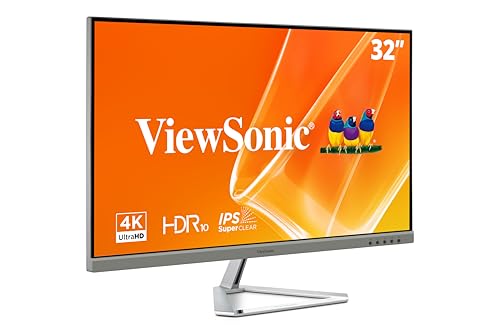
The ViewSonic VX3276-4K-MHD has a very calm, readable personality. That sounds funny for a monitor, but it fits. The 32-inch 4K display gives text plenty of room to breathe, and the eye-care features make it a sensible choice for long office days or late-night reading sessions. If your screen time is heavy on articles, docs, and browser tabs, this panel does a nice job of keeping the whole experience relaxed. The ultra-thin bezels help it look modern without calling attention to itself, which some buyers will love immediately.
The preset modes are a neat touch, especially if you switch between text work, video, and light entertainment throughout the day. It is one of those monitors that feels easy to live with because it does a little bit of everything without demanding setup drama. HDMI, DisplayPort, and Mini DisplayPort inputs keep compatibility broad, which is handy if you rotate between devices. It is not the flashiest pick in the group, but there is a quiet confidence to it. Sometimes that is what makes a monitor stick around on the desk for years.
Pros
- 32-inch 4K screen is excellent for reading and office use.
- Eye-care features help reduce fatigue.
- Preset viewing modes simplify switching tasks.
- Wide input support makes it flexible.
- Thin bezels keep the design clean.
Cons
- 60Hz refresh is basic.
- Panel type is not aimed at high-end creative work.
- Less exciting for buyers who want a more feature-packed monitor.
This is the quiet achiever of the group. It suits readers, office users, and anyone who values a gentle, easy-on-the-eyes display more than speed. If your monitor life is mostly documents, email, and the occasional movie night, it is a strong candidate. Buyers chasing stronger gaming chops or more dramatic contrast may want a different pick, but for calm everyday use, it works very well.
To buy this product, click here.
How To Choose The Right Best Refurbished 4K Monitors
Pick The Right Screen Size For Your Desk
The most common mistake is buying a huge 32-inch panel for a cramped desk and then realizing the monitor is doing yoga with your keyboard space. A 27-inch 4K monitor usually feels crisp and compact, while a 32-inch model gives more room for multitasking and side-by-side windows. If you sit close to the screen, 27 inches can feel perfectly balanced. If you want a broader workspace and more relaxed viewing, 32 inches is easier on the eyes.
Match The Panel Type To Your Use
IPS panels are usually the safest bet for mixed work, casual editing, and shared viewing because colors stay consistent from wider angles. VA panels often bring deeper contrast, which can make movies and darker game scenes look richer. That contrast can feel great, but some buyers notice a slightly different texture to motion or color consistency. If your days are mostly spreadsheets and web work, IPS is the easy lane. If movie nights matter more, VA may feel more satisfying.
Look Closely At Refresh Rate
Many shoppers assume 4K means the same thing across every monitor, but refresh rate changes the feel dramatically. A 60Hz screen is fine for office work and general use. A 120Hz option feels smoother during scrolling, window movement, and gaming. If you use your monitor for fast-paced games or you simply like a snappier desktop, higher refresh rates are worth chasing. If your workload is mostly static, do not overspend for speed you will barely notice.
Check Ergonomics Before Anything Else
A good stand can make a bargain monitor feel better than a pricey one with poor adjustments. Height, tilt, and pivot matter if you work long hours, share a desk, or switch between portrait and landscape use. A weak stand often shows up in the worst way possible, usually after a week of neck stiffness. If you already know your setup needs flexibility, prioritize ergonomics over a few extra spec points.
Think About Connectivity And Laptop Compatibility
USB-C can be a genuine quality-of-life upgrade. For laptop users, one cable for display and charging keeps the desk cleaner and reduces fiddling every morning. HDMI and DisplayPort still matter, especially if you use a desktop tower, console, or dock. A lot of buyers skip this part and end up juggling adapters. If you know your setup depends on a particular port, verify it before buying so the monitor fits your life instead of creating new clutter.
Do Not Ignore Comfort Features
Eye-care tech, flicker reduction, and low blue light modes sound small until you spend hours staring at a bright screen. These features matter for readers, office workers, and anyone who works late. They can take the edge off eye fatigue, especially in a room that goes from bright afternoon glare to a dim evening workspace. Comfort features are easy to dismiss, then hard to live without once your routine gets serious.
Weigh Refurbished Risk Against Value
Refurbished and renewed monitors can save money, but they also ask for a little more attention. Check the seller reputation, return policy, and any warranty information before buying. A good refurb can feel like a smart steal. A careless one can mean dead pixels, odd wear, or a stand that has seen better days. If the savings are meaningful and the seller is solid, refurbished can be a very smart move. If the listing looks vague, keep walking.
Best Refurbished 4K Monitors FAQ
Is A Refurbished 4K Monitor Worth It?
Yes, if the seller is trustworthy and the return policy is clear. Refurbished monitors often give you the screen quality you want for less money, especially if you are more focused on sharp text and solid everyday use than on buying something fresh out of the box. The key is checking condition details and not assuming every renewed unit is the same.
Should I Choose 27 Inches Or 32 Inches?
That depends on how you work. A 27-inch 4K monitor is compact and very sharp, which is great for smaller desks and close viewing. A 32-inch screen gives more room for split windows and a more relaxed feel. If your desk is tight, 27 inches is easier to manage. If you multitask heavily, 32 inches feels more spacious.
Is 60Hz Enough For A 4K Monitor?
For office work, streaming, and general browsing, yes. Many people are perfectly happy with 60Hz. If you game often or like super smooth cursor and window movement, 120Hz is a noticeable step up. The higher refresh is especially nice if you spend long hours moving between apps and scrolling through dense content.
Do IPS Panels Look Better Than VA Panels?
Neither is universally better. IPS panels usually offer better viewing angles and very consistent color, which is why they are popular for productivity and mixed use. VA panels usually bring deeper contrast, which many people enjoy for movies and darker scenes. If you want crisp office clarity, IPS is often the safer choice. If contrast matters more, VA can be more appealing.
What Ports Should I Look For?
HDMI and DisplayPort cover most desktop setups. USB-C is especially useful for laptop users who want a cleaner desk and one-cable docking. If you plan to connect multiple devices, look for monitors with more than one input and easy switching. A great screen with the wrong ports can turn into a daily annoyance fast.
Can Refurbished Monitors Still Be Good For Gaming?
Yes, especially if they have a higher refresh rate and low response time. A 120Hz refurbished monitor can feel much more responsive than a basic 60Hz office display. Just make sure the model supports the kind of gaming you actually do. Casual and story-driven players have different needs from fast FPS players, so the best pick depends on the games you play.
What Should I Check Before Buying A Renewed Monitor?
Look at seller ratings, warranty details, return window, and whether the listing explains the condition clearly. Also check for missing cables, damaged stands, or limited ports. A renewed monitor can be a smart buy, but only if the listing is transparent and the risks are manageable. A few minutes of checking can save a lot of hassle later.
Final Verdict
The Dell 27 Plus 4K Monitor is the strongest overall pick in this group because it gets the balance right. It looks crisp, moves smoothly at 120Hz, stays comfortable during long sessions, and fits neatly into the kind of desk setup most people actually use. If you want a monitor that feels modern without forcing you to overthink every spec, this is the one I would put at the top of the pile. The Dell 32 Plus is the premium-leaning choice for buyers who want a bigger, richer-feeling screen, while the LG 27US500-W is the budget-friendly route that still delivers the core 4K experience.
The real trick with refurbished 4K monitors is matching the screen to your habits. A 27-inch IPS model makes sense for compact workstations and sharp text. A 32-inch display is better if you like room to spread out. USB-C helps laptop users, higher refresh rates help gamers, and stronger stand adjustments help anyone who spends too long at the desk. Pick the monitor that fits the way you work and relax, and the whole setup starts feeling easier in a very real way.