Best Refurbished Laser Printers: 9 Top Picks in 2026
Refurbished laser printers attract a very specific kind of buyer. Maybe you are tired of ink cartridges drying up in a drawer, maybe your small office needs crisp pages without paying flagship money, or maybe you just want a machine that can sit quietly in the corner and churn out invoices, handouts, and shipping labels without drama. The trap is that plenty of shoppers grab the cheapest unit they can find, then realize too late that it is missing duplex printing, has weak wireless support, or feels clunky the first time they try to scan a stack of documents before lunch.
The smartest way to shop is to focus on the stuff that matters day after day: print speed, toner cost, paper handling, connection options, and whether you need simple print-only duty or a true all-in-one workhorse. Different buyers want different things, too. A freelancer working from a kitchen table may want a tiny monochrome unit that wakes fast and disappears into the background, while a busy office manager may care more about a refurbished color MFP with an ADF, duplex scanning, and enough capacity to survive a chaotic Monday morning.
The strongest overall pick here is the Brother HL-L2460DW renewed premium model, because it hits that sweet spot of speed, duplexing, and practical office friendliness without feeling oversized or fussy. If you want a quick overview before digging into the details, the comparison table below makes the tradeoffs easy to spot.
Best Refurbished Laser Printers Comparison Table
| Product | Best For | Main Strength | Key Specs |
|---|---|---|---|
| Brother HL-L2460DW | Best Overall | Fast monochrome output with duplex printing | Up to 36 ppm, wireless, Ethernet, 250-sheet tray |
| Brother MFC-L2820DW | Best All-In-One | Print, scan, copy, and fax in one compact unit | ADF, duplex, wireless, touchscreen |
| Brother HL-L3280CDW | Best Color Printing | Color laser speed with duplex efficiency | Up to 27 ppm, color touchscreen, wireless, Ethernet |
| HP Color LaserJet Pro MFP 3301cdw | Best Premium Office | Heavy-duty color all-in-one performance | ADF, fax, duplex, security tools, wireless |
| Brother DCP-L2640DW | Best Small Business | Print, scan, copy with strong speed | Up to 36 ppm, 50-page ADF, duplex, wireless |
| HP LaserJet MFP M140w | Best Compact MFP | Very small footprint for 1 to 3 users | Print, scan, copy, wireless, mobile app |
| Canon imageCLASS LBP6030w | Best Budget | Affordable print-only simplicity | 19 ppm, wireless, 150-sheet capacity |
| HP LaserJet M110w | Best Ultra-Compact | Tiny black-and-white printer for light duty | Up to 21 ppm, wireless, mobile printing |
| HP LaserJet Pro P1606dn | Best Classic Refurbished | Old-school workhorse appeal | Certified refurbished, 90-day warranty, print-only |
If you want the differences laid out in plain English, the reviews below walk through each option and show where it earns its keep.
1. Best Overall: Brother HL-L2460DW

The Brother HL-L2460DW is the sort of printer that disappears into a routine and then quietly proves it was the right choice. It boots up, connects, prints fast, and keeps the paper moving without the kind of hiccups that make a home office feel like a repair shop. With up to 36 pages per minute and automatic duplex printing, it has the brisk, no-nonsense pace that makes stack printing feel less like a chore and more like a quick errand. For a shared work desk or a small office nook, that matters a lot.
This renewed premium version makes especially good sense for buyers who want a dependable black-and-white laser printer without paying for scan or fax hardware they may never use. The 250-sheet tray is generous for its size, and the dual-band wireless plus Ethernet support means it can settle into a network instead of fighting for attention. If your day looks like invoices in the morning, shipping slips after lunch, and school forms at night, this is the kind of machine that keeps pace without turning into the loud center of the room.
Pros
- Fast monochrome output keeps longer print jobs moving smoothly.
- Automatic duplex printing saves paper and feels especially useful for work documents.
- Dual-band wireless, Ethernet, and USB cover most home and office setups.
- 250-sheet input capacity reduces how often you need to refill the tray.
- Compact enough to fit into a small office without crowding the desk.
Cons
- No scanning or copying, so it is not a true all-in-one.
- Black-and-white output only, which rules it out for color-heavy work.
- Renewed units can vary a bit in cosmetic condition.
If your goal is efficient everyday document printing, this one lands in a very comfortable sweet spot. It is strong enough for a solo business owner, practical enough for a family office, and simple enough that nobody needs a tutorial the first time they hit print. Buyers who want scanning or faxing should keep moving, but anyone who values speed, duplexing, and easy network use will probably find this model hard to fault.
To buy this product, click here.
2. Best All-In-One: Brother MFC-L2820DW

The Brother MFC-L2820DW is the one you buy when a printer needs to behave like an office assistant instead of a paper pusher. Print, scan, copy, and fax are all baked in, and that matters if your workday involves forms, contracts, or a scanner that gets used more than you expected. The 50-page auto document feeder is a real time saver, especially on mornings when a stack of paperwork lands on your desk before coffee has even cooled down.
It also feels well suited to the kind of buyer who wants one device to do many jobs without taking over the room. The 36 ppm print speed gives it good punch for black-and-white tasks, and the 2.7-inch touchscreen makes routine functions feel less fussy than they do on older office machines. The renewed premium angle is appealing here too, because the model is fairly current and packed with features that still feel modern rather than stripped down. If a home office has a lot of scanning and copying to do, this one starts to look like a very sensible buy.
Pros
- Print, scan, copy, and fax cover nearly every document task.
- 50-page ADF is a big help for multi-page jobs.
- Fast 36 ppm output suits busy workdays.
- Wireless, Ethernet, and USB support flexible setups.
- Touchscreen and mobile app support make it easy to live with.
Cons
- More expensive than simple print-only models.
- Black-and-white only, so it is not built for color graphics.
- The feature set may be overkill if you rarely scan or fax.
This is the pick for buyers who hate device clutter and want one machine to handle the paper traffic. A freelancer with client paperwork, a small office receptionist, or a family that scans school documents and tax forms regularly will get much more out of this than from a basic printer. If your workflow is mostly simple printing, the extra hardware may feel unnecessary, but for mixed office tasks the convenience is excellent.
To buy this product, click here.
3. Best Color Printing: Brother HL-L3280CDW

Color laser printing can be a bit of a sweet spot for people who want charts, handouts, and client-facing pages to look sharp without moving into inkjet territory. The Brother HL-L3280CDW handles that nicely. It prints up to 27 pages per minute, supports automatic duplexing, and brings color into the mix without feeling bulky. For a home office that occasionally needs polished brochures or presentation pages, that is a very handy combination.
What stands out here is how office-friendly it feels. The color touchscreen is easy to navigate, cloud app support is genuinely useful for modern workflows, and the wireless plus Ethernet options give it plenty of flexibility. Picture a small team printing a pitch deck before a meeting, then a stack of internal memos after lunch. This is the kind of printer that can handle both without getting moody. It is still a print-focused machine, so buyers who need scan and copy should look at the HL-L3300CDW instead, but for color output alone this model hits a strong balance of speed and practicality.
Pros
- Color laser output adds polish to reports and handouts.
- Automatic duplex printing helps control paper use.
- 27 ppm speed is strong for a color model.
- Color touchscreen improves day-to-day usability.
- Multiple connection options fit shared office environments.
Cons
- Print-only design means no scanner or copier.
- Color toner costs can be higher than monochrome upkeep.
- It makes the most sense for buyers who truly need color.
This is the one for buyers who want their documents to look a little sharper and a little more professional without babysitting an inkjet. It works well for entrepreneurs, consultants, and office users who print mixed color paperwork from time to time. If your pages are almost always text-only, a monochrome Brother will probably be the cleaner value, but if color matters even occasionally, this printer earns its spot.
To buy this product, click here.
4. Best Premium Office: HP Color LaserJet Pro MFP 3301cdw
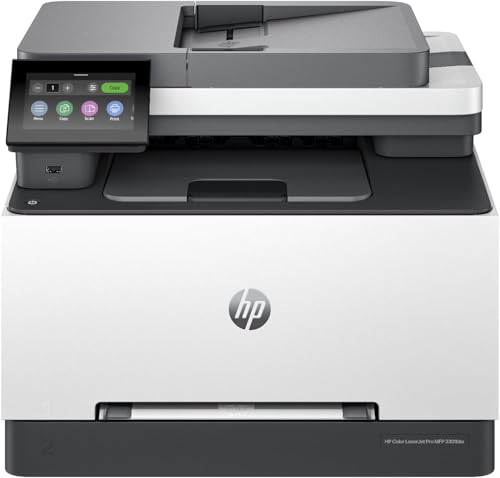
The HP Color LaserJet Pro MFP 3301cdw feels built for a desk that never really goes quiet. It is a full color all-in-one with print, scan, copy, fax, automatic duplexing, and a single-pass duplex scanner, which means it can handle a messy stream of paperwork without slowing the room down. For a small office, that kind of breadth is a big deal. You are not hunting for a separate scanner or squeezing a second machine onto a crowded counter.
Then there is the premium-office polish. HP’s TerraJet toner is meant to deliver vivid color, the 250-sheet tray gives it decent stamina, and the security features are the sort of thing office admins appreciate once they have seen a few bad network days. Imagine a front desk printing client forms while someone else scans signed pages and another coworker faxes documents back and forth. This printer can sit in the middle of that chaos and keep working. It is more expensive than the black-and-white picks, but it earns the bump if your office actually uses color and multiple functions on a regular basis.
Pros
- Color printing, scanning, copying, and fax cover a full office workflow.
- Automatic duplex printing and duplex scanning save time.
- Strong wireless support with self-reset helps keep it connected.
- Security tools are a plus for business-minded buyers.
- Vivid color output looks better for professional documents.
Cons
- One of the pricier options in this roundup.
- More printer than many home users actually need.
- Color toner upkeep can add more running cost than monochrome models.
Buy this if you want a serious office machine and need color to feel polished rather than “good enough.” It is ideal for small teams, shared workspaces, and anyone who regularly scans and faxs documents as part of the day. If you are mostly printing tax forms or shipping labels, this is probably too much printer, but for a busier office it has the right kind of muscle.
To buy this product, click here.
5. Best Small Business: Brother DCP-L2640DW

The Brother DCP-L2640DW is a very sensible small-business machine because it trims the fat without feeling stripped down. You get print, scan, and copy in one compact body, and the 36 ppm print speed keeps it moving through documents fast enough for a busy day. The 50-page auto document feeder is the kind of feature that makes a huge difference once you start handling multi-page scans or copies regularly. It saves time in tiny ways that pile up quickly.
It also has the kind of connectivity that keeps a printer from becoming a headache. Dual-band wireless, Ethernet, USB, and the Brother Mobile Connect app mean it can fit into a shared office, a side room, or a solo work setup without much drama. Picture a tiny retail office scanning receipts and forms between customers, or a home-based business printing packing slips and copying paperwork in one stretch. That is where this model shines. It is not the fanciest unit here, but it is one of the most balanced, which is often the better win.
Pros
- Print, scan, and copy in a compact footprint.
- Fast 36 ppm output helps during busier office hours.
- 50-page ADF is excellent for stacked paperwork.
- Wireless and Ethernet options make setup flexible.
- Monochrome laser output is clean and professional.
Cons
- No color printing for graphics-heavy documents.
- Not as feature-rich as a full fax-equipped MFP.
- Best suited to document workflows rather than creative use.
This is a great fit for buyers who want a real work printer and do not want to pay for bells and whistles they will ignore. It is especially good for small businesses, shared home offices, and anyone who scans a fair amount of paperwork. If your weekly routine includes a lot of PDFs, forms, and copies, this one will feel like a relief.
To buy this product, click here.
6. Best Compact MFP: HP LaserJet MFP M140w

The HP LaserJet MFP M140w is tiny in a way that feels almost sneaky. It squeezes print, scan, and copy into a body that is easy to tuck onto a shelf or a small table, which makes it ideal for tight spaces. If your desk is already crowded with a laptop, a monitor, a notebook pile, and the usual daily clutter, this printer feels refreshingly unobtrusive. For one to three people, it is a very practical little machine.
Its speed is modest compared with the Brother units, but 21 ppm is still perfectly workable for everyday black-and-white documents. The self-reset wireless feature and HP Smart app support make it approachable for people who want convenience without a complicated setup ritual. Think about a student apartment, a compact home office, or a small team printing a few reports and scanning ID cards. That is where this model fits neatly. It is not the hard-charging office workhorse, but it solves the space problem better than a lot of bigger printers can.
Pros
- Very small footprint for a print, scan, and copy model.
- Easy wireless printing from many device types.
- Simple for light office or home use.
- Handy for scanning IDs and small documents.
- HP Smart app adds mobile convenience.
Cons
- Slower than some Brother rivals.
- Better for light-duty use than heavy office traffic.
- Cartridge restrictions can be a concern for some buyers.
Choose this if your main struggle is space, not sheer throughput. It is especially appealing for students, light office users, or small teams that need a compact black-and-white MFP without a lot of setup fuss. If you expect high-volume printing, there are stronger options in this list, but for a tiny workspace the M140w is easy to like.
To buy this product, click here.
7. Best Budget: Canon imageCLASS LBP6030w

The Canon imageCLASS LBP6030w keeps things simple, and that is exactly why some buyers will love it. It is a print-only monochrome laser printer with wireless support, a compact body, and a very approachable price point for anyone who just needs crisp documents without the extra machinery. It feels like the printer version of a reliable basic sedan. No extra chrome. No fancy dashboard. Just enough capability to get the job done.
In real life, that means it works well for light home use, students, or a small office that mainly needs invoices, worksheets, and occasional forms. The 19 ppm speed is not blazing, but it is respectable for a budget unit, and the 150-sheet tray is enough for most casual workloads. You do give up scanning, copying, and duplex printing, so this is a more focused tool than the Brother models above. Still, for buyers who want black-and-white printing at a lower entry point, Canon’s little laser box makes a solid argument.
Pros
- Very affordable for a laser printer.
- Small footprint makes it easy to place almost anywhere.
- Wireless printing is available right out of the gate.
- Low-energy mode is appealing for light use.
- Good pick for basic documents and schoolwork.
Cons
- Print-only, so no scanner or copier.
- No duplex printing.
- Better suited to light workloads than demanding office use.
This is the bargain pick for people who know exactly what they need and nothing more. If your home office prints a handful of pages at a time and you do not want a giant machine on the desk, this is worth a look. If you need a more versatile all-in-one, spend a little more and move up the list.
To buy this product, click here.
8. Best Ultra-Compact: HP LaserJet M110w

The HP LaserJet M110w is the sort of printer you buy because you want it to sit there and get out of the way. It is tiny, black-and-white only, and built for straightforward printing from mobile devices, PCs, and tablets. In a cramped apartment or a small office with zero extra surface space, that kind of compactness can feel like a luxury. There is something satisfying about a device that never demands much attention and still turns out clean pages.
It is especially good for 1 to 3 people who need fast-ish simple prints and value easy wireless access more than extra features. The 21 ppm top speed is enough for routine document duty, and HP Smart app support keeps the workflow reasonably friendly. A person who prints a contract here, a shipping label there, and a school packet once in a while will probably be perfectly happy. If your world includes scanning, copying, or duplexing, this will feel limited, but as a tiny black-and-white laser printer, it gets the job done with very little fuss.
Pros
- Extremely small footprint.
- Good for quick black-and-white printing in tight spaces.
- Wireless and mobile printing support are convenient.
- Simple to understand and easy to live with.
- Works well for personal or light shared use.
Cons
- Print-only and monochrome only.
- No duplex printing.
- Not ideal for busy office volume.
This model is a clean fit for buyers who want the smallest possible laser printer and are fine keeping tasks basic. It is a nice match for dorm rooms, compact apartments, or minimalist workstations. If you want extra functions, this is not your machine, but if space is the enemy, it solves the problem beautifully.
To buy this product, click here.
9. Best Classic Refurbished: HP LaserJet Pro P1606dn

The HP LaserJet Pro P1606dn is the classic refurbished choice, the kind of printer that appeals to people who like straightforward office hardware with a workhorse feel. It is not loaded with modern bells and whistles, and that is part of the charm. Certified refurbished units are tested, cleaned, inspected, and repackaged, so the appeal here is getting a proven laser printer at a lower entry point. For some buyers, that is exactly the right kind of deal.
This one makes the most sense for people who mainly want reliable black-and-white printing and are comfortable with a more basic feature set. Since it is print-only and comes without toner, it asks a little more from the buyer up front, but in return it offers a familiar, office-style experience. Imagine a back room desk that just needs to spit out forms, labels, and memos all day. The P1606dn fits that type of life very well. It is not the flashiest refurbished printer here, but it has the old-school practicality that some shoppers still prefer.
Pros
- Certified refurbished status adds confidence to the purchase.
- Simple print-only design keeps operation straightforward.
- Good fit for buyers who want a basic office-style laser printer.
- Lower-cost way to get into refurbished printing.
- Reliable for text documents and routine forms.
Cons
- Does not include toner, which adds a first-use cost.
- Older design lacks the convenience of newer models.
- No scanning, copying, or color output.
Buy this if you appreciate simplicity and do not mind that it feels a little more old-school than the newer Brothers and HPs. It works best for buyers who value plain document printing and want a refurbished unit with a basic warranty cushion. If you need wireless convenience, scanning, or duplexing, you will probably be happier with one of the newer options above.
To buy this product, click here.
How To Choose The Right Best Refurbished Laser Printers
Decide Whether You Need Print-Only Or An All-In-One
The first fork in the road is simple: do you only need to print, or do you also scan, copy, and maybe fax? Print-only models are usually cheaper, smaller, and easier to live with. All-in-ones make more sense if your week is full of forms, paperwork, and the occasional need to scan a stack without hunting for a second device.
A lot of buyers overspend on functions they never use, then regret the extra size and complexity. Others go too minimal and end up borrowing a scanner from someone else twice a month. If your paperwork habits are messy or frequent, the all-in-one route usually pays off fast.
Think About Monochrome Versus Color
Monochrome laser printers are the safe bet for most people. They are usually cheaper to buy, cheaper to maintain, and better suited to text-heavy documents. Color laser printers cost more, but they can make reports, charts, flyers, and client-facing pages look far more polished.
If your pages are mostly black text with the occasional logo, monochrome often wins. If you print presentation handouts, school projects, or business materials that need color to make sense, the upgrade can be worth it. The mistake is buying color “just in case” and then paying for toner you barely use.
Check Duplex Printing And Duplex Scanning
Automatic duplex printing is one of those features people ignore until they have used it for a week. It saves paper, cuts down on manual flipping, and makes longer jobs less annoying. Duplex scanning is even nicer if you deal with double-sided paperwork, because it removes a lot of tedious page shuffling.
For home offices and small businesses, duplex support often matters more than flashy app features. If you print contracts, invoices, reports, or manuals, the time and paper savings show up quickly. It is a practical feature, not a fancy one, which is exactly why it should be near the top of your checklist.
Look At Paper Capacity And Duty Style
A printer with a tiny tray can turn into a mini chore if you print often. A 250-sheet tray feels much more relaxed than a 150-sheet tray when your desk is already full of other tasks. If you only print a few pages here and there, smaller capacity is fine. If you print in batches, capacity matters more than most shoppers expect.
Think about how the printer will live in your day. A family printer that handles homework, tax forms, and shipping labels benefits from a bigger tray. A dorm room printer that gets used every few days does not need a giant paper bin sitting there like a warehouse pallet.
Make Sure The Connectivity Fits Your Setup
Wireless is convenient, but not all wireless setups are equally smooth. Dual-band Wi-Fi, Ethernet, USB, and mobile app support all make a printer easier to fit into different spaces. If you share a printer across multiple devices, a stronger network setup can save you a lot of annoyance later.
People often underestimate this part. They buy a printer that looks great on paper, then discover it only behaves nicely with one computer or one app. If you switch between a laptop, a phone, and a desktop, make sure the connection options feel flexible, not fussy.
Balance Size Against Performance
Small printers are appealing, especially in apartments and home offices, but tiny does not always mean efficient. Some compact models are perfect for light use, while others sacrifice tray size, speed, or extra functions. Bigger printers can be more comfortable for real work, but they take more space and may feel overbuilt if you rarely print.
This is where real-life habits matter. If the printer sits on a corner table and only wakes up a few times a week, a compact model is lovely. If it is going to handle daily document traffic, spend the extra time thinking about speed, paper handling, and the footprint around the machine.
Watch For Refurbished Condition And Warranty Coverage
Refurbished does not always mean the same thing from seller to seller. Some units are certified refurbished with testing, cleaning, and warranty support, while others are renewed or restored with less clarity about cosmetic wear. That difference matters if you want peace of mind.
Look closely at the warranty length, included accessories, and whether toner is part of the package. A printer that needs a cartridge right away can feel less cheap than it first appears. A strong refurbished listing should make the condition easy to understand before the box lands at your door.
Best Refurbished Laser Printers FAQ
Are Refurbished Laser Printers Worth Buying?
Yes, if you shop carefully. Refurbished laser printers can offer a strong mix of lower upfront cost and dependable document printing. They are especially appealing when you want office-style performance without paying full retail for a new unit. The key is buying from a seller or program with clear testing and warranty support.
Should I Choose A Monochrome Or Color Laser Printer?
Monochrome is usually the better value if you print mostly text. Color makes sense if you regularly need charts, handouts, graphics, or polished client materials. If you rarely use color, the cheaper running costs of a black-and-white printer will usually feel better over time.
Is Duplex Printing A Must-Have?
Not for everyone, but it is one of the most useful features in a refurbished laser printer. Duplex printing saves paper and makes longer documents easier to manage. If you print reports, contracts, school packets, or internal office pages, it is worth having.
How Much Should I Care About Wireless Connectivity?
A lot, if your home or office uses more than one device. Wireless printing makes life easier, and dual-band Wi-Fi tends to be more stable than basic single-band setups. Ethernet can be a lifesaver in busier offices, while USB still works fine for simple single-user setups.
Are All-In-One Printers Better Than Print-Only Models?
Not always. All-in-ones are more versatile, but they usually cost more and take up more room. Print-only models can be faster to set up and easier to maintain. The right choice depends on whether you actually need scanning, copying, or faxing in your regular workflow.
What Should I Check Before Buying A Refurbished Unit?
Look at the warranty, the seller reputation, whether toner is included, and whether the model supports the functions you need. Also check the paper capacity, duplex support, and connectivity options. A refurbished printer should solve problems, not create them.
Is A Used Older Laser Printer Better Than A Newer Renewed Model?
Sometimes, but not always. Older printers can be cheaper and very reliable, but they may lack modern wireless features, app support, or compact design. Newer renewed models often balance better convenience with decent value, which is why they tend to be the safer pick for most buyers.
Final Verdict
The Brother HL-L2460DW stands out as the best refurbished laser printer for most buyers because it gets the fundamentals right without wasting space or money on gimmicks. It is fast, duplex-friendly, and flexible enough for both home offices and small business use. If you want an even fuller feature set, the Brother MFC-L2820DW is the most practical all-in-one pick, while the HP Color LaserJet Pro MFP 3301cdw is the premium choice for offices that need color, scanning, copying, and faxing in one place.
The smartest move is to match the printer to your daily rhythm. If you print text-only documents and want low hassle, a monochrome Brother or Canon will probably feel best. If color matters, step up to one of the Brother or HP color models. If your workspace is tiny, the HP M110w or M140w keeps things compact and manageable. Refurbished laser printers can be a bargain, but only if the feature set fits the way you actually work, and that part is where the real savings live.