Best Refurbished Mesh WiFi Systems: 9 Top Picks in 2026
Mesh Wi-Fi shoppers usually arrive at the same place after a few annoying nights. One room has blazing speeds, the hallway turns into a swamp, and the back bedroom acts like it lives off the grid. That is where refurbished mesh Wi-Fi systems start making a lot of sense. They can stretch coverage, smooth out dead zones, and do it without forcing you to buy a brand-new premium kit if you do not need one.
The trap is grabbing the cheapest set with a shiny spec sheet and calling it a day. A lot of buyers do that, then wonder why the network still stumbles during video calls, why the attic node feels sluggish, or why the app setup turns into a little tech soap opera. The better move is to match the system to your home size, internet speed, device count, and how much control you want over settings. Some households want a simple plug-and-play setup. Others want wired backhaul, Wi-Fi 6E or Wi-Fi 7 headroom, and enough ports to keep a desktop, console, and NAS happy. The right pick really depends on your house and your habits.
At the top of this list, the TP-Link Deco 7 BE25 stands out as the best all-around refurbished mesh option for buyers who want strong modern performance without jumping straight to ultra-premium pricing.
If you are short on time, the comparison table below gives a fast way to size up the main contenders.
Best Refurbished Mesh Wi-Fi Systems Comparison Table
| Product | Best For | Main Strength | Coverage / Capacity |
|---|---|---|---|
| TP-Link Deco 7 BE25 | Best Overall | Wi-Fi 7 speed, wide coverage, easy expansion | Up to 6,600 sq. ft., 150+ devices |
| TP-Link Deco X55 3-Pack | Best Value | Balanced Wi-Fi 6 performance | Up to 6,500 sq. ft., 150 devices |
| TP-Link Deco 7 Pro BE63 | Best Premium | Tri-band Wi-Fi 7 with 10G-ready hardware | Up to 7,600 sq. ft., 200+ devices |
| Netgear MK73-100NAR Nighthawk | Best Budget | Low-cost certified refurbished starter kit | AX3000 class mesh system |
| TP-Link Deco AXE5300 | Best 6E Pick | 6 GHz band for newer devices | Up to 7,200 sq. ft., 200 devices |
| Google WiFi 3-Pack | Best Simple Setup | Easy app-based management | Up to 4,500 sq. ft. |
| TP-Link Deco S4 | Best Basic Coverage | Reliable AC1900 mesh on a tight budget | Up to 5,500 sq. ft., 100 devices |
| TP-Link Deco X55 2-Pack | Best for Smaller Homes | Same Wi-Fi 6 DNA in a smaller kit | Up to 4,500 sq. ft., 150 devices |
| Amazon eero 6+ | Best for Smart Homes | Strong app experience and built-in hub | Up to 4,500 sq. ft., 75+ devices |
Below, each system gets a closer look so you can see which one fits a crowded family house, a gigabit plan, a smart-home setup, or a plain old “please make the Wi-Fi stop dropping” situation.
1. Best Overall: TP-Link Deco 7 BE25

The Deco 7 BE25 feels like the sweet spot many households are actually shopping for, even if they start out hunting for something cheaper. It brings Wi-Fi 7 into refurbished mesh territory without making the setup feel like a lab experiment, and that matters in a busy home where people just want streaming, gaming, and work calls to stop fighting each other. The dual-band design keeps things efficient, while the 2.5G ports and wired backhaul support give it real legs for homes that already have at least a little Ethernet running around the place.
What makes it especially appealing is the mix of modern speed and practical coverage. A 3-pack reaching up to 6,600 square feet is a big deal if you have a multi-level house, a long ranch, or an office tucked far from the main router. TP-Link’s AI-Roaming and HomeShield features also make daily use feel calmer than it does on older gear. A parent can pause a device, a remote worker can keep a VPN client running, and the whole system can still behave like one network instead of a patchwork of nodes that keep forgetting who they are.
Pros
- Wi-Fi 7 support gives it a more future-ready feel than older Wi-Fi 6 systems.
- Strong whole-home coverage suits medium to large homes well.
- 2.5G ports and wired backhaul help it shine in faster wired setups.
- Deco app setup is straightforward and friendly for non-experts.
- HomeShield and AI-roaming add useful everyday polish.
Cons
- Dual-band design is less flexible than top-tier tri-band Wi-Fi 7 kits.
- Best results depend on having the right home layout and, ideally, some wired backhaul.
If you want a refurbished mesh system that feels current without going overboard, this is the easy place to start. It suits families, stream-heavy homes, and buyers who want a meaningful upgrade that still feels approachable. The tradeoff is that Wi-Fi 7 alone does not magically fix weak placement or poor backhaul choices, so it still rewards a thoughtful install. For many homes, though, this one lands in that happy zone where the connection feels fast, the app stays out of the way, and the dead spots finally quiet down.
To buy this product, click here.
2. Best Value: TP-Link Deco X55 3-Pack

The Deco X55 3-pack has that dependable, no-drama personality that a lot of refurbished buyers secretly want. It does not chase the newest badge on the shelf, but it covers the important stuff with real confidence. Wi-Fi 6 AX3000 is still plenty for most homes, especially if your internet plan is in the normal gigabit-adjacent zone and your house is filled with phones, laptops, tablets, TVs, and smart plugs that all want a piece of the pie. This is the kind of system that feels grounded, not flashy.
Its strongest selling point is balance. The coverage claim up to 6,500 square feet and support for as many as 150 devices make it a very practical pick for families and busy apartments that have grown into homes with too many screens. Three Gigabit Ethernet ports per unit give you room for wired gear, and Ethernet backhaul support makes the whole thing more stable if you can run cable between nodes. A lot of people buy mesh to fix one annoying dead zone, but this system is better suited to fixing the entire network without creating a new set of headaches.
Pros
- Excellent balance of price, coverage, and performance.
- Three Gigabit ports per node add real flexibility.
- Works well for households with lots of connected devices.
- Deco app setup is clean and beginner-friendly.
- Wired backhaul support helps it hold speed more consistently.
Cons
- Wi-Fi 6 is solid, but it lacks the newer shine of Wi-Fi 6E and Wi-Fi 7.
- Heavy power users with very fast broadband may want a tri-band upgrade.
This is the one I would steer toward buyers who want a sensible refurbished mesh system that should feel fast for years without becoming a money pit. It is a particularly nice fit for families upgrading from an old router and extender setup, since the single-network experience removes a lot of daily friction. If your internet plan is fast but not extreme, this one hits a very comfortable middle ground. It may not be the most exciting box in the bunch, but it is often the one that makes the house feel normal again.
To buy this product, click here.
3. Best Premium: TP-Link Deco 7 Pro BE63

The Deco 7 Pro BE63 is the sort of mesh kit you buy when you want the network to stop being the bottleneck altogether. Tri-band Wi-Fi 7, a 10G-ready port, and four 2.5G WAN/LAN ports give it a very polished hardware profile. That matters for homes with fast fiber service, heavy local transfers, gaming rigs, or a bunch of people trying to stream and work at the same time while the router quietly does the heavy lifting in the closet.
This system also feels built for homes that have grown into serious connectivity beasts. The 3-pack coverage reaches up to 7,600 square feet, and support for more than 200 devices makes it a strong fit for families with smart cameras, voice assistants, TVs, tablets, and work laptops all living under one roof. The upside is obvious the first time you open a dozen tabs, start a video meeting, and let somebody else stream in 4K without watching the network groan. The downside is just as obvious, since this level of hardware is overkill for smaller homes that barely break a sweat on standard Wi-Fi 6.
Pros
- Tri-band Wi-Fi 7 gives it serious performance headroom.
- Excellent coverage and device capacity for large homes.
- 10G-ready hardware and multiple 2.5G ports are future-friendly.
- Strong choice for fast internet plans and dense smart homes.
- Deco app management remains simple despite the premium hardware.
Cons
- It is more system than many average homes will ever need.
- Best value comes only if you can use the speed and port options.
Buy this if you want the refurbished mesh system that feels the least compromised, especially in a bigger house with serious throughput needs. It is a smart move for enthusiasts, power users, and anyone building around modern wired and wireless gear. For a small apartment or light-use family home, though, this can feel like a sports car stuck in school pickup traffic. That is not a flaw, exactly, but it is a reminder that premium network gear should match the lane you actually drive in.
To buy this product, click here.
4. Best Budget: Netgear MK73-100NAR Nighthawk

The refurbished Netgear MK73 is the kind of purchase that makes sense when the budget is tight but the old Wi-Fi is making everybody grumpy. It keeps the mesh concept straightforward, sticks with Wi-Fi 6 AX3000-class performance, and delivers enough coverage for many smaller or medium homes without demanding a premium. Certified refurbished gear can be a smart path here because the price drop gives you more room to solve the real problem, which is coverage, not bragging rights.
What makes this one appealing is the Netgear Nighthawk name combined with the practical simplicity of a 1-router, 2-satellite package. That setup works well in a starter home, a condo with a bad far corner, or a rental where you need a decent mesh system but do not want to overspend on features you will never use. The tradeoff is that it is less expansive and less future-proof than the top TP-Link picks, so you are buying a sturdy bridge solution, not a forever machine. For a lot of people, though, that is exactly the right call.
Pros
- Certified refurbished pricing makes mesh networking far more accessible.
- Easy way to replace an old router-and-extender mess.
- Solid Wi-Fi 6 performance for everyday use.
- Good fit for smaller households and lighter internet plans.
- Netgear brand recognition may reassure buyers who want a familiar name.
Cons
- Less advanced than newer Wi-Fi 6E and Wi-Fi 7 alternatives.
- Coverage and expansion options are more limited than larger mesh kits.
This is the one to look at if you want the cheapest path into a real mesh setup and you are fine keeping expectations sensible. It works best in homes where the goal is steady, reliable coverage rather than pushing every last bit of speed from a top-tier fiber line. If you are shopping refurb and feel tempted to gamble on a random low-end router bundle, this is the safer bet. It keeps the focus where it should be, on making Wi-Fi behave, not on turning your house into a network science project.
To buy this product, click here.
5. Best 6E Pick: TP-Link Deco AXE5300

The Deco AXE5300 is a nice middle road for buyers who want one foot in the newer wireless world without jumping all the way to Wi-Fi 7 pricing. The extra 6GHz band is the big story here, and for homes with compatible phones, laptops, or streaming gear, it can help reduce congestion in a way older mesh systems simply cannot. That extra lane matters most in busy homes where several people are tugging on the network at once and the familiar “why is it buffering again?” complaint starts bouncing down the hallway.
Coverage up to 7,200 square feet and support for up to 200 devices make it a serious candidate for larger households, and tri-band operation gives it more breathing room than dual-band models. Since this is a renewed system, it also fits the refurbished theme nicely for buyers who are chasing value, not retail-box perfection. The main caution is that Wi-Fi 6E shines brightest with 6E-capable devices, so some buyers will pay for the extra band and only tap part of its potential. Still, if you want a refurbished mesh kit that feels current and spacious, it is a compelling choice.
Pros
- 6GHz support can reduce congestion for newer devices.
- Tri-band layout handles busy homes more gracefully.
- Large coverage area suits bigger layouts.
- Strong device capacity for family use.
- Renewed pricing makes 6E more approachable.
Cons
- 6E benefits are smaller if most of your devices are older Wi-Fi 5 or Wi-Fi 6 hardware.
- It may be more than a smaller home really needs.
This is a smart buy if you want more headroom than Wi-Fi 6 but do not need the full cost and complexity of Wi-Fi 7. It is especially appealing for homes where a newer phone, a newer laptop, and a handful of smart devices are all trying to coexist without drama. If your device mix is older and your internet plan is modest, the extra band may feel like nice insurance rather than a daily miracle. That still makes it a thoughtful refurbished option, just one that rewards buyers with a newer ecosystem at home.
To buy this product, click here.
6. Best Simple Setup: Google WiFi 3-Pack
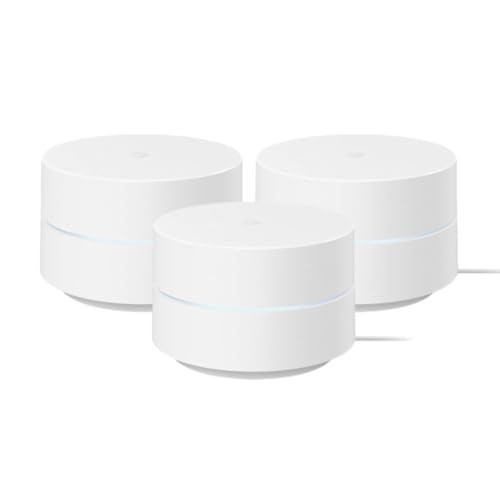
Google WiFi has always had a “keep it calm” vibe, and the refurbished 3-pack continues that tradition. It is not the fastest kit here, and it is not trying to be. Instead, it leans into simplicity, predictable coverage, and an app experience that a lot of everyday users find easy to live with. If you are the sort of person who would rather set something up once and forget about it, this is a pretty comfortable lane to be in.
The coverage, up to 4,500 square feet, is enough for plenty of homes and townhouses, and the manufacturer-refurbished status with a limited warranty can be reassuring for cautious buyers. Google Home app setup is quick, and the parental controls are practical rather than fussy. This one fits a household where the network needs to quietly serve video calls, streaming, and homework without turning into a hobby. It is also one of the more natural choices for people who want a polished app instead of a feature-stuffed dashboard they will never open twice.
Pros
- Very approachable setup and app experience.
- Reliable whole-home coverage for moderate spaces.
- Good parental controls for family use.
- Manufacturer-refurbished condition adds peace of mind.
- Simple, low-stress network management.
Cons
- AC1200-class hardware is slower than newer mesh systems.
- Less attractive for speed-hungry households or very large homes.
This is the right pick for someone who values ease more than raw power. Think first apartment, family home with average usage, or a parent who wants the network to stay out of the way while the kids stream and the adults work. If you have a fast fiber line and a pile of high-demand devices, you will probably outgrow it. If what you want is a smooth, friendly mesh setup that does its job without much fuss, it still has a lot going for it.
To buy this product, click here.
7. Best Basic Coverage: TP-Link Deco S4

The Deco S4 is the old reliable of this roundup. It is not flashy, and that is part of the charm. AC1900 mesh still gets a lot done in homes where the real problem is weak corners, awkward layouts, or a router tucked behind the TV stand like an afterthought. The 3-pack format and coverage up to 5,500 square feet make it a very usable refurbished option for buyers who care more about steady signal than chasing the newest acronym.
This model also has a nice practical streak. Gigabit ports, wired backhaul support, and a fairly simple app experience mean it can grow with a household that is slowly getting more connected. It is especially good for families that want one network name across the house without spending heavily. The downside is that it lives closer to the basics than the newer Deco systems, so speed ceilings arrive sooner. Still, a lot of homes do not need more than this, and the lower-cost refurbished angle makes that easier to admit out loud.
Pros
- Good whole-home coverage for the money.
- Simple mesh roaming keeps the experience smooth.
- Gigabit ports and wired backhaul support add flexibility.
- Works well for practical, everyday household needs.
- Easy app setup keeps the learning curve gentle.
Cons
- Older Wi-Fi 5-based hardware is behind the newest systems.
- Less ideal for very fast internet plans or heavy multi-user loads.
This is a strong choice if your goal is to fix coverage without getting pulled into a bigger spending spree. It works especially well for average-sized homes where the network needs to support laptops, TVs, and phones, not a full-blown tech lab. If you later decide to upgrade, you will probably be doing it for speed headroom, not because the setup failed. That makes it a solid stepping-stone pick for cautious buyers who just want the dead spots gone.
To buy this product, click here.
8. Best For Smaller Homes: TP-Link Deco X55 2-Pack

The two-unit Deco X55 is a smart little variation on one of the most dependable mesh systems in this roundup. It gives you the same Wi-Fi 6 AX3000 personality as the larger kit, but in a package that makes more sense for smaller homes, apartments, and townhouses that do not need three nodes to blanket every corner. That is a useful distinction, because too many buyers overbuy mesh hardware and end up with a setup that feels crowded rather than clever.
Coverage up to 4,500 square feet is still substantial, and the support for up to 150 devices keeps it relevant for busy households. Three Gigabit ports per unit and wired backhaul support mean it still has teeth, especially if you want to connect a TV or work PC near one of the nodes. This version hits a nice rhythm for buyers who want the quality of the X55 line without paying for extra hardware they would never place in the garage or upstairs hallway anyway.
Pros
- More practical than a 3-pack for smaller homes.
- Strong Wi-Fi 6 performance with a proven platform.
- Three Gigabit ports per unit are genuinely useful.
- Handles many devices without feeling cramped.
- Easy setup and reliable app management.
Cons
- Not as expansive as the larger X55 3-pack.
- Still lacks the newer features of Wi-Fi 6E and Wi-Fi 7 systems.
This is the right move if your home is medium-small and you want a mesh system that feels tidy rather than oversized. It is a particularly strong match for apartment dwellers, couples, and smaller families who still want room to grow. If you are trying to cover a sprawling property, this two-pack will probably feel a little too modest. For the right floor plan, though, it is an efficient and sensible buy that avoids wasting money on extra nodes you would just unplug and store in a drawer.
To buy this product, click here.
9. Best For Smart Homes: Amazon Eero 6+

The eero 6+ has a very specific charm. It is the mesh system for people who want the network to act like a quiet assistant rather than a hobby. The app-first setup is clean, the TrueMesh routing is meant to reduce dead spots, and the built-in smart home hub is a nice little bonus for homes running Thread or Zigbee gear through Alexa. That hub feature can save a separate purchase, which is a neat upside if your living room already looks like it got sprinkled with smart bulbs, plugs, and sensors.
Performance-wise, the 6+ is a solid gigabit-class option for normal household use. It supports up to 75+ devices, covers up to 4,500 square feet, and feels geared toward stable everyday connectivity more than headline-chasing speed. That makes it a nice fit for work-from-home users, smart-home fans, and families who appreciate reliable support and simple app control. The main downside is that some management features sit behind a subscription, which may bother buyers who prefer everything included upfront. Still, for the right home, the ease factor is hard to ignore.
Pros
- Very easy setup and intuitive app management.
- TrueMesh routing helps smooth out dead spots.
- Built-in smart home hub is handy for Alexa-based homes.
- Good fit for gigabit-adjacent household use.
- Strong support experience adds confidence for non-technical buyers.
Cons
- Some security and management features require a subscription.
- Less flexible on ports and advanced networking features than some rivals.
Buy this if your main wish is for the whole network to feel effortless. It suits smart-home households, busy parents, and anyone who would rather spend time using Wi-Fi than learning network menus. If you want deep control, lots of wired options, or the newest wireless standard, other models on this list are stronger. If you want a polished refurbished mesh setup that keeps life simple, though, eero 6+ has a very easy pitch to make.
To buy this product, click here.
How To Choose The Right Best Refurbished Mesh Wi-Fi Systems
Match The Mesh To Your Home Size
Big coverage claims sound great on paper, but your floor plan still matters more than the number on the box. A long house with thick walls can punish a smaller kit, while a compact apartment can feel overpowered by a premium 3-pack. Think about square footage, wall material, and where your modem actually lives, because a nice mesh system placed badly can still feel clunky.
Think About Your Internet Speed First
If your plan is modest, a Wi-Fi 7 system may be impressive but not truly necessary. If you already pay for fast fiber or you move large files around the house, then faster hardware and better ports start pulling their weight. A lot of buyers blame the router for slow service when the internet plan is the real limit, so it helps to know which part of the chain is actually holding things back.
Decide Whether You Need Wi-Fi 6, 6E, Or Wi-Fi 7
Wi-Fi 6 is still a very practical baseline for most families. Wi-Fi 6E adds the 6GHz band, which can help newer devices breathe a little easier. Wi-Fi 7 goes further with more modern features and higher potential performance, but it makes the most sense if your devices and your home network can actually use it. Chasing the newest standard for bragging rights alone can waste money fast.
Check The Ports And Backhaul Options
If you plan to hook up game consoles, desktop PCs, printers, or media boxes, the number and speed of Ethernet ports matter more than many shoppers expect. Wired backhaul can also make a mesh system feel much steadier, especially in larger homes or places with lots of interference. If you have the chance to run cable between nodes, a system that supports it can feel like it got a free upgrade.
Look Closely At App Control And Family Features
Some people want deep network settings. Others want to pause the kids’ tablets, set guest access, and move on with their day. Refurbished mesh systems vary a lot here, so it pays to check whether the app feels polished and whether the parental controls, security tools, or device management options fit your household. Fancy hardware is nice, but a clean app can save way more frustration in daily life.
Pay Attention To Refurbished Condition And Warranty Support
Refurbished can be a bargain, but the condition and warranty language should never be brushed aside. Manufacturer-refurbished units often offer more confidence than random open-box deals, and a limited hardware warranty can matter if you are trying to stretch value without rolling dice. If a listing is vague about refurb standards, that is usually a sign to slow down and read more carefully.
Avoid Buying For The Future You Might Never Have
It is easy to overspend on premium specs because they sound wise in theory. The problem is that many households never use the extra bands, extra ports, or extra throughput they paid for. A better question is simple: what does your home actually need most, stronger coverage, easier setup, or more speed headroom? The right answer usually points to the right mesh system faster than a spec sheet ever will.
Best Refurbished Mesh Wi-Fi Systems FAQ
Is Refurbished Mesh Wi-Fi Worth Buying?
Yes, if the seller is trustworthy and the condition is clearly described. Refurbished mesh systems can save a meaningful amount of money while still giving you the coverage and stability that older routers often cannot match. The key is to buy from a listing with a real warranty or manufacturer refurbishment details, not a mystery box with vague promises.
How Many Mesh Nodes Do I Need?
Most homes do fine with two or three nodes, depending on layout and square footage. A smaller apartment may only need two, while a larger home with multiple floors or lots of walls may benefit from three. More nodes are not automatically better if they are placed too close together or in a home that does not need them.
Should I Choose Wi-Fi 6, 6E, Or Wi-Fi 7?
Wi-Fi 6 is still strong for most households. Wi-Fi 6E is a smart middle step if you have newer devices and want the 6GHz band. Wi-Fi 7 is the premium pick for buyers who want the newest feature set and more future room, especially in busy homes or fast wired environments. The best choice is the one your devices and internet plan can actually use.
Does Wired Backhaul Really Help?
Yes, in many homes it helps a lot. When mesh nodes are connected with Ethernet, they can spend more energy serving devices instead of talking wirelessly to each other. That usually means better stability and better real-world speed, especially if the nodes are far apart or the house has thick walls.
Are Mesh Systems Better Than A Router And Extender?
For most homes, yes. Mesh systems usually create a smoother experience because devices stay on one network name and roam more naturally from room to room. Extenders can work, but they often add awkward switching and weaker performance. If your home keeps dropping signal in different corners, mesh usually feels like a much cleaner fix.
What Should I Watch Out For With Refurbished Units?
Check the warranty, seller reputation, and what is actually included in the box. Some refurbished systems may come with everything you need, while others may be missing accessories or have a shorter support window. It also helps to confirm that the model still matches your speed and coverage needs, since a cheap refurb is not a good deal if it is underpowered for your house.
Do I Need A Separate Modem?
In many cases, yes. Most mesh systems still need a modem if your internet service provider uses one. Some fiber setups use an ONT or gateway instead, so the exact answer depends on your service. Before buying, it helps to check how your current internet hardware connects and whether the mesh system will replace the router only or the whole gateway setup.
Which Pick Is Best For A Family Home?
For a lot of families, the Deco 7 BE25 or Deco X55 3-pack are the easiest fits because they balance coverage, app simplicity, and room for many devices. If the home is very large or heavily connected, the Deco 7 Pro BE63 makes sense. If the household is more modest and budget-sensitive, the Netgear MK73 or Deco S4 can still be enough to get the job done.
Final Verdict
The best refurbished mesh Wi-Fi system for most buyers is the TP-Link Deco 7 BE25. It brings modern Wi-Fi 7 performance, strong coverage, easy app control, and useful wired backhaul support into a package that feels genuinely practical for real homes. It is the best all-around blend of speed, flexibility, and everyday convenience, which is exactly what a lot of refurbished shoppers are hoping to find. If you want the premium end of the spectrum, the TP-Link Deco 7 Pro BE63 is the heavyweight choice, while the TP-Link Deco X55 3-Pack is the value pick that hits a very comfortable middle ground.
The right choice still comes down to the shape of your home and the way you use it. Small apartments and starter homes can do very well with the Netgear budget option, Google WiFi, or the Deco X55 2-pack. Bigger households, fast internet plans, and heavy smart-home setups should lean toward the stronger Deco models or the eero 6+ if simple management matters most. Refurbished mesh gear can be a terrific buy when it matches the job, so focus on coverage, device count, wired options, and the wireless standard that fits your devices best. Pick for your actual house, not the dream version of it, and the network is far more likely to feel fast, calm, and invisible in all the right ways.