Best Refurbished Business Laptops: 9 Top Picks in 2026
Refurbished business laptops have a simple appeal: they let you get a serious work machine without paying new-machine money for features you may never use. For remote workers, students juggling spreadsheets and Zoom calls, or anyone who wants a dependable road companion, the sweet spot is usually a laptop with a strong CPU, 16GB of RAM, solid-state storage, and a chassis built to survive real-life abuse, not a glossy desk life. The trap, though, is grabbing the cheapest listing that looks fine at a glance and then discovering a dim screen, weak battery life, or ports that do not match your dock and accessories.
The best choice depends on how you actually work. Some buyers want the snappiest processor and a sharp Full HD panel for long days of multitasking. Others care more about battery confidence, a sturdy keyboard, or a lighter chassis that slips into a backpack without a fuss. That is why the top pick here leans into the balanced middle ground rather than chasing a flashy spec sheet. The Dell Latitude 5430 stands out as the most complete package for most people, with modern 12th-gen muscle, 16GB of RAM, and a 512GB SSD in a lightweight business frame.
If you are short on time, the comparison table below gives a fast snapshot of the strongest options. Click any product name to jump straight to its full review.
Best Refurbished Business Laptops Comparison Table
| Product | Best For | Main Strength | Key Specs |
|---|---|---|---|
| Dell Latitude 5430 | Best Overall | Modern balance of speed, portability, and storage | 12th Gen Core i5, 16GB RAM, 512GB SSD, 14-inch FHD |
| Dell Latitude 7420 Touchscreen | Best Premium Touch | Strong power for heavy multitasking | 11th Gen Core i7, 16GB RAM, 512GB SSD, 14-inch FHD touch |
| Dell Latitude 7430 | Best Flagship | Newest feel and premium security features | 12th Gen Core i7, 16GB RAM, 512GB SSD, 14-inch FHD |
| Dell Latitude 5420 Core i7 | Best Certified Refurbished | Reliable performance with certified refurbishment | 11th Gen Core i7, 16GB RAM, 512GB SSD, 14-inch FHD touch |
| Dell Latitude 5420 Core i5 | Best Value | Strong specs without going overboard | 11th Gen Core i5, 16GB RAM, 512GB SSD, 14-inch FHD |
| Dell Latitude 5410 | Best Budget | Solid everyday business performance | 10th Gen Core i5, 16GB RAM, 256GB SSD, 14-inch FHD |
| HP EliteBook 845 G8 | Best HP Alternative | AMD-powered efficiency and comfortable portability | Ryzen 5 5650U, 8GB RAM, 256GB SSD, 14-inch FHD |
| Lenovo ThinkPad T14 | Best Keyboard Feel | Classic ThinkPad input and port selection | 10th Gen Core i5, 16GB RAM, 256GB SSD, 14-inch HD |
| Dell Latitude 5400 | Best Entry-Level | Dependable basics for lighter workloads | 8th Gen Core i5, 16GB RAM, 256GB SSD, 14-inch HD |
If you want the full story on how these machines differ in daily use, the reviews below spell it out in plain language.
1. Best Overall: Dell Latitude 5430

One reason the Dell Latitude 5430 rises to the top is that it feels tuned for the kind of work most people actually do all day. The 12th-gen Core i5-1235U brings a very modern rhythm to everyday tasks, with enough snap for browser-heavy workflows, office apps, and a handful of side quests like Slack, a video call, and a spreadsheet that somehow has fourteen tabs open. Pair that with 16GB of RAM and a 512GB SSD, and the machine stops feeling like a compromise pretty quickly. It boots fast, opens files fast, and keeps its cool when the day gets messy.
It also hits a nice sweet spot for commuting and desk work. At about 1.36 kilograms, it is light enough to carry around without making your backpack feel like a brick, yet it still keeps business-friendly ports, including Thunderbolt 4, HDMI, Ethernet, and microSD. That matters more than people think. The difference between a laptop that plays nicely with a dock and one that sends you hunting for adapters can be the difference between calm mornings and annoying ones. For buyers who want one refurbished laptop that can handle work-from-home life, office days, and travel, this is the cleanest all-around bet.
Pros
- 12th-gen processor gives it a newer, more responsive feel than many older refurbished business laptops.
- 16GB RAM and 512GB SSD make multitasking and file handling feel smooth rather than cramped.
- Lightweight build is easy to carry through a workday or commute.
- Strong port mix supports docks, external displays, and wired networking without hassle.
- 14-inch FHD class design is a comfortable middle ground for productivity and portability.
Cons
- It is a business-first machine, so nobody should expect flashy gaming or creative-performance bragging rights.
- The refurbished market can vary by seller, so condition details still deserve a close look.
- Battery health may differ from unit to unit, which is true of most renewed laptops.
If you want the safest blend of modern performance, travel-friendly weight, and practical business features, this is the one I would point most buyers toward first. It feels like the laptop you buy once and keep using without thinking about it, which is exactly what a good work machine should do. Buyers who live in spreadsheets, email, browser tabs, and meetings will appreciate the balance. If you need a sharp, dependable daily driver with fewer compromises than the cheapest options, this is the model to beat.
To buy this product, click here.
2. Best Premium Touch: Dell Latitude 7420 Touchscreen

The Latitude 7420 with touchscreen has a polished, premium feel that stands out the moment you start using it. The 11th-gen Core i7-1165G7 gives it more punch than basic office machines, and the 16GB of RAM keeps the whole experience fluid when you are bouncing between a CRM, a browser full of tabs, and a presentation deck. On paper, the differences between these faster refurbished units can look small, but in real life the 7420 has that extra snap that makes it feel less like a recovered laptop and more like a serious tool.
The touchscreen adds a little convenience that sneaks up on you. During a train ride, at a café table, or while reviewing a presentation in a meeting room, tapping and scrolling directly on the display feels quick and natural. The FHD panel and Iris Xe graphics also make the screen look livelier than basic HD options. If your work involves note review, light creative tasks, or presentations where you want to move through content fast, this model is genuinely pleasant. It is a good fit for users who spend long stretches on a laptop and care about the experience as much as the raw specs.
Pros
- Core i7 performance is strong enough for demanding multitasking and heavier business workloads.
- Touchscreen support adds convenience for meetings, presentations, and casual navigation.
- 512GB SSD and 16GB RAM create a roomy, responsive work setup.
- FHD display and Iris Xe graphics give the laptop a sharper, more modern feel.
- Good port selection keeps it flexible in office and travel settings.
Cons
- Touchscreen models often cost more than non-touch alternatives with similar core specs.
- Battery life can depend heavily on how much the display and processor get pushed.
- It may be more laptop than a casual user actually needs.
This is the pick for buyers who want a refurbished business laptop that feels a bit more refined than the average office slab. If you take a lot of notes, like touch input, or simply enjoy a more interactive workflow, it earns its place. If your needs are straightforward and budget-sensitive, there are cheaper Latitude options that get you close enough. But if you want the extra polish and are willing to pay for it, the 7420 Touchscreen is a fun and practical upgrade.
To buy this product, click here.
3. Best Flagship: Dell Latitude 7430

The Latitude 7430 is the one that feels most like a premium office laptop with a current-generation attitude. Its 12th-gen Core i7-1265U is the quickest chip in this group on paper, and that extra headroom shows up when your workday gets crowded with data-heavy apps, conferencing, multiple browser windows, and a local file or two that refuses to behave. The 16GB memory and 512GB SSD help it stay smooth, and the overall package gives off a clean, high-trust vibe that makes sense for executives, consultants, and anyone who wants a more flagship-like refurbished machine.
What really pushes it into flagship territory is the set of details around it. The anti-glare FHD display, Thunderbolt 4 ports, Wi-Fi 6E, FHD IR camera, and privacy features such as ExpressSign-In and the shuttered camera all add up to a laptop that feels thoughtfully built for modern work. I can picture this landing on a conference table in the morning and slipping into a backpack by evening without complaint. It is also one of the better choices if you care about long-term platform freshness, since the 12th-gen platform tends to feel more future-ready than the older 10th- and 11th-gen machines here.
Pros
- 12th-gen Core i7 gives it the strongest performance profile in the roundup.
- Security and privacy features are genuinely useful for business users.
- Wi-Fi 6E and Thunderbolt 4 make it feel ready for modern office setups.
- Premium build cues make it a strong fit for frequent travelers and professionals.
- 16GB RAM and 512GB SSD are a comfortable baseline for demanding daily use.
Cons
- It sits at the premium end of the refurbished price spectrum.
- Non-touch display means some users will miss the flexibility found on the 7420 Touchscreen.
- People who only need basic email and documents will not get full value from its stronger specs.
Buy this if your laptop is part work tool, part professional calling card. It is ideal for users who care about performance, modern connectivity, and a polished feature set. If you are mostly checking email and editing the occasional document, it is probably more than you need. But for anyone who wants a flagship-feeling refurbished Dell with a newer platform and a strong security story, this one earns its spot.
To buy this product, click here.
4. Best Certified Refurbished: Dell Latitude 5420 Core I7

This certified refurbished Latitude 5420 has a reassuring, almost tidy kind of appeal. The certification angle matters because it usually gives shoppers a little more confidence about testing, cleaning, and packaging standards, and that calm matters when you are buying renewed gear online. Inside, the 11th-gen Core i7-1185G7 brings strong everyday power, and the 16GB of RAM with a 512GB NVMe SSD means the machine can handle busy browser sessions, office work, and file juggling without sounding like it is huffing up a hill. It is the sort of setup that feels civilized from the first boot.
The touchscreen and FHD panel add a nice layer of usability, especially for workers who move between desk mode and presentation mode. If you are in meetings, reviewing docs, or jumping around between dashboard views, the touch layer can shave off little bits of friction all day long. This is also a practical option for people who want a higher-confidence renewed machine without jumping all the way to the flagship 7430. Think of it like the sweet, middle-lane choice for buyers who care about build trust and modern specs, but still want a familiar Latitude shape and strong ports.
Pros
- Certified refurbished status adds extra confidence for cautious buyers.
- Core i7 and 16GB RAM support smooth multitasking and heavier office workloads.
- 512GB SSD gives you useful storage room for business files and local projects.
- Touchscreen helps with presentations, note-taking, and casual navigation.
- Thunderbolt and Type-C connectivity make it easy to dock and expand.
Cons
- It costs more than several non-certified alternatives with similar core hardware.
- Touch functionality is nice, but some buyers will never use it enough to justify the premium.
- It sits in a crowded middle zone, where value-minded shoppers may look elsewhere.
This is a smart buy for anyone who wants better peace of mind in the refurbished lane. It is especially appealing if you have been burned by rough-condition used laptops before and want a more controlled purchase. If raw value is your main concern, the i5-based 5420 or 5430 may make more sense. If confidence, stronger specs, and a responsive touch display matter more, this one is easy to like.
To buy this product, click here.
5. Best Value: Dell Latitude 5420 Core I5
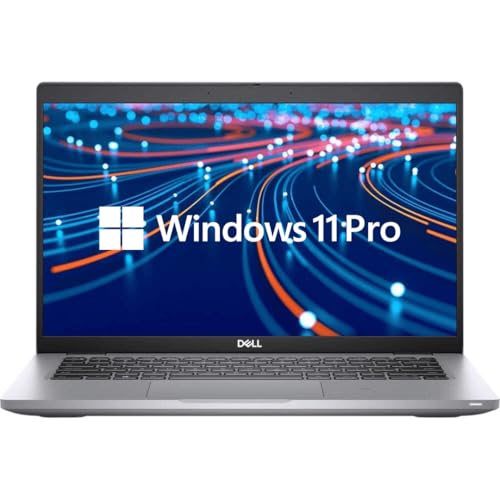
The Dell Latitude 5420 with the Core i5 has that very appealing value profile where the spec sheet looks sensible instead of excessive. The 11th-gen Core i5, 16GB of RAM, and 512GB SSD create the kind of foundation most office users actually need. You get quick startup, smooth app switching, and enough storage headroom that you are not immediately thinking about external drives or cloud cleanup. For a lot of buyers, that is the money zone right there, because it covers the practical stuff without pushing too far into premium territory.
It also benefits from the Latitude 5420 chassis itself, which is a comfortable 14-inch business form factor with a Full HD IPS display. That makes it a better all-day machine than the older low-resolution options, especially if you spend hours staring at spreadsheets or text-heavy documents. Add in business-friendly ports and Windows 11 Pro, and it becomes a great match for office workers, home entrepreneurs, and students who need a dependable machine for the long haul. It is the kind of laptop that disappears into the workday, which is really the compliment these machines deserve.
Pros
- Excellent balance of price, performance, and storage for everyday business use.
- 16GB RAM and 512GB SSD are generous at this level.
- Full HD IPS display is easier on the eyes than basic HD panels.
- Good for multitasking, video calls, and document-heavy work.
- Windows 11 Pro adds the business features many buyers want from day one.
Cons
- The Core i5 is solid, but it does not feel as punchy as the i7 options above it.
- It lacks the extra polish and security extras found on the higher-end 7430.
- Condition and battery quality can still vary with refurbishing, as always.
This is the one I would point budget-conscious professionals toward if they still want a laptop that feels properly equipped. It is stronger than entry-level options, yet it avoids paying for features many people will rarely notice. If you want a dependable refurbished business laptop that balances common sense and comfort, this one lands in a very attractive spot.
To buy this product, click here.
6. Best Budget: Dell Latitude 5410

The Latitude 5410 is one of those steady, no-nonsense machines that makes sense the second you think about everyday office work. Its 10th-gen Core i5-10310U is older than the chips in the 5420 and 5430, but it still handles email, documents, browser tabs, video calls, and light multitasking without drama. The 16GB of RAM helps a lot here, because it keeps the machine from feeling pinched, even if the 256GB SSD is more modest than what the larger-budget options offer. For a lot of shoppers, that tradeoff is exactly right.
It also has a practical feel that business buyers tend to appreciate. The 14-inch FHD panel is much easier to live with than the older HD screens, and the port selection is a pleasant surprise for a more affordable refurb. Thunderbolt 3, HDMI, Mini DisplayPort, and a microSD reader give it real-world flexibility that can save you from carrying a bag full of adapters. I like this pick for people who work mostly at a desk but still want something light enough to move around the house or toss in a backpack. It is budget-friendly without feeling stripped down.
Pros
- Affordable entry into the refurbished business laptop category.
- 16GB RAM makes the older CPU feel much more capable than you would expect.
- Full HD screen is a welcome upgrade over low-resolution budget panels.
- Excellent port selection for an older business laptop.
- Lightweight enough for commuting and daily carry.
Cons
- 10th-gen performance is fine, but clearly behind newer Latitude models.
- 256GB SSD may feel tight if you keep lots of local files or media.
- It lacks the premium finish and longer platform runway of newer models.
If you need a real business laptop on a tighter budget, this is one of the strongest places to land. It is especially good for office basics, school work, remote admin tasks, and light travel. Buyers who expect heavy multitasking or want a longer-term platform should step up to a newer Latitude, but for many people, the 5410 gets the job done without wasting money.
To buy this product, click here.
7. Best HP Alternative: HP EliteBook 845 G8

The HP EliteBook 845 G8 brings a slightly different flavor to the roundup, and that is a good thing. Its Ryzen 5 5650U processor has a reputation for efficient, dependable everyday performance, and that matters when you want a laptop that stays composed through long work sessions. The 8GB of RAM is the one spec that keeps it from climbing higher in the rankings, but for lighter business work, meetings, and document handling, it still delivers a clean, responsive experience. The 14-inch FHD anti-glare screen is also a nice touch, especially if you work under office lights or near windows.
There is a nice practical feel here too. The EliteBook line has long been a favorite among business users because it tends to hit a comfortable middle ground between portability and durability, and this refurb keeps that spirit alive. It is especially appealing for people who want to step away from the Dell-heavy field and try something with a different keyboard feel and layout. I would lean toward this for light office users, students, or home professionals who value comfort and general efficiency over brute-force specs.
Pros
- Ryzen 5 platform offers solid day-to-day efficiency.
- Anti-glare FHD display is easier on the eyes for longer sessions.
- Reasonable weight makes it a practical carry-around laptop.
- Good port selection for an office machine.
- HP EliteBook design language is comfortable and business-friendly.
Cons
- 8GB RAM is weaker than the 16GB baseline found on many rivals here.
- 256GB storage may feel limited for users with larger file libraries.
- It is a better fit for light to moderate use than demanding multitasking.
Choose this if you want an HP business laptop that feels capable and polished without chasing the most powerful specs in the lineup. If you run lots of apps at once, I would look at the Dell 5420 or 5430 instead. But if your work life is mostly office apps, web tools, and calls, this is a comfortable, sensible alternative that gets its job done with a bit of quiet confidence.
To buy this product, click here.
8. Best Keyboard Feel: Lenovo ThinkPad T14

The ThinkPad T14 is here for the people who still care about typing feel, and honestly, that crowd has a point. Lenovo has long made keyboards that feel purposeful, and the T14 keeps that reputation alive in a refurbished package that suits business work beautifully. The 10th-gen Core i5-10310U and 16GB of RAM are good enough for the standard office grind, and the 256GB SSD keeps boot times brisk. It is not the most powerful machine in the group, but it is a comfortable one, which can matter more after a long afternoon of writing, chatting, and spreadsheet work.
The ThinkPad identity also shows up in the port selection. USB-C, Thunderbolt 3, HDMI, microSD, Ethernet, and a dock connector make it easy to plug into a proper desk setup without the usual dongle circus. The HD display is the main compromise, and that is worth saying plainly. It is usable, but it does not have the crispness of the Full HD options above it. Still, if keyboard quality, port variety, and reliable business styling are your top concerns, this model has a very loyal following for good reason.
Pros
- Excellent keyboard feel for long typing sessions.
- Strong port variety helps with docking and older accessories.
- 16GB RAM keeps the system reasonably smooth for business multitasking.
- ThinkPad build style is familiar and trusted by many professionals.
- Good choice for users who spend more time writing than watching video.
Cons
- HD display is a step down from the sharper FHD screens in many rivals.
- Older processor limits how future-proof it feels.
- Storage is modest for users who keep large local files.
This is the choice for buyers who live in documents, emails, and long writing sessions and want their laptop to feel pleasant under the fingers. If screen sharpness matters more than keyboard comfort, there are better picks in this roundup. But if you want that classic ThinkPad feel and a dependable business layout, this one still has plenty of charm.
To buy this product, click here.
9. Best Entry-Level: Dell Latitude 5400

The Latitude 5400 is the kind of entry-level refurb that can save the day for a buyer who simply needs a dependable Windows business machine and does not want to overspend. Its 8th-gen Core i5-8265U is older, yes, but still capable enough for web work, office apps, and daily admin tasks. The 16GB of RAM helps it feel smoother than many older laptops with similar processors, and the 256GB SSD keeps the basics moving at a reasonable pace. For lighter workloads, this is absolutely workable.
The tradeoff is the display. The 14-inch HD panel is functional, but it is the least impressive screen in the lineup, and that matters if you spend long hours staring at text or side-by-side windows. The upside is that the machine remains practical, durable, and easy to connect thanks to HDMI, USB 3.1, and the memory card reader. This is the sort of laptop I would recommend for basic office duty, a backup work machine, or a student who wants a low-cost business-class chassis and can live with the screen compromise. It gets the job done without a lot of drama, which can be enough.
Pros
- Lowest-friction entry point for buyers on a tighter budget.
- 16GB RAM helps keep older hardware usable for everyday tasks.
- Business-class build should hold up better than most bargain consumer laptops.
- Good selection of basic ports for work and peripherals.
- Easy to recommend as a backup or secondary machine.
Cons
- HD display is the weakest screen in this roundup.
- Older processor is fine for basics, but it will not feel modern.
- 256GB storage is limited for anyone with large files or heavy app use.
Buy this only if value is the priority and your workload stays fairly light. It is the most bare-bones option here, but it still has enough business credibility to deserve a look. If you can stretch to the 5410 or 5420, that will usually buy you a better screen and a newer platform. Still, for simple tasks and backup use, this remains a practical choice.
To buy this product, click here.
How To Choose The Right Refurbished Business Laptop
Start With The Display, Not The Chip Label
A fast processor feels nice, but you stare at the screen for hours. A 14-inch Full HD panel usually gives the best balance for business work, while HD screens can feel cramped and fuzzy once you have a few windows open. If you read a lot, compare documents side by side, or spend time in spreadsheets, screen quality matters more than many first-time buyers expect.
Match The RAM To Your Real Work
For most buyers, 16GB is the sweet spot. It keeps browser-heavy work, video calls, office apps, and cloud tools moving without the annoying slowdowns that creep in with smaller memory. Eight gigabytes can still work for lighter use, but it becomes easier to hit a wall when tabs pile up. If you keep dozens of apps open at once, treat 16GB as the baseline, not the luxury pick.
Pick Storage Based On How Much You Keep Local
A 256GB SSD is fine if your files live mostly in the cloud and you do not keep lots of media on the machine. A 512GB drive is more forgiving and helps the laptop feel less cramped over time. Many buyers underestimate how fast office files, downloads, photos, and cached app data start to nibble at space, so it helps to think beyond the first week of use.
Think About Portability And Weight
If the laptop will move from desk to couch to coffee shop to office bag, lighter models are worth a closer look. Around 3 pounds is a very comfortable range for a business laptop, especially if you carry a charger, notebook, and other gear too. Bulkier models can still be fine for a mostly desk-based life, but daily carry changes the equation fast.
Check The Ports Before You Buy
Business laptops live or die by compatibility. Thunderbolt, USB-C, HDMI, Ethernet, and card readers can save you from a tangle of dongles and extra purchases. If you already use a dock, an external monitor, or wired networking, a laptop with the right ports is worth more than a slightly faster chip. Buying the wrong port mix is one of the most frustrating mistakes people make.
Know Which Refurbished Grade You Are Comfortable With
Certified refurbished listings can offer a little extra peace of mind because they usually include clearer testing and warranty language. Standard renewed models can still be excellent, but seller quality matters more. If this is your main work machine, a stronger refurb process can be worth the extra money. If it is a backup or casual laptop, a more value-focused listing may be plenty.
Buy For Your Workload, Not The Loudest Spec Sheet
A buyer who lives in documents and email does not need the strongest chip in the lineup. A buyer who runs lots of tabs, meetings, and data tools every day probably does. That sounds obvious, but it is where a lot of refurb purchases go sideways. The best deal is the one that fits your routine without overspending on power you will barely notice.
Best Refurbished Business Laptops FAQ
What Specs Matter Most In A Refurbished Business Laptop?
For most buyers, the big three are the processor, RAM, and storage. A newer Intel Core i5 or i7, 16GB of RAM, and an SSD usually create a smooth work experience. After that, screen quality and port selection become the next most useful details because they affect comfort and compatibility every day.
Is 16GB Of RAM Necessary?
It is not mandatory for every single buyer, but it is the safest choice for modern business use. If you keep several browser tabs open, use cloud tools, join video calls, and switch between apps often, 16GB helps the laptop stay responsive. Eight gigabytes can work for light duties, yet it leaves less breathing room.
Should I Choose A Touchscreen Model?
Touchscreen models are handy if you present often, review content on the move, or simply like tapping and scrolling directly on the screen. They are less important if you work mostly with a keyboard and mouse. Touch also adds cost, so it makes sense to pay for it only if you know you will use it.
How Risky Is Buying A Refurbished Laptop?
The risk depends a lot on the seller and refurbishing standard. Certified refurbished listings usually feel safer because they are more likely to include testing, cleaning, and some kind of warranty coverage. Even then, battery wear and cosmetic condition can vary, so reading the listing carefully matters.
Is A 512GB SSD Better Than 256GB For Work?
Yes, if you store files locally or keep lots of apps installed. A 256GB SSD can be enough for cloud-based work, but it can fill up faster than people expect. A 512GB drive gives you more breathing room and makes the laptop feel less cramped over time.
Are Older 10th- And 8th-Gen Business Laptops Still Worth It?
They can be, especially if the price is right and your workload is simple. Older Latitudes and ThinkPads often have sturdy builds, good ports, and solid keyboards. They are less attractive if you want a laptop that feels current for several years, but as budget tools or backup machines, they can still make sense.
What Is The Biggest Mistake Buyers Make?
The most common mistake is focusing on processor names while ignoring the display and battery condition. A faster chip does not help much if the screen is uncomfortable or the battery is tired. The second big mistake is buying a machine with too little storage, then having to manage space constantly.
Final Verdict
For most shoppers, the Dell Latitude 5430 is the best refurbished business laptop in this group because it balances modern performance, strong portability, and sensible storage without drifting into unnecessary excess. It feels like the most complete all-rounder for remote work, office days, and travel, which is exactly what many buyers want from a refurbished machine. If you want something a little more premium, the Dell Latitude 7430 is the flagship pick, while the Dell Latitude 5420 Core i5 is the value play that still feels properly equipped for serious daily use.
The real lesson here is to match the laptop to your work rhythm. If you need a better screen and stronger multitasking, lean toward the newer Latitude models with 16GB of RAM and a 512GB SSD. If you are trying to keep costs down, the Latitude 5410 and 5400 still have enough business-class backbone to serve well for lighter tasks. The best refurbished buy is not the flashiest one. It is the one that makes your day smoother, stays out of the way, and fits your budget without making you regret the screen, the ports, or the storage three weeks later.