Best Refurbished Routers: 9 Top Picks in 2026
Refurbished routers have a very specific kind of appeal. They let shoppers get into faster WiFi, stronger coverage, and better security without paying full new-in-box money, which matters a lot if your old router is coughing, dropping calls, or turning movie night into a buffering circus. The catch is that a cheap router can become a miserable one fast if it is underpowered, poorly covered, or missing the ports and standards your home actually needs. That is why buyers hunting for best refurbished routers usually care about a mix of speed, reliability, firmware support, and how well the router fits their internet plan and household size.
The biggest mistake people make is chasing the biggest speed number on the box and ignoring the real stuff, like whether the router is only dual-band, whether it has a 2.5G port for faster internet tiers, or whether it can handle a crowded house full of TVs, consoles, laptops, and phones. Another common slip is buying a model that is great on paper but awkward in practice, especially if setup is clunky or coverage falls apart behind a few walls. Different buyers want different things. One person wants the cheapest workable upgrade for a small apartment. Another wants a serious WiFi 7 platform for a busy home office and gaming setup. And some just want a solid refurb that feels like a smart little win. The top overall pick here nails the balance best.
If you are short on time, the comparison table below gives a quick way to size up the strongest options and jump straight to the one that fits your setup.
Best Refurbished Routers Comparison Table
| Product | Best For | Main Strength | Key Specs |
|---|---|---|---|
| NETGEAR RS300 Nighthawk RS300 | Best overall performance | Tri-band WiFi 7 speed with strong coverage | Up to 9.3 Gbps, up to 2,500 sq. ft., 2.5G port |
| TP-Link Archer AX10 | Best budget pick | Low-cost WiFi 6 upgrade | AX1500, beamforming, OFDMA, parental controls |
| TP-Link Archer AX21 V5 | Best value | Reliable AX1800 performance | Dual-band WiFi 6, EasyMesh, VPN server |
| TP-Link Archer BE400 | Best for future-proofing | WiFi 7 with 2.5G connectivity | BE6500, 90 devices, USB 3.0, HomeShield |
| NETGEAR RS140 | Best for gaming and fast plans | Fast WiFi 7 in a smaller footprint | Up to 5.0 Gbps, up to 2,250 sq. ft., 80 devices |
| TP-Link Archer AX55 | Best midrange WiFi 6 | Balanced speed, cooling, and security | AX3000, USB 3.0, EasyMesh, HomeShield |
| TP-Link Archer BE230 | Best compact WiFi 7 upgrade | Strong ports and flexible expandability | BE3600, 2×2.5G ports, EasyMesh, USB 3.0 |
| NETGEAR MK73 Nighthawk Mesh System | Best mesh coverage | Whole-home WiFi from a 3-pack | AX3000 mesh, 1 router + 2 satellites, certified refurbished |
| TP-Link Archer AXE75 | Best premium 6E pick | Tri-band WiFi 6E with 6 GHz support | AXE5400, OneMesh, 160 MHz, WPA3 |
For a closer look at how these routers differ in daily use, the reviews below spell out the tradeoffs, the wins, and the places where each one makes the most sense.
1. Best Overall: NETGEAR RS300 Nighthawk RS300

This one stands out immediately because it feels like the kind of refurbished router that can grow up with a home instead of tapping out the moment the internet bill gets upgraded. The tri-band WiFi 7 setup, the 9.3 Gbps rating, and the 2.5G port give it a serious edge for households that stream, game, video chat, and move giant files all at once. If you have ever watched a 4K stream hiccup while someone else joins a call from the kitchen and a console starts downloading an update, this is the sort of router that tries to flatten that chaos into something calmer.
Coverage is another strong point. The smaller footprint helps it fit more cleanly on a shelf or desk, and the stated 2,500 sq. ft. range is generous for a single-router setup. NETGEAR’s built-in security features and automatic firmware updates are also a real comfort, especially for buyers who do not want to babysit router settings every weekend. It is still a router only, so the modem question stays on your side of the fence, but for people with cable or fiber gear already sorted, this refurb has the feel of a premium upgrade without the usual first-price sting.
Pros
- WiFi 7 performance is strong enough for busy homes and heavier internet plans.
- Tri-band design helps reduce congestion when many devices are active.
- 2.5G internet support is a nice fit for faster cable or fiber service.
- Built-in security features and automatic updates add peace of mind.
- Coverage claims are solid for medium to larger spaces.
Cons
- Router only, so it still needs a separate modem.
- Refurbished units are best for buyers who are comfortable with that tradeoff.
- Overkill for very small homes with modest internet plans.
If your home leans heavily on streaming, remote work, and gaming at the same time, this is the refurb that makes the most sense near the top of the list. It feels especially good for buyers who want one clean box to do a big job, and who value security features as much as raw speed. If you have a smaller apartment or only basic browsing needs, there are cheaper picks below that do the job with less flash. To buy this product, click here.
2. Best Budget: TP-Link Archer AX10
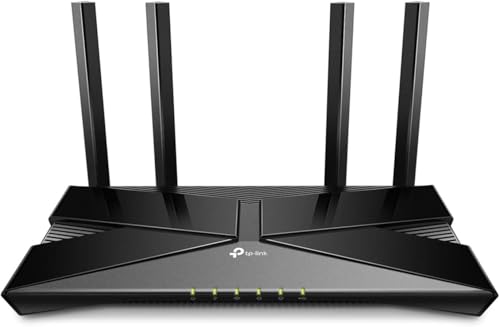
The Archer AX10 earns its spot because it lands in that sweet little zone where the price feels almost suspiciously friendly, yet the feature list still looks grown-up enough for everyday life. For an apartment, dorm, starter home, or backup router, this is the kind of refurb that gets you off the WiFi 5 hamster wheel without making your wallet groan. The AX1500 class is not built to dominate a mansion, but for smaller spaces it can feel snappy, steady, and refreshingly uncomplicated.
What helps most here is the practical mix of WiFi 6 features: OFDMA, MU-MIMO, beamforming, and a tri-core processor that keeps things moving without too much drama. That matters on nights when a couple of laptops are open, the TV is streaming, and someone decides to hop into a game. It is also easy to live with, which is half the battle with budget networking gear. The refurbished angle makes the value even sharper, though buyers who need long-range coverage or multi-gig speeds should keep looking up the ladder.
Pros
- Very affordable entry into WiFi 6.
- Simple setup through the TP-Link Tether app.
- Beamforming and OFDMA help with device handling and coverage.
- Works with older devices, so it is friendly to mixed households.
- Good fit for small homes and basic internet plans.
Cons
- Not the strongest choice for large homes or heavy multi-user demand.
- No WiFi 7 or 6E features.
- Speed ceiling is modest compared with more expensive options.
This is the refurb I would point to for buyers who want the cheapest sensible upgrade, not the flashiest one. It is especially appealing if you are replacing a tired old router in a small place and simply want steadier streaming and fewer random slowdowns. If your home traffic is light, it should feel like a nice little reset rather than a compromise. To buy this product, click here.
3. Best Value: TP-Link Archer AX21 V5

The Archer AX21 V5 has that quietly confident vibe of a router that does a lot of things well without trying to be the star of the show. It is one of the most balanced refurb-friendly options here because it gives you WiFi 6, AX1800 throughput, strong device handling, and better-than-basic coverage without climbing into premium territory. If your house is full of phones, tablets, laptops, and a smart TV that seems to be online every five minutes, this model handles that sort of everyday traffic with less fuss than a bare-bones router.
There is real utility in the details. The four high-gain antennas and beamforming help push signal where it needs to go, and the VPN server support is a nice bonus for more privacy-minded users or people who work from home. The CISA Secure-by-Design angle adds credibility on the security front too. It is not the fastest router in the lineup, and it will not wow anybody chasing cutting-edge WiFi 7 features, but for the money this refurb offers one of the strongest blend of performance and practicality. That is exactly why it sits in the value slot.
Pros
- Strong all-around WiFi 6 performance for the money.
- Good fit for mixed device homes and casual streaming.
- VPN server support adds flexibility.
- EasyMesh support helps if you want to expand later.
- Security-focused design and firmware support are reassuring.
Cons
- Dual-band only, so it lacks a dedicated 6 GHz lane.
- Not the fastest option for demanding gaming households.
- Coverage is good, but not class-leading.
This is the pick for shoppers who want the least regret per dollar. It is the sort of router that feels smarter the longer you use it, because it solves the annoying parts of home WiFi without turning into a hobby. If you want a refurb that feels reliable, easy to manage, and well matched to most homes, the AX21 is a very easy recommendation. To buy this product, click here.
4. Best For Future-Proofing: TP-Link Archer BE400

The Archer BE400 feels like the point where refurbished WiFi starts looking genuinely forward-looking instead of merely economical. This is a WiFi 7 router with dual 2.5G ports, a fast 6-stream design, and enough bandwidth headroom to make modern homes feel less crowded. If your current setup starts panting the minute a couple of people stream in 4K and someone else uploads a video call recording, this router is built to smooth out those little domestic pileups.
It also has a nice practical bend. Up to 90 devices, USB 3.0, EasyMesh support, HomeShield security, and VPN client/server support all make it more than a speed headline. I like that it feels like a router for real households, not just benchmark charts. A family with school tablets, work laptops, smart plugs, streaming boxes, and a couple of gamers will get a lot out of the flexibility. The downside is that WiFi 7 only really shines when your devices can take advantage of it, so buyers with older gear may not see the full sparkle right away. Still, this is one of the smartest refurbished stepping stones into the next generation.
Pros
- WiFi 7 brings modern speed and better efficiency.
- Dual 2.5G ports are excellent for faster internet plans.
- Good device capacity for busy homes.
- HomeShield and VPN support add real feature depth.
- EasyMesh support makes future expansion easier.
Cons
- Best benefits show up with newer WiFi 7-capable devices.
- More expensive than WiFi 6 refurb choices.
- Dual-band layout may not suit the most demanding power users.
Buyers who want to keep the router for years rather than a couple of seasons should look closely here. It is especially attractive if you are on or moving toward faster internet service and want the wired ports to keep pace too. If your goal is a router that feels current now and still has breathing room later, this one hits that brief well. To buy this product, click here.
5. Best For Gaming: NETGEAR Nighthawk RS140

The RS140 is the kind of router that makes a gaming setup feel a little less temperamental. Its WiFi 7 speed ceiling is lower than the RS300 above, but it still packs a punch with a 2.5G port, a compact body, and coverage that should suit a good-sized home without taking over the room like a small spaceship. If your evenings involve online matches, big downloads, and a couple of 4K streams running in the background, this refurb has enough muscle to keep the network from getting twitchy.
One thing I like is the smaller footprint. That matters more than people admit. A router that looks tidy often gets placed in a better spot, and placement affects performance in the real world. The RS140 also keeps the setup straightforward, which is a relief for buyers who do not want to spend half a Saturday inside app menus. The big caution is that this is router only, not a modem, and it is best understood as a WiFi-first upgrade rather than a cable-box replacement. For gamers who want newer wireless tech without going all the way to the highest tier, it lands nicely.
Pros
- WiFi 7 speed and latency benefits suit gaming well.
- 2.5G port supports faster internet plans.
- Compact design is easier to place neatly.
- Strong coverage for medium to larger homes.
- Good balance of modern features and simpler hardware.
Cons
- Not as fast or as feature-rich as the top NETGEAR pick.
- Requires a separate modem.
- Still more router than casual users really need.
Pick this one if you want a gaming-friendly refurb that does not feel bloated or overbuilt. It is a good match for homes where speed matters, but the network still needs to stay easy to live with. If your setup leans toward fast action and clean wireless performance, this is one of the more convincing refurbished options on the page. To buy this product, click here.
6. Best Midrange: TP-Link Archer AX55

The Archer AX55 hits a very useful middle lane. It is fast enough to feel like a serious upgrade, but it does not wander into the price and complexity zone that scares off everyday buyers. AX3000 class WiFi 6 gives you plenty of headroom for streaming, downloads, and video calls, and the four high-gain antennas help it push signal through the usual home obstacles like hallways, drywall, and that one annoying corner where WiFi always seems to fade.
What makes this refurb especially appealing is the polish. The improved cooling design is a quiet but meaningful detail because routers get hot in real homes, especially when they sit near other electronics or run all day. HomeShield, EasyMesh compatibility, USB 3.0, and VPN client/server support round things out nicely. If someone in the family works from home while another person is gaming upstairs and a third is streaming something loud in the living room, this router has enough bandwidth and network handling to keep the peace. It is a balanced pick, which in networking is often a compliment with real teeth.
Pros
- Strong WiFi 6 performance for a broad range of households.
- Good cooling and stable operation over long sessions.
- EasyMesh support makes future expansion easier.
- VPN support and HomeShield add useful extras.
- Very good fit for families and work-from-home setups.
Cons
- Does not deliver WiFi 7 or 6E speed tiers.
- Not the cheapest refurb on the list.
- Best for medium homes, not very large ones.
This is the kind of router I would recommend to someone who wants a dependable daily driver instead of a flashy headline machine. It is well suited to buyers who care about stability, smooth streaming, and a setup that feels mature rather than fussy. If you want a refurb that fits a lot of households without making anyone feel shortchanged, the AX55 is a strong bet. To buy this product, click here.
7. Best Premium: TP-Link Archer BE230

The Archer BE230 feels premium in the ways that matter most to real people. It brings WiFi 7, dual 2.5G ports, a quad-core processor, USB 3.0, and a feature set that looks ready for a house with lots of moving parts. If your internet use has grown from “a few devices and some streaming” into “work, school, gaming, smart home gadgets, and cloud backups all day,” this is the sort of refurb that can take the pressure. The speed and capacity are there, but so is the sense that the router has room to breathe.
I also like the balance of modern convenience and practical control. EasyMesh support means expansion is straightforward, while HomeShield, private IoT networking, and VPN support give it enough security and flexibility to appeal to privacy-conscious buyers. One realistic scenario: a family member is on a video meeting, another is watching sports in 4K, and a game download starts in the background. On a weaker router, that can feel like a traffic jam. On the BE230, it should feel much smoother. It is not cheap, and many homes will be fine with less, but for shoppers who want a refurb that leans high-end, this one is compelling.
Pros
- WiFi 7 support brings strong future-ready performance.
- Dual 2.5G ports are excellent for modern internet setups.
- Great feature mix for power users and smart homes.
- EasyMesh support makes whole-home expansion practical.
- Solid security and VPN tools add extra value.
Cons
- Costs more than most WiFi 6 refurb options.
- Dual-band design may leave power users wanting a tri-band model.
- May be more router than smaller homes need.
Buy this if you want refurbished gear that still feels upscale. It suits buyers with faster internet, lots of devices, or a long upgrade horizon. If you like the idea of buying once and being done with router shopping for a while, this one makes a strong case. To buy this product, click here.
8. Best Mesh: NETGEAR MK73 Nighthawk Mesh System

The MK73 is for the buyer who knows the real problem is not speed alone, it is dead zones. This refurbished 3-pack mesh system changes the conversation from “How fast is the router?” to “Can the whole house finally get a decent signal?” That is a huge shift if your WiFi always seems fine in the living room and awful upstairs, or if your backyard connection has been held together by hope and random luck. With one router and two satellites, this system is built for broad, even coverage.
Mesh systems can feel a little less exciting on a spec sheet than a flashy WiFi 7 router, but in actual use they can be the more satisfying buy. The MK73 gives you that whole-home blanket effect without needing to string cables through walls or play the ancient game of “move the router two feet and see what happens.” It is still a certified refurbished unit, so buyers should be comfortable with the refurb model, but for coverage-first shoppers it solves a very specific, very common headache. If your home has awkward corners, long hallways, or multiple floors, this one deserves serious attention.
Pros
- Three-piece mesh setup is excellent for whole-home coverage.
- Better choice than a single router for tricky layouts.
- AX3000-class WiFi 6 offers good everyday performance.
- Certified refurbished value can be strong for mesh buyers.
- Good fit for larger homes or coverage problem areas.
Cons
- Less cutting-edge than WiFi 7 or 6E options.
- Mesh systems take more space than a single router.
- Can be more than small apartments really need.
Choose this if dead spots are your main enemy. That is the simple truth. If you have a large house, a weird layout, or a family that keeps moving from room to room with devices in hand, mesh coverage often feels better than chasing raw speed numbers. For the right home, this refurb is a very practical win. To buy this product, click here.
9. Best Premium 6E Pick: TP-Link Archer AXE75

The Archer AXE75 has a very polished feel for a refurbished router. It brings tri-band WiFi 6E, including the 6 GHz band, which can feel like a breath of fresh air in homes where the normal 2.4 GHz and 5 GHz lanes are packed tight. That extra lane matters most for modern phones, laptops, and gaming devices that can use it, especially if your household is a noisy digital place with multiple streams, backups, and calls happening at once. The 160 MHz support, quad-core processor, and generous memory also give it a sturdier backbone than many cheaper refurb options.
What makes this one premium is not only the speed, but the sense of breathing room. A living room TV streaming a movie, a laptop hopping on a meeting, and a console chasing a game patch can all feel a little less like they are elbowing each other. OneMesh support and HomeShield also help it stay useful as your network grows or your security needs become more serious. The tradeoff is price, of course. It is still refurbished, but it sits at the upper end of this roundup and will be best appreciated by users who can actually use the 6E lane. If that sounds like your setup, it is a sharp choice.
Pros
- Tri-band WiFi 6E adds the cleaner 6 GHz band.
- Strong for gaming, streaming, and busy homes.
- Good processing and memory for long-term stability.
- OneMesh support helps with expansion.
- Security features are solid for a premium refurb.
Cons
- Costs more than many WiFi 6 refurb alternatives.
- 6 GHz benefits depend on compatible devices.
- May be more router than casual users need.
Buy this if you want a premium-feeling refurb and your devices can actually use the cleaner 6E spectrum. It is one of the best options for buyers who want strong performance now and a little future cushion too. For a household that pushes hard on streaming and gaming, it earns its premium slot well. To buy this product, click here.
Best Refurbished Routers FAQ
What Makes A Refurbished Router Worth Buying?
A refurbished router is worth buying when it offers a meaningful upgrade in speed, coverage, or features over your current gear. The best ones come from trusted brands, include modern standards like WiFi 6, WiFi 6E, or WiFi 7, and still support firmware updates. If the refurb saves real money and the model suits your home size and internet plan, the value can be excellent.
Should I Buy WiFi 6, WiFi 6E, Or WiFi 7 Refurbished?
For most homes, WiFi 6 is still a very smart buy. It is mature, stable, and usually the best bargain. WiFi 6E makes sense if you want the extra 6 GHz band for less congestion and have devices that support it. WiFi 7 is the premium route for buyers who want top-end performance and better long-term headroom, especially on faster plans or busier networks.
How Do I Know Whether A Router Is Strong Enough For My Home?
Start with your home size, wall layout, and device count. A small apartment with light use does not need the same router as a two-story home with dozens of devices. Look at coverage claims as a rough guide, then think about how many people stream, game, work from home, or use smart devices at the same time. If dead zones are already a problem, a mesh system may be the smarter move.
Do Refurbished Routers Still Get Security Updates?
Often they do, especially from major brands like NETGEAR and TP-Link, but the exact support window depends on the model. That is why automatic firmware updates and current security features matter so much. Before buying, it helps to choose a router that is still actively supported rather than one that has fallen too far behind.
Can A Refurbished Router Handle Gaming?
Yes, and several of the models above are excellent for gaming. Look for low-latency features, stronger processors, good coverage, and faster bands that can handle traffic spikes. WiFi 7 and tri-band designs are especially attractive for gaming homes, but a strong WiFi 6 router can still perform very well if the rest of your setup is reasonable.
Is A Mesh System Better Than A Single Router?
If your home has dead spots, thick walls, or multiple floors, mesh often wins because it spreads coverage more evenly. If your space is smaller and your main concern is raw speed or value, a single strong router may be enough. Mesh is usually about consistency, while a single router is often about simplicity and cost.
Do I Need A Router With 2.5G Ports?
Only if your internet plan or local network can actually use that extra speed. A 2.5G port becomes useful with faster fiber or cable plans, or if you move large files between wired devices. If your service tops out below gigabit and your devices are mostly wireless, you may not notice much benefit yet.
What Should I Avoid In A Refurbished Router?
Avoid models that are too old for current standards, unsupported on security updates, or mismatched to your home size. Also be wary of paying too much for features you will never use. A flashy speed rating means little if the router cannot cover your rooms or handle the number of devices on your network.
Final Verdict
The NETGEAR RS300 Nighthawk RS300 is the standout all-around choice in this roundup because it brings together WiFi 7 speed, strong coverage, modern security, and useful wired connectivity in a way that feels genuinely future-ready. It is the refurb I would point to first for buyers who want one router to handle a serious household without constant second-guessing. If you want to spend less, the TP-Link Archer AX10 is the smartest budget doorway into refurbished networking, while the TP-Link Archer AX21 V5 gives you one of the cleanest value plays on the list. Those three cover very different needs, which is exactly how a good router roundup should behave.
The right choice really comes down to your space, your device count, and how hard your home pushes the network on a normal day. If you are chasing the cleanest coverage, the NETGEAR MK73 mesh system is the obvious shape-shifter. If you want a premium future-proof refurb, the TP-Link Archer BE550 and TP-Link Archer AXE75 bring serious firepower. The smart move is to buy for your actual life, not the most dramatic spec line. Match the router to your internet plan, the size of your home, and the number of people fighting for bandwidth, and the upgrade will feel far more satisfying than a box full of marketing noise.