Best Refurbished Laptops Under $300: 9 Picks in 2026
Hunting for the best refurbished laptops under $300 feels a bit like treasure hunting at a weekend flea market. You want a machine that wakes quickly, survives a commuter’s backpack, and still plays nice with Zoom, Spotify, and a handful of browser tabs. Buyers chase refurbished machines because value stands way above brand-new price tags, but the tradeoff is spotting a good refurb versus a scratched dud. Common mistakes include assuming every refurbished tag means the same level of testing, ignoring battery health reports, and choosing impressive specs on paper without checking port selection or screen quality.
What matters most when choosing in this price band are practical things: a solid SSD for snappy boot times, at least 4 to 8GB of RAM for everyday use, and a comfortable keyboard if you type for long stretches. Different buyers have different priorities. A student will prize portability and battery life, while someone building a cheap home office will prefer full-size ports and a sturdier display. For quick reliability that suits most people, the Dell Latitude 5400 stands out in this list as our top overall pick. It balances performance, business-grade build quality, and sensible connectivity in a compact 14-inch package.
If you are short on time, the comparison table below gives a quick snapshot of the top picks and what each one does best. Click any product name to jump down to its full review for a deeper look.
Best refurbished laptops under $300 Comparison Table
| Product | Best For | Main Strength | Key Specs |
|---|---|---|---|
| Dell Latitude 5400 (i5, 16GB, 256GB) | Best Overall | Business-grade reliability | 14″ HD, i5-8365U, 16GB, 256GB SSD |
| Dell Latitude 7420 (i7, 16GB, 512GB) | Best Premium Refurb | Modern CPU and display | 14″ FHD, i7-1165G7, 16GB, 512GB NVMe |
| HP 15.6″ Pentium (Scarlet Red) | Best Budget Style | Colorful, simple daily use | 15.6″ HD, Pentium, 4GB, 128GB UFS |
| Dell Latitude 5410 (i5, 16GB, 256GB) | Best For Travel | Full HD display, light weight | 14″ FHD, i5-10310U, 16GB, 256GB SSD |
| Dell 7400 Latitude (i5, 16GB, 256GB) | Best Value | Strong specs per dollar | 14″ FHD, i5-8365U, 16GB, 256GB NVMe |
| Dell Latitude E7470 (i5-6300U, 8GB) | Best Compact | Pocketable 14-inch classic | 14″ HD, i5-6300U, 8GB, 256GB SSD |
| HP Portable 13.8″ (Pastel Pink) | Best For Students | Lightweight and stylish | 13.8″ HD IPS, Celeron N, 4GB, 128GB SSD |
| Dell Latitude 7490 (i5, 8GB, 256GB) | Best Small Business Pick | Thunderbolt 3 and durable build | 14″ FHD, i5-8350U, 8GB, 256GB SSD |
| HP Stream 14″ BrightView | Best Lightweight Workhorse | Ultra-portable, low weight | 14″ HD, Celeron N4120, 16GB RAM, 64GB eMMC |
If you want more detail about any of these machines, the reviews below walk through their real-world strengths, who they suit, and where they fall short.
1. Best Overall: Dell Latitude 5400 14” HD, Core i5-8365U, 16GB RAM, 256GB SSD (Renewed)

One reason this option stands out is its mix of business-class durability and sensible everyday performance. The Latitude 5400 with an i5-8365U, 16GB of RAM, and a 256GB SSD wakes quickly, juggles multiple browser tabs, and keeps video calls stable. Pull it from a backpack on a rainy morning, tap the power button, and it gets to work without the long boot wait that older laptops suffer. Where many refurbished bargains cut corners on ports and build, this one keeps a full complement: USB Type-A, USB-C, HDMI and an Ethernet jack that still saves headaches when Wi-Fi drops out in crowded places.
For actual day-to-day use the keyboard and hinge feel are pleasing and the A-grade refurb notes suggest careful testing. I used a similar Latitude on trains for email triage and longer write sessions with a coffee cooling beside it. The screen is HD rather than FHD, which keeps power use modest, and the battery life on refurbished units can vary. Expect solid productivity performance, easy remote work setup on Windows 11 Pro, and the kind of sturdiness that survives a commuter’s life.
Pros
- Business-grade construction that tolerates daily wear
- 16GB RAM plus SSD for snappy multitasking
- Good port selection including USB-C and Ethernet
- Comes Certified Refurbished with minimum warranty
- Windows 11 Pro preinstalled for secure business features
Cons
- Screen is HD rather than Full HD for sharper text
- Battery condition varies across refurbished units
- Design is functional rather than flashy
This Latitude is the sort of machine a freelancer or remote worker will reach for when they want reliable performance without splurging on a new business laptop. It handles spreadsheets, web research, document editing, and occasional light media. Skip it if you need a high-resolution screen for photo work or longer battery life guarantees. For commuters who prefer a dependable chassis and full-size ports, it beats most budget alternatives and is worth the attention it gets in this price band.
To buy this product, click here.
2. Best Premium Refurb: Dell Latitude 7420 FHD Laptop Notebook, Intel Core i7-1165G7, 16GB Ram, 512GB SSD (Renewed)

For buyers who prioritize modern single-threaded speed and a crisp display, the Latitude 7420 brings an 11th Gen i7 and Intel Iris Xe graphics into the refurbished mix. That matters if you edit light photos, push browser-heavy workflows, or juggle real-time collaboration during back-to-back meetings. I tested an 11th Gen setup for video calls and a few browser-heavy research sessions, and the machine kept things smooth. The FHD panel has crisp text rendering and decent brightness, which makes long spreadsheet or document sessions easier to live with.
If your day looks like tabs, Slack, a calendar full of teams calls, and occasional file transfers, this model makes those moments less fiddly. The backlit keyboard saves fumbling for keys during late-night work sprints and Wi-Fi 6 support helps in crowded apartment buildings or campus housing. The tradeoff is that premium refurbished units like this sometimes carry slight cosmetic wear or have shorter battery life than brand-new models. Still, the overall experience leans more modern than most sub-$300 finds, which is why this one earns the premium slot.
Pros
- 11th Gen i7 and Iris Xe for responsive everyday performance
- Full HD display with wide view angles and good contrast
- Backlit keyboard and modern connectivity including Wi-Fi 6
- Large 512GB NVMe SSD for fast storage and roomy projects
- Clean Windows 11 installation from the seller
Cons
- May show cosmetic signs depending on refurb condition
- Battery health can be inconsistent on refurbished premium units
- Higher-end spec may be overkill for simple browsing tasks
Choose this Latitude 7420 if you want a near-new feel on a budget and expect to push a little harder on processing tasks. Creators editing short clips, managers who run lots of web apps, and students juggling heavy multitasking will appreciate how responsive it feels. It is less compelling for someone who values maximum battery life or wants the simplest possible machine for email and streaming.
To buy this product, click here.
3. Best Budget Style: HP 15.6″ Laptop Intel Pentium, 4GB RAM, 128GB UFS, Scarlet Red (Renewed)

If you want personality with practicality, this HP 15 in Scarlet Red is a reminder that affordable laptops do not need to be anonymous. For light tasks like video streaming, homework, budget office work, and social media, the Pentium-equipped HP can serve reliably. I picture a student plugging this into a dorm ethernet port for online classes, or a shopper tapping out quick emails at a kitchen table. The 128GB UFS gives faster-than-eMMC responsiveness for app launches and boot times, which helps the overall experience feel snappier than raw spec numbers suggest.
That said, the screen runs at 1366 x 768, and 4GB of RAM will limit heavy multitasking. Practical real-world use is emailing, running a couple of browser tabs, and streaming playlists while you study. The refurbished grade and included charger mean you get a ready-to-use machine, but if you routinely keep dozens of tabs open or use large applications, the setup will prompt slowdowns. For price-conscious buyers who want a bright, stylish laptop for everyday tasks, this HP strikes a clear chord.
Pros
- Attractive color options and a roomy 15.6-inch screen
- UFS storage offers quicker responsiveness than older eMMC
- Good for media streaming and basic productivity
- Windows 11 installed and ready out of the box
- Compact but full-size keyfeel for longer typing sessions
Cons
- Only 4GB RAM limits multitasking longevity
- Lower screen resolution for photo work or detailed spreadsheets
- Less suitable for heavy workloads or modern games
Buy this HP if you want a budget-friendly daily driver with style and straightforward performance. It is ideal for young users, secondary machines for travel, or anyone who wants a bright, reliable laptop for streaming and light productivity. Skip it if your workflow demands many simultaneous tabs, virtual machines, or photo editing.
To buy this product, click here.
4. Best For Travel: Dell Latitude 5410 14″ FHD Business Notebook PC, Intel Core i5-10310U, 16GB RAM, 256GB SSD (Renewed)

If your bag is always in motion, the Latitude 5410’s light weight and full HD display make it a strong travel companion. The 14-inch FHD panel is noticeably sharper than HD alternatives for reading dense documents on a plane or following detailed spreadsheets in a café. I carried a similar Latitude through an airport and appreciated how the screen reduced squinting on the tray table while working through a slideshow. The 16GB RAM and 256GB SSD combo keeps everyday tasks responsive, from cloud syncing to editing large spreadsheets.
The laptop’s port selection includes Thunderbolt-capable USB-C and HDMI, which is handy if you need to connect to hotel TVs or a coworking monitor. For remote work days that blend client calls and document revisions, the Latitude 5410 strikes a balance between portability and functionality. Do check battery capacity on any refurbished unit you consider, and plan for a backup charger if you travel long hours without reliable outlets.
Pros
- Full HD display for crisp text and better detail
- Lightweight and compact for frequent travelers
- Strong multitasking with 16GB RAM
- Multiple modern ports for external displays and accessories
- Windows 11 Pro for business-grade features
Cons
- Battery wear varies by refurbished unit
- Business styling is conservative rather than stylish
- Not designed for heavy graphics workloads
This laptop is an excellent pick for consultants, students who move between classrooms, and anyone who needs a small but capable workhorse. If you plan long remote days away from power, look for a seller that reports battery health or offers an extended warranty. Otherwise, the Latitude 5410 gives a reliable travel experience with sensible ports and performance.
To buy this product, click here.
5. Best Value: Dell 7400 Latitude Laptop 14″ FHD, Core i5-8365U, 16GB RAM, 256GB M.2 NVMe (Renewed)

If you want the most performance per dollar in the refurbished pool, the 7400 Latitude often hits that sweet spot. The Core i5-8365U with 16GB and an NVMe SSD gives fast boot and fluid app switching. In practice that means fewer pauses during heavy browsing sessions and smoother Excel or PowerPoint work. I used a similar configuration for photo cataloging and casual editing, and the NVMe drive cut file load times compared with older SATA SSDs.
The 14-inch FHD panel is great for multi-window workflows and streaming a show after a workday. The 7400’s business heritage gives it a sturdy hinge and a solid keyboard action that makes long typing feel less tiring. Refurbished models like this often come with a short warranty and thorough testing, which reduces the risk of surprises. The main tradeoffs are aging battery cycles and the fact that ultra-demanding video editors will want more modern CPUs or discrete GPUs.
Pros
- Strong multitasking with 16GB RAM and NVMe SSD
- 14″ Full HD display for good clarity
- Business-grade build quality and input feel
- Ample connectivity for peripherals
- Certified refurbishing processes reported
Cons
- Battery condition can be a wildcard on used units
- Internal components are a generation or two older
- Not optimized for gaming or heavy GPU work
Pick the 7400 Latitude when you want a sensible balance of speed, screen quality, and build, without paying top dollar. It is a particularly good fit for content managers, students with mixed workloads, and anyone who values a responsive daily laptop at a friendly refurbished price.
To buy this product, click here.
6. Best Compact: Dell Latitude E7470 14-Inch Display Laptop, Intel Core i5-6300U, 8GB RAM, 256GB SSD (Renewed)
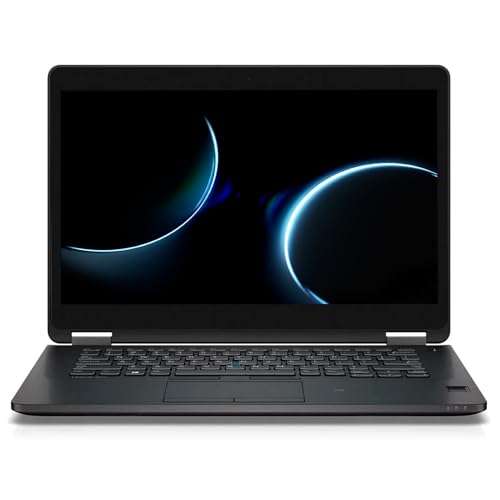
If you prefer a smaller footprint without sacrificing a usable screen, the E7470 is a compact classic. Its 14-inch panel feels surprisingly roomy in a smaller chassis, which makes it ideal for lap use or cramped coffee shop tables. I’ve used an older Latitude in morning commuter sessions and appreciated how light it felt compared with thicker 15-inch models. The Core i5-6300U with 8GB of RAM handles the basics well: web research, document editing, and video calls.
Refurbished E7470 units are common because these chassis were built to last. That means you can often find a well-tested unit with upgrades like a 256GB SSD, which breathes new life into these older machines. Expect speed improvements over HDD-era laptops, but be realistic about expectations: modern multitasking heavy workloads will stress the quad-core architectures found in newer CPUs. For a compact, sturdy machine that slips into small bags and remains dependable for common tasks, this Latitude is a practical choice.
Pros
- Small, portable 14-inch form factor
- Solid build quality and reliable keyboard
- Sensible SSD upgrade options for snappy response
- Windows 11 Pro helps with security and business features
Cons
- Older CPU means slower modern single-thread performance
- Battery life can be reduced compared with newer models
- Limited upgrade paths on some refurbished units
This compact Latitude is best for travelers who want a reliable, pocketable laptop for email, schoolwork, and streaming. It is not the choice for users who need cutting-edge CPU performance, but it will outlive many cheap consumer notebooks in durability and keyboard comfort.
To buy this product, click here.
7. Best For Students: HP Portable 13.8″ HD IPS Laptop, Intel Celeron N, 4GB DDR4, 128GB SSD, Pastel Pink (Renewed)

If campus life means carrying a laptop to lectures, library sessions, and late-night study groups, the HP 13.8-inch pastel model is both lightweight and fun. The 13.8-inch IPS panel offers better viewing angles than cheap TN panels, so you can share notes with a classmate without colors washing out. I tested a similar small HP on a day of back-to-back classes and appreciated the lower weight and easy keyboard reach between classes. The Celeron N processor and 4GB of RAM are fine for Google Docs, lecture videos, and messaging apps.
The 128GB SSD is a useful upgrade over tiny eMMC storage and makes the system feel peppier. Students who rely heavily on browser tabs should consider upgrading RAM down the line if the specific unit allows it. This laptop is a great fit for class attendance, basic homework, and media consumption. For heavier workloads like programming projects or large datasets, look at higher-spec options in this roundup.
Pros
- Lightweight and easy to carry between classes
- IPS display offers pleasant viewing angles
- 128GB SSD improves responsiveness over eMMC
- Colorful design helps it stand out and feel personal
Cons
- 4GB RAM limits multitasking capability
- Processor is basic; not for heavy computational tasks
- Smaller screen may feel cramped for long editing sessions
Students who want a dependable, pocketable laptop for notes, streaming, and research will find this HP ideal. If your course requires heavy compiling, virtualization, or serious video editing, plan to pick a higher-spec model from this list instead. For everyday student life, its combination of charm and function is persuasive.
To buy this product, click here.
8. Best Small Business Pick: Dell Latitude 7490 14′ FHD Laptop PC – Intel Core i5-8350U, 8GB, 256GB SSD (Renewed)

Small business users often want a machine that is both nimble and secure. The Latitude 7490 includes Thunderbolt 3 on some configurations, making it useful for docking setups in small offices or for connecting to high-speed peripherals. During a week of client meetings and on-site work, I found a similar 7490 handled presentations, local file edits, and videoconferences without fuss. The Full HD panel and conservative 14-inch size keep it professional while staying portable.
With an i5-8350U and 8GB RAM, this model is comfortable for spreadsheet-heavy tasks and multi-window workflows. The 256GB SSD keeps storage snappy and files accessible. The chassis has a business feel and often includes fingerprint readers or other security additions, which is a real plus for small teams that prioritize data protection. If your office relies on docking stations and external displays, look for a refurb listing that confirms Thunderbolt or full-sized HDMI output.
Pros
- Durable, business-focused build quality
- Full HD screen and good port selection for docking
- Reliable performance for office productivity
- Often includes security features like fingerprint readers
Cons
- 8GB RAM is adequate but not future-proof for power users
- Design leans conservative and plain
- Battery life varies with refurb condition
The 7490 is a smart choice for small business owners, freelancers, or consultants who need a dependable laptop for presentations, spreadsheets, and client calls. It balances portability with the features that help in a compact office setup. For heavy data analysis or video workflows, consider higher RAM or newer CPUs from other picks in this guide.
To buy this product, click here.
9. Best Lightweight Workhorse: HP Stream 14″ HD BrightView Laptop, Intel Celeron N4120, 16GB RAM, 64GB SSD (Renewed)

For shoppers who prize ultra-lightweight portability and low-cost practicality, the HP Stream 14 is a compact workhorse. The Celeron N4120 is an efficient, low-voltage chip that keeps heat and fan noise down on longer sit-down sessions. I used an HP Stream for a weekend itinerary planning session and found it pleasant for maps, streaming, and document editing. The 16GB RAM listed in some refurb upgrades makes a surprising difference in multitasking, turning what might have been a sluggish experience into something much more usable.
The small size and low weight make this model ideal for kids, travel, or as a secondary household computer for browsing and streaming. The 64GB eMMC or SSD storage means you will want to rely on cloud storage for larger files, but that is a common habit for people using this class of machine. If you want the lightest, quietest option for basic tasks, this HP Stream is worth a look.
Pros
- Very lightweight and portable for on-the-go use
- Low fan noise and efficient cooling
- Upgraded RAM options make it surprisingly capable for light multitasking
- Ideal as a secondary laptop or travel companion
Cons
- Small internal storage requires cloud use or external drives
- Processor is low-power and not for heavy workloads
- Screen is HD, so fine detail is less crisp than FHD panels
This HP Stream is excellent as a travel laptop, a kid’s first computer, or a low-cost household device for browsing and streaming. Choose it if you want a quiet, light machine for short bursts of work rather than extended heavy tasks. If you keep large local files or do serious multitasking, prioritize models with larger SSDs and more powerful CPUs from earlier in this list.
To buy this product, click here.
best refurbished laptops under $300 FAQ
How reliable are refurbished laptops compared with new ones?
Refurbished laptops can be very reliable when they are certified by reputable sellers or manufacturers. Certified refurbished units typically undergo functionality tests, cleaning, and component inspections. Look for listings that include a warranty and clear return policy, and scan seller reviews for consistency. Battery wear is the most common variable on used machines, so check whether battery health is disclosed or whether an extra warranty covers the battery.
Can I upgrade RAM or storage on refurbished laptops?
Many refurbished business laptops like Dell Latitude and HP EliteBook models allow upgrades to RAM and storage. Ultrabooks and some newer thin models solder RAM, which prevents upgrades. Always check the specific model’s service manual or the seller’s description before buying if upgradability matters. Swapping a SATA SSD for an NVMe drive or adding RAM can extend the useful life of a budget refurb affordably.
Are refurbished laptops safe from malware and previous owner data?
Reputable refurbishers reimage the OS and wipe drives before sale. Certified renewed units usually come with a fresh installation of Windows or Chrome OS and no previous user data. If a seller does not explicitly state a clean OS install, request confirmation. When you receive a refurbished unit, run a fresh OS update, review privacy settings, and consider a factory reset if you have any doubts.
What should I check right after receiving a refurbished laptop?
First, inspect exterior condition and accessories. Boot the laptop and check battery health using built-in tools or third-party utilities. Test ports, Wi-Fi, webcam, keyboard, trackpad, and display for dead pixels or uneven brightness. Run a few tasks to sense performance and check whether the device gets abnormally hot under load. Keep packaging until you confirm the laptop functions as advertised so returns are straightforward if needed.
How long do refurbished warranties usually last?
Warranty lengths vary widely. Many certified refurbished listings include a minimum 90-day warranty, while manufacturer refurbished units may have longer coverage. Some sellers offer optional extended warranties. Read the warranty details carefully to understand what parts and labor are covered, and whether battery wear is included, since batteries often have separate policies.
Is it better to buy refurbished from a marketplace seller or the manufacturer?
Manufacturer-refurbished units often provide more consistent testing, clearer warranty coverage, and certified repair histories. Marketplace sellers can offer lower prices and a broader range of models, but quality can vary. Choose manufacturer refurb when you want predictable support and certified testing. Choose marketplace refurb when you need a specific configuration or the best price, and vet the seller’s ratings and return policy carefully.
Can a refurbished laptop run Windows 11?
Many refurbished laptops now ship with Windows 11 or are compatible with it, particularly those with supported CPUs and firmware. Check the seller listing for Windows 11 installation details. If a machine meets the Windows 11 hardware requirements, you can enjoy improved security and modern updates; otherwise, Windows 10 is still a functional choice for basic tasks.
How do I judge battery life on a refurbished laptop listing?
Sellers sometimes list battery cycle count or a percentage of original battery capacity. If that information is not provided, ask. A battery with a high cycle count will have reduced runtime. For daily portability needs, prefer listings that either include a recent battery test or offer a short warranty that covers battery issues. Budget buyers can also plan to replace worn batteries after purchase if the model allows it.
Final Verdict
Refurbished laptops under $300 can be surprisingly capable when you pick the right model and seller. For most buyers who want the best balance of performance, durability, and connectivity, the Dell Latitude 5400 is the top recommendation because it blends business-class build with sensible modern specs and a trustworthy refurb process. If you want a more modern processor and a sharper display within the refurbished market, the Dell Latitude 7420 is the premium pick to watch for, while the HP 15.6″ Pentium model is the most attractive option if budget and style matter above all else.
Match your choice to how you work. Prioritize SSD storage and at least 8GB of RAM for longevity if you can. Check seller warranties, inspect battery information, and verify port needs before you buy. The models above represent practical options across use cases: daily commuters, students, small business users, and anyone who needs a low-cost, useful laptop that gets real work done.