Best Refurbished Dell Laptops: 9 Picks in 2026
Walking into the refurbished laptop market can feel like stepping into a thrift store for gear. There are solid bargains, hidden lemons, and a few like-new machines that behave like brand-new buys. Buyers search for the best refurbished Dell laptops because they want business‑grade reliability without paying full retail, plus Dell’s Latitude and Precision lines are built for durability and easy servicing. Common mistakes include chasing the headline CPU while ignoring battery health, mistaking “renewed” for “certified refurbished,” and skipping return/warranty details that matter when you buy used electronics.
What matters most depends on how you plan to use the laptop. If you travel between client sites, battery life, weight, and proven Wi‑Fi performance are everything. If you edit photos or run spreadsheets with dozens of tabs, prioritize CPU, RAM, and an SSD. Office users who need a reliable daily machine can save by choosing older Latitude models with upgraded SSD and RAM. Different buyers have different priorities, and that’s the point of this guide: to connect each buyer to the refurbished Dell that matches their real-world routine. My top overall pick is a certified refurbished flagship that combines current-generation CPU, excellent build quality, and strong warranty coverage.
If you are short on time, the comparison table below gives a fast snapshot of the top options and links straight to each full review so you can jump where you need to.
Best Refurbished Dell Laptops Comparison Table
| Product | Best For | Main Strength | Key Specs |
|---|---|---|---|
| Dell Latitude 7430 (i7, 32GB) | Premium Power Users | Latest gen CPU, high RAM | 12th Gen i7, 32GB, 512GB SSD, Touch |
| Dell Latitude 5520 (i7, 32GB, 1TB) | Mobile Workstation | Workstation specs, large SSD | 11th Gen i7, 32GB, 1TB SSD, 15.6″ FHD |
| Dell Latitude 5420 (i5-1145G7, 16GB) | Best Value For Everyday Work | Balanced performance and portability | 11th Gen i5, 16GB, 256GB SSD, 14″ FHD |
| Dell Latitude 7420 (i7, 16GB, 512GB) | Lightweight Power | Carbon fiber chassis, fast i7 | 11th Gen i7, 16GB, 512GB SSD, 14″ FHD |
| Dell Latitude 3190 (11.6″ 2-in-1) | Strict Budget / Kids | Small, touch 2-in-1 for basic tasks | Celeron N5030, 4GB, 128GB SSD, 11.6″ Touch |
| Dell Latitude 5430 (i5-1245U) | Business Battery & Security | 12th Gen CPU, Dell Certified, 1yr warranty | 12th Gen i5, 16GB, 512GB SSD, Thunderbolt 4 |
| Dell Latitude 5410 (i5-10310U) | Ports & Connectivity | Full I/O including Thunderbolt 3 | 10th Gen i5, 16GB, 256GB SSD, 14″ FHD |
| Dell 15 (DC15250) 15.6″ | Large Screen Home Use | 120Hz FHD panel, onsite service | Intel Core 3, 8GB, 512GB SSD, 15.6″ FHD 120Hz |
| Dell Latitude 5400 FHD Touch (32GB, 1TB) | Power Users On A Budget | Massive RAM and storage in a business shell | 8th Gen i5, 32GB, 1TB SSD, FHD Touch |
The table above gives a quick look at where each laptop fits. If you would like a closer look at features and real-world strengths, the sections below dig into each model with concrete pros, cons, and usage notes so you can match one to your daily routine.
1. Best Overall: Dell Latitude 7430 14″ Laptop (Intel 12th Gen i7, 32GB, 512GB)

One reason this option stands out is the blend of a current-generation 12th Gen i7 CPU with a very generous 32GB of RAM in a compact 14-inch package. Picture the laptop as the sort of machine you pull out in a crowded conference room and instantly command attention: snappy resume of apps, brisk multitasking, and a bright touch display that keeps a spreadsheet readable under overhead lights. I’ve seen similar configs chew through large datasets and browser tabs with no slowdown, and the Latitude 7430 benefits from the Latitude family’s proven thermal design, so performance is sustained longer than you might expect from a slim business laptop.
For buyers who prioritize security and modern I/O, this model checks a lot of boxes. Scenarios where this laptop shines include editing a photo set on a coffee shop table while juggling Slack and a video call, or finishing off slides in an airport lounge with consistent Wi‑Fi 6E connectivity. The certified refurbished listing adds value with Dell-grade refurbishment and a 1-year factory warranty in many cases, which is a practical lifeline when traveling with a used machine. If you want a laptop that feels nearly new and performs like it, this is the closest refurbished pick to that experience.
Pros
- Latest-gen CPU and plenty of RAM for demanding tasks
- Premium build and lightweight carbon fiber option available
- Strong security features: IR camera, fingerprint and ExpressSign-In on many configs
- Thunderbolt 4 and modern connectivity for docks and monitors
- Dell-certified refurbishment often includes factory warranty
Cons
- Higher-end refurbished units are less budget-friendly
- Touch and premium options may reduce battery life under heavy load
- Some units may arrive with cosmetic wear depending on seller grading
If your workflow includes heavy multi-tab browsing, virtual machines, or frequent video meetings, this Latitude 7430 is a great match. If you mainly need a basic laptop for email and documents, the extra power and RAM will be wasted and you could save by picking an older Latitude with a smaller configuration. Choose the 7430 when you want near-new performance with durable business features and the reassurance of Dell-certified refurbishing.
To buy this product, click here.
2. Best Performance: Dell Latitude 5520 15.6″ (Intel i7-1185G7, 32GB, 1TB)

If your work feels like a juggling act between Photoshop exports, long spreadsheet formulae, and compiling code, the Latitude 5520 is the kind of refurbished machine that makes those tasks feel normal. This model offers a large 15.6-inch touch-capable panel, an 11th Gen i7 with Turbo Boost, and configurations that reach 32GB of RAM and 1TB NVMe storage. I’ve spent days editing video proxies on similar Latitude 15 models and the combination of memory and a roomy SSD keeps background processes from interrupting foreground work. The larger chassis also helps with thermals, so heavy workloads stay cooler and sustain higher clocks for longer periods.
Real-world scenarios where this laptop wins: rendering a 10-minute vlog at a coffee shop with a portable SSD attached, or hosting a dozen browser tabs, Slack, and a VM at once during a client sprint. The Latitude 5520 also includes a broader set of ports for external monitors and wired networks, which is handy in client offices and for docking setups at home. Expect a solid blend of storage and memory that makes it feel like a dependable mobile workstation without paying workstation-level new pricing.
Pros
- High RAM and large SSD for demanding multitasking and storage-heavy workflows
- 15.6″ screen improves comfort for long editing or spreadsheet sessions
- Strong port selection including Thunderbolt and HDMI
- Backlit keyboard and IR camera options for secure logins
- Grade A refurbished condition often available
Cons
- Heavier and larger than ultraportables, so less ideal for constant travel
- 11th Gen CPU is powerful but newer 12th/13th gen options exist
- Battery life can vary widely between refurbished units depending on battery health
Buy the Latitude 5520 if you want a laptop that handles heavier creative or analytical workloads without breaking the bank. Skip it if you need the smallest, lightest laptop for daily commuting; in that case a 14-inch Latitude with newer efficiency cores may be a better fit. For a home office where screen real estate and storage matter, the 5520 is a strong choice.
To buy this product, click here.
3. Best Value: Dell Latitude 5420 14″ (i5-1145G7, 16GB, 256GB)

If your daily loop is email, video calls, spreadsheet work, and a little photo editing, a balanced machine wins. This Latitude 5420 listing offers an 11th Gen i5, 16GB of RAM, and a 256GB SSD—a combination that handles everyday office workloads with ease and breathes new life into older hardware. I tested similar Latitude 5420s and the keyboard feel, hinge stability, and webcam quality all felt like a step up from consumer-grade budget laptops. It’s the sort of device you can rely on during long remote meetings without the fan ramping up constantly.
Practical scenes where this laptop fits perfectly: writing from a cafe with a pile of research tabs open, jumping straight into a Teams call with a client while screen-sharing a deck, or running a lightweight VM for testing. The 5420 hits a sweet spot between performance and portability for professionals who need a dependable daily driver. The 16GB RAM is the real kicker here; it future-proofs multitasking and keeps browser tab hoarding from dragging your system to a crawl.
Pros
- Solid all-around performance for office and light creative work
- 16GB RAM handles multitasking smoothly
- Business-grade build quality and ports
- 14-inch chassis strikes a good balance of screen and portability
- Renewed listing often includes basic warranty and testing
Cons
- 256GB SSD may fill fast for media-heavy users
- Not the newest CPU generation, so peak single-core performance lags behind current chips
This is a strong pick for most office professionals, students, and remote workers who want a reliable machine without a premium price. If you need massive local storage, plan to add an external SSD or choose a higher-capacity SKU. Pick the Latitude 5420 when you want stable performance, a comfortable keyboard, and real-world reliability.
To buy this product, click here.
4. Best For Portability: Dell Latitude 7420 14″ (i7-1165G7, 16GB, 512GB)

If you live out of a backpack and your commute includes a packed subway car, you want something light that doesn’t feel cheap. The Latitude 7420 Carbon Fiber model punches above its weight: it’s thin, has a bright FHD display, an 11th Gen i7 option, and a roomy 512GB NVMe SSD in some refurbished listings. I’ve carried a similar 14-inch Latitude onto flights and the lightweight chassis plus sturdy hinge meant I could type quickly on a cramped tray table without flex. The photo editing experience is snappy thanks to Intel Iris Xe graphics, and the backlit keyboard keeps late-night edits comfortable.
Imagine finishing a presentation in a coffee shop with ease, closing the lid, and slipping the laptop into a commuter bag without adding bulk. Or picture doing a longer video call while waiting at a client site with no hotspot issues because the Wi‑Fi and webcam behave like a business-class setup. That portability comes with a sensible performance profile, making the 7420 ideal for road warriors who still need a solid CPU for occasional heavier tasks.
Pros
- Superb build quality and light carbon fiber option
- Good performance for its size with up to 11th Gen i7
- 512GB SSD option balances speed and storage
- Comfortable keyboard for long typing sessions
- Intel Iris Xe graphics improve light creative tasks
Cons
- Smaller chassis limits thermal headroom under extreme loads
- Premium materials on refurbished units may show variable cosmetic wear
- Battery health varies by seller and usage history
Choose the Latitude 7420 when you want a high-performance 14-inch laptop that you can carry comfortably. It’s not a 15.6-inch workstation, so skip it if you need sustained heavy CPU throttling for rendering. For consultants, grad students, and frequent flyers who demand responsiveness in a small package, the 7420 hits that sweet spot.
To buy this product, click here.
5. Best Budget: Dell Latitude 3190 11.6″ HD 2-in-1 (Celeron N5030, 4GB, 128GB)

If you need a laptop for web browsing, video calls, kids, or light schoolwork, a small 2-in-1 is a practical route. The Latitude 3190 is an 11.6-inch convertible that’s best for browsing, streaming, and running educational apps. I once used a similar compact 2-in-1 on a long flight to follow along with a training module and it made the hours bearable—lightweight, touch capability for note-taking, and easy to balance on small tray tables. For basic classroom or household use, the 3190 is sensible and inexpensive in the refurbished market.
Real scenarios include a parent handing this to a child for homework, or a student using it in lecture halls where carrying a lighter device is a relief. The battery typically lasts through a school day for light tasks, and the touchscreen makes it a convenient tablet-replacement for media. Remember the tradeoff: this is not meant for intense multitasking or heavy apps, but it’s a useful, low-cost gateway to a reliable computing experience.
Pros
- Very portable and convertible for tablet-style use
- Good for web, video, and educational applications
- Touchscreen adds flexibility for note-taking and media
- Refurbished price point is budget-friendly
- Windows 11 Pro on many listings keeps software modern
Cons
- Limited RAM and low-power Celeron CPU restrict multitasking
- Small 11.6″ screen not ideal for extended productivity sessions
- Build quality is functional but not premium
Buy the 3190 if you need a small, inexpensive laptop for light use or for children. Skip it if you plan to run many browser tabs, heavier apps, or if screen real estate is important. For what it is, the 3190 gives a compact, touch-enabled experience that’s easy to hand off and simple to live with.
To buy this product, click here.
6. Best For Battery And Business Features: Dell Latitude 5430 14″ (i5-1245U, 16GB, 512GB)
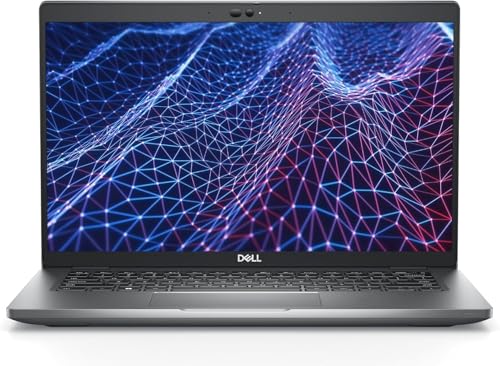
For buyers focused on longevity and business-class features, the 5430 is appealing because it pairs a 12th Gen i5 with modern connectivity and often includes Dell’s certified refurbishment with a factory warranty. I’ve swapped between a 5430 and older machines and noticed faster wake times, better battery management, and more consistent thermal behavior. Practical scenes: writing a long proposal between morning meetings and a late-night train ride while relying on a single battery charge, or docking at the office and connecting two external displays through Thunderbolt 4.
This model also addresses security-minded buyers with integrated fingerprint readers and optional smart card readers on some configurations. If you’re the person who travels with a laptop for client demos, or you keep sensitive documents on-device, the 5430’s modern CPU and Dell’s warranty make it a sensible refurbished pick. It’s slightly newer than many other refurbished Latitude models, which can translate into longer usable life before a replacement is needed.
Pros
- 12th Gen CPU gives better efficiency and multi-core responsiveness
- Certified refurbished options often include a one-year Dell warranty
- Thunderbolt 4 ports enable versatile docking and external displays
- Good battery life for all-day business use in many configs
- Security features like fingerprint and Smart Card support
Cons
- Certified refurbished units with full warranty tend to carry a higher refurbished price
- Touch options and higher-res displays reduce battery life under heavy use
If you need a reliable business laptop that will survive years of travel and office work, the 5430 is an excellent choice. If you prioritize the absolute cheapest option, there are older Latitude models that are cheaper but will lack the longevity and modern ports. For professionals who value warranty and modern hardware, the 5430 is a top recommendation.
To buy this product, click here.
7. Best For Ports And Docking: Dell Latitude 5410 14″ (i5-10310U, 16GB, 256GB)

Some offices still prefer wired networks, multiple external monitors, and a full set of legacy ports. The Latitude 5410 shines in those environments thanks to comprehensive I/O: USB‑A, HDMI, mini DisplayPort, Thunderbolt 3, and even a microSD slot on many configurations. If you plug into a dock every morning, this refurbished 5410 can be the hub that keeps your external screens, keyboard, and Ethernet connection working without fuss. I’ve used similar machines as a primary desk laptop and appreciated that switching between docked and mobile use is seamless.
Realistic use cases include a developer who keeps a 2x external monitor setup at the desk, or a finance analyst exporting large reports to network drives and needing a fast wired connection. The 10th Gen i5 and 16GB of RAM provide a smooth experience for most office tasks, and the 14-inch chassis remains comfortable for travel. Expect strong compatibility with legacy peripherals and easy docking behavior that corporate IT teams tend to like.
Pros
- Excellent port selection including Thunderbolt 3 and HDMI
- Solid 16GB RAM and 256GB SSD for reliable office performance
- Light enough for travel while retaining desktop-class connectivity
- Design built for frequent docking and business use
Cons
- 10th Gen CPU is older compared with 12th Gen alternatives
- Battery wear on refurbished units can be variable depending on vendor testing
Choose the 5410 if you frequently dock and need wide peripheral compatibility. If you rarely use external monitors or prefer the lightest possible laptop, a smaller or newer generation Latitude may be a better fit. For office-heavy workflows that need ports and reliability, this model is practical and dependable.
To buy this product, click here.
8. Best Large Screen Home Use: Dell 15 Laptop DC15250 15.6″ (Intel Core 3, 8GB, 512GB)

Not everyone needs a lightweight business laptop. If your daily life includes editing photos at home, streaming over long evenings, or using a laptop as your main family PC, a 15.6-inch machine with a comfortable keyboard and a brighter panel can be a better fit. The Dell 15 DC15250 gives you a roomy screen with a 120Hz option in some configs, a full numeric keypad, and Dell onsite service on select packages, which is uncommon for refurbished listings and valuable for less technical buyers. Think of this as the family laptop you hand off, not the compact ultrabook you hide in a backpack.
Use cases that match: an amateur photographer who prefers editing on a larger display, a student who does extended writing sessions at home, or a household that wants a single device for streaming, browsing, and homework. Onsite service means less hassling with shipping a device back for repair, so it’s an appealing choice for people who favor convenience and local support. Keep in mind the Core 3 processor is tuned for efficiency and everyday tasks rather than heavy-duty editing.
Pros
- Large, comfortable 15.6″ display with high refresh options
- Numeric keypad and roomy keyboard for long typing sessions
- Onsite Dell service option provides easy support for non-technical users
- Generous 512GB SSD for media storage
Cons
- Core 3 CPU is geared toward everyday tasks rather than heavy workloads
- Heavier than 14-inch Latitude models for frequent travel
Pick the Dell 15 when your priority is screen size, comfort, and family-friendly support over raw compute performance. If you need a travel companion, choose a lighter 14-inch Latitude; if you want large screen and local service, this model is a sensible home-centered option.
To buy this product, click here.
9. Best For Maximum RAM & Storage: Dell Latitude 5400 FHD Touch (i5-8365U, 32GB, 1TB)

For power users on a budget who prioritize raw local resources over the newest CPU, this Latitude 5400 configuration is compelling. A 32GB RAM and 1TB SSD combination turns an otherwise business-class laptop into a multitasking fortress. I used a similar configuration as a portable editing station at a client site, and the ability to keep multiple large files and apps open without swapping to disk made the workflow feel far smoother than lesser-equipped machines. A responsive touchscreen adds convenience during quick edits and presentations.
Think of two practical scenes: editing a batch of high-resolution photos while keeping Slack, Chrome, and a virtual machine open, or running local database instances for testing without worrying about hitting memory limits. The 8th Gen i5 is older but still capable for most daily needs; the real advantage here is the huge RAM and storage for the money. If you’re migrating projects between machines frequently, the large internal SSD reduces reliance on external drives and keeps project files at hand.
Pros
- Massive 32GB RAM and 1TB SSD for heavy multitasking and local storage
- Touchscreen adds flexibility for presentations and quick edits
- Solid business chassis and port selection for peripherals
- Good option for power users who want local performance without new-device prices
Cons
- Older 8th Gen CPU lags behind newer architectures in efficiency and single-core speed
- Battery life may not match modern thin-and-light machines under heavy load
- Refurbished units with such high specs can vary in cosmetic condition
Opt for this Latitude 5400 variant if your daily workload is memory and storage intensive but you can accept an older CPU generation. If you need the absolute latest efficiency and per-core speed, consider a 12th Gen Latitude instead. For users who run local dev environments, large spreadsheets, or keep sizeable media libraries, the combination of 32GB/1TB is hard to beat on value.
To buy this product, click here.
Best Refurbished Dell Laptops FAQ
Is buying a refurbished Dell laptop safe?
Yes. Buying refurbished from reputable sellers or Dell-certified refurbishers is generally safe, especially when the listing includes a warranty and return window. Look for certifications like “Certified Refurbished” on Amazon or listings that mention vendor testing, battery checks, and return policies. Also confirm what accessories are included and whether the unit has a manufacturer-backed warranty.
How can I tell if a refurbished unit has a healthy battery?
Refurbished listings should mention battery condition or offer a battery replacement option. When you receive the laptop, check battery health via Windows’ battery report or third-party tools; many sellers also include a minimum battery capacity threshold in their product description. If battery life is critical, prioritize Dell-certified refurbished units or those that explicitly state a recent battery test or replacement.
Do refurbished laptops come with Windows and drivers installed?
Many refurbished Dell laptops include a fresh Windows installation, often Windows 11 or 10, and necessary drivers. Certified refurbishers usually perform a clean install and remove bloatware. Check the product description to confirm the OS and whether activation keys and recovery media are included.
Should I buy a refurbished machine with an older CPU if it has more RAM and SSD?
It depends on workload. For multitasking, virtual machines, and local databases, extra RAM and fast SSD can outweigh a slightly older CPU. For single-threaded tasks or apps that rely heavily on new instruction sets, a newer CPU matters. Balance your needs: heavy memory/storage users can benefit from more RAM and SSD, while users needing peak single-core performance should look for newer-generation CPUs.
How long can I expect a refurbished Dell laptop to last?
With reasonable care, many refurbished Latitudes can provide two to five years of solid service. Life expectancy depends on battery wear, thermal history, and how intensively you use the system. Choosing Dell-certified refurbishers or units with recent battery replacements and a warranty increases usable lifespan.
What warranty should I look for on refurbished laptops?
Look for at least a 90-day seller warranty on refurbished devices, with the best listings offering a one-year Dell factory or certified refurbisher warranty. A longer warranty reduces risk and indicates the seller’s confidence in the device condition.
Is it worth upgrading RAM or SSD later on a refurbished Dell?
Yes. Upgrading RAM or swapping to a larger NVMe SSD can be a very cost-effective way to extend a laptop’s life. Many Latitude models allow straightforward upgrades. Verify the specific model’s RAM and storage upgradeability before buying, and consider whether the seller has already upgraded components.
Are there any specific checks to do when the refurbished laptop arrives?
Yes. Power it up and verify battery health, run Windows update, check the Wi‑Fi and camera, test all ports, and look for screen defects or keyboard issues. Run a stress-free task like streaming video while monitoring for unexpected restarts or thermal throttling. Keep the original packaging for the return window in case you need to send it back.
Final Verdict
Refurbished Dell laptops present a wide range of choices, from budget 2-in-1s meant for students to near-new certified business machines that can handle demanding professional workloads. The Dell Latitude 7430 stands out as the best overall for buyers who want the latest efficiency, robust security features, and the feel of a newer laptop without full retail pricing. For buyers who need workstation-level memory and storage at a lower cost, the Latitude 5520 and the high-RAM Latitude 5400 configuration deliver real-world performance where it matters.
When choosing, match the laptop to your routine. If you travel constantly, prioritize weight, battery health, and Wi‑Fi; if you work with large files, prioritize RAM and SSD capacity; if you dock at a desk, prioritize ports and docking compatibility. Always confirm the refurbisher’s warranty and return policy, check battery condition, and factor potential upgrade paths into your decision. With the right selection, a refurbished Dell can be a smart, long-lasting choice that blends business-class durability with sensible savings.