6 Best Refurbished Laptops for Students in 2026
For students in 2026, choosing a laptop is no longer just about finding something that “works.” Coursework has become more digital, multitasking is the norm, and laptops are expected to last several years without becoming frustratingly slow or unreliable. At the same time, many students are working within tight budgets and are increasingly skeptical of brand-new, entry-level laptops that look modern on paper but often struggle in real-world use.
This is where refurbished laptops enter the conversation—not as a compromise, but as a practical alternative. Well-refurbished laptops, especially former business-class models, are designed for long-term daily use. They tend to offer better keyboards, sturdier construction, and more consistent performance than many budget new laptops in the same price range.
However, not all refurbished laptops are equally suitable for students. The refurbished market includes a wide range of devices, conditions, and configurations. Some models age gracefully and remain dependable for years, while others may introduce unnecessary trade-offs in portability, battery life, or usability.
This guide focuses on refurbished laptops that make sense specifically for students in 2026. Rather than chasing the newest designs or highest specifications, the goal here is to identify models that deliver reliable everyday performance, reasonable longevity, and a smooth day-to-day experience for academic work. Each recommendation is evaluated based on how it fits real student needs—not just how it looks on a spec sheet.
What Students Should Look for in a Refurbished Laptop
Before comparing specific models, it’s important to understand what actually matters for student use—especially when buying refurbished. The right priorities can make the difference between a laptop that quietly supports your studies and one that becomes a constant source of distraction.
Reliability Over Raw Performance
For most students, stability is far more important than peak performance. Tasks such as note-taking, research, writing papers, online classes, and light multitasking do not require cutting-edge processors or powerful graphics. What they do require is consistency.
Refurbished business-class laptops are often well-suited here. These machines were originally designed for corporate environments, where reliability and uptime matter more than flashy features. As a result, they tend to hold up better over time compared to many consumer-grade budget laptops that prioritize appearance over durability.
Keyboard Quality, Build Strength, and Port Selection
Students spend hours typing—whether it’s lecture notes, essays, or group assignments. A comfortable, responsive keyboard is not a luxury; it’s a necessity. Many refurbished business laptops still outperform newer budget models in this area, offering deeper key travel and more consistent feedback.
Build quality also matters in everyday student life. Laptops are carried between classes, placed on crowded desks, and used in libraries, cafés, and dorm rooms. A sturdier chassis and solid hinges reduce the risk of long-term wear.
Port selection is another often-overlooked factor. Refurbished laptops frequently include a wider range of ports, making it easier to connect external displays, USB devices, or wired accessories without relying on adapters.
Battery Expectations and Realistic Use
Battery life is one area where refurbished laptops require realistic expectations. While some refurbished units may include new or replacement batteries, many do not. For students, this doesn’t necessarily mean poor usability—but it does mean planning accordingly.
A refurbished laptop with moderate battery life can still work well for classes and study sessions when paired with good charging habits. Understanding this trade-off upfront helps avoid disappointment and ensures the laptop fits your daily routine.
Size, Weight, and Campus Portability
Portability matters more for students than for many other users. Carrying a laptop across campus every day makes weight and size noticeable over time. For most students, laptops in the 13- to 14-inch range strike a good balance between screen space and portability, though some may prefer larger displays for multitasking.
Refurbished laptops often come in slightly thicker or heavier designs compared to ultrabooks, but the difference is usually manageable—and often justified by improved durability and cooling.
Operating System and Compatibility
Most refurbished laptops aimed at students run Windows, which remains widely compatible with academic software and campus systems. While macOS and Linux may appeal to certain users, Windows-based refurbished laptops generally offer the most flexibility for general student use without requiring additional setup or troubleshooting.
For students who value simplicity and broad software support, this makes Windows-based refurbished laptops a safe and practical choice.
1. Dell Latitude 5400 – Best Overall Refurbished Laptop for Most Students
The Dell Latitude 5400 stands out as one of the safest all-around refurbished laptop choices for students in 2026. Originally designed for corporate environments, this model prioritizes reliability, durability, and long-term usability—qualities that translate extremely well to student life. It doesn’t rely on flashy design or cutting-edge features, but instead focuses on consistent performance and practical everyday functionality.
For students who want a laptop that “just works” without constant troubleshooting, the Latitude 5400 offers a reassuring balance between performance, build quality, and portability. [affiai asin=”B0FGG5BJMQ” count=”1″ template=”grid”]
Pros
-
Durable, business-class build designed for long-term daily use
-
Comfortable keyboard suitable for extended typing sessions
-
Practical port selection with minimal reliance on adapters
-
Consistent performance for common student workloads
Cons
-
Heavier and less sleek than modern ultrabooks
-
Display quality is functional rather than premium
-
Battery life varies noticeably across refurbished units
Real-World Student Use
In daily academic use, the Latitude 5400 handles common student workloads with ease. Tasks such as note-taking, research, essay writing, online classes, and multitasking between browser tabs and productivity apps feel smooth and stable. Video conferencing platforms, cloud-based tools, and standard academic software all run comfortably without pushing the system to its limits.
While it isn’t designed for heavy creative workloads or GPU-intensive tasks, it excels in exactly the areas most students depend on throughout a typical semester.
Build Quality and Everyday Handling
One of the Latitude 5400’s biggest strengths is its solid construction. The chassis feels sturdy, the hinges are firm, and the overall design is clearly built to withstand daily transport. This matters for students who carry their laptops between classes, libraries, and study spaces.
The keyboard is another highlight. It offers comfortable key travel and a layout well-suited for long typing sessions—an underrated advantage for students who spend hours writing papers or taking notes. Port selection is also practical, reducing the need for adapters when connecting peripherals or external displays.
Refurbished-Specific Considerations
As a refurbished device, the Latitude 5400 benefits from its business-class background. Parts availability is generally good, configurations are straightforward, and many units were used in controlled office environments rather than heavy consumer use.
Battery life will vary depending on the refurbishment process and usage history, so expectations should be realistic. However, even with moderate battery performance, the Latitude 5400 remains very usable for campus life when paired with regular charging habits.
Who This Laptop Is Best For
-
General university and college students
-
Students focused on writing, research, and online coursework
-
Those who value reliability and keyboard comfort over ultra-thin design
-
Anyone planning to keep a laptop for multiple years without frequent upgrades
Who Should Skip It
-
Students doing heavy video editing or 3D work
-
Those who prioritize ultra-lightweight designs above all else
-
Users who need dedicated graphics performance
Overall, the Dell Latitude 5400 represents one of the safest refurbished laptop choices for students who value stability over style. It may not feel modern or eye-catching, but it consistently delivers where it matters most: reliability, typing comfort, and predictable performance. For students who want a laptop that fades into the background and simply supports their academic work day after day, the Latitude 5400 remains a dependable long-term option.
To buy this product, click here.
2. Lenovo ThinkPad X1 Carbon – Best Refurbished Laptop for Portability and Typing
The Lenovo ThinkPad X1 Carbon is an excellent refurbished option for students who prioritize portability, comfort, and day-long usability. As a premium business ultrabook, the X1 Carbon was originally designed for professionals who travel frequently and type extensively—two traits that translate extremely well to student life.
Compared to more traditional business laptops, the X1 Carbon offers a noticeably lighter and slimmer form factor without sacrificing structural integrity. For students who carry their laptop across campus every day, this balance between weight and durability makes a meaningful difference. 
Pros
-
Extremely lightweight and easy to carry across campus
-
One of the best laptop keyboards available for typing-heavy tasks
-
Solid build quality despite slim design
-
Quiet and cool operation during everyday use
Cons
-
Refurbished pricing can be higher than other student options
-
Limited upgrade flexibility due to thin design
-
Smaller screen may feel restrictive for multitasking
Real-World Student Use
In everyday academic use, the ThinkPad X1 Carbon feels responsive and effortless. It handles note-taking, research, writing, presentation work, and online classes smoothly, even when juggling multiple browser tabs and productivity apps. The system remains quiet and cool during typical workloads, which is ideal for libraries and shared study spaces.
While it isn’t built for heavy creative or graphics-intensive tasks, it excels at sustained, low-friction productivity—exactly what most students rely on throughout a semester.
Build Quality and Everyday Handling
Despite its lightweight design, the X1 Carbon feels solid and well-engineered. The carbon-fiber reinforced chassis provides durability without bulk, and the hinge mechanism is firm and reliable. This combination makes it well-suited for frequent opening, closing, and transport.
The keyboard is one of the X1 Carbon’s defining strengths. Long regarded as one of the best laptop keyboards available, it offers excellent key travel, tactile feedback, and spacing. For students who spend long hours typing essays, reports, or lecture notes, this alone can significantly improve daily comfort and efficiency.
Port selection is practical for a thin laptop, supporting common peripherals without excessive reliance on adapters.
Refurbished-Specific Considerations
As a refurbished device, the ThinkPad X1 Carbon benefits from Lenovo’s strong business ecosystem. Replacement parts and compatible components are generally accessible, and many refurbished units originate from corporate lease programs, meaning they were used in relatively controlled environments.
Battery condition can vary depending on the refurbishment process, especially for thinner designs like the X1 Carbon. Students should approach battery expectations realistically, but even with moderate battery health, the laptop remains very manageable for campus use with regular charging access.
Who This Laptop Is Best For
-
Students who value light weight and portability
-
Heavy typists who prioritize keyboard comfort
-
Those who move frequently between classes, libraries, and study spaces
-
Students who want a premium feel without buying new
Who Should Skip It
-
Students on extremely tight budgets
-
Users who need larger screens for multitasking
-
Those who require dedicated graphics or high sustained performance
The ThinkPad X1 Carbon is best viewed as a premium productivity tool rather than a budget machine. Its lightweight design and exceptional keyboard make it especially appealing for students who type extensively and move constantly between classes. While refurbished pricing can be higher than other student options, the overall experience—comfort, portability, and build quality—justifies its place for those who prioritize daily usability over cost savings.
To buy this product, click here.
3. Apple MacBook Air (M1) – Best Refurbished macOS Laptop for Students
The refurbished MacBook Air with Apple’s M1 chip stands out as the most compelling macOS option for students in 2026. Unlike older Intel-based MacBooks, the M1 Air represents a clear generational shift in efficiency, responsiveness, and everyday performance—making it one of the few refurbished laptops that still feels thoroughly modern years after its release.
For students who prefer macOS, value long battery life, or want a laptop that feels fast and fluid for everyday academic tasks, the refurbished M1 MacBook Air remains a strong and relevant choice. 
Pros
-
Excellent performance efficiency for everyday student tasks
-
Long battery life compared to most refurbished laptops
-
Silent, fanless operation ideal for libraries and lectures
-
Premium build quality and high-quality display
Cons
-
Limited port selection without adapters
-
macOS may not support all institution-specific software
-
Hardware upgrades and repairs are more restrictive
Real-World Student Use
In typical student workloads, the M1 MacBook Air delivers a smooth, frictionless experience. Tasks such as note-taking, research, writing papers, managing presentations, and attending video classes feel effortless. The system handles multitasking gracefully, even with multiple applications and browser tabs open.
The M1 chip’s efficiency also means the laptop stays quiet and cool during normal use—an advantage in lecture halls, libraries, and shared study spaces. While it is not intended for intensive professional workloads, it comfortably supports the daily demands of most students.
Build Quality and Everyday Handling
The MacBook Air’s slim aluminum chassis feels solid, lightweight, and well-balanced. Its compact form makes it easy to carry across campus, and its overall fit and finish remain among the best in its class.
The keyboard is comfortable and reliable for long typing sessions, while the large trackpad offers precise and consistent control. The high-quality display further enhances the experience for reading, writing, and media consumption—especially for students who spend long hours in front of the screen.
Refurbished-Specific Considerations
When buying the MacBook Air M1 refurbished, battery health is one of the most important factors to consider. While Apple-certified refurbishments typically include strict quality checks, third-party refurbished units may vary more in battery condition.
Another consideration is software compatibility. While macOS supports a wide range of academic and productivity applications, some specialized software—particularly certain engineering or institution-specific tools—may still favor Windows. Students should confirm their program requirements before committing.
Who This Laptop Is Best For
-
Students who prefer macOS
-
Those who value long battery life and silent operation
-
Students focused on writing, research, and general productivity
-
Users who want a lightweight laptop with a premium feel
Who Should Skip It
-
Students whose coursework requires Windows-only software
-
Users who need extensive port selection without adapters
-
Those who plan to run heavy engineering or specialized applications
The refurbished MacBook Air M1 remains one of the most compelling student laptops for those committed to macOS. Its efficiency, quiet operation, and long battery life make it particularly well-suited for writing, research, and general productivity. As long as software compatibility is not a concern, the M1 Air offers a modern-feeling experience that continues to age exceptionally well in the refurbished market.
To buy this product, click here.
4. HP EliteBook 840 Series – Best Refurbished Business Laptop Alternative for Students
The HP EliteBook 840 series offers a well-balanced refurbished option for students who want business-grade reliability in a more modern, refined package. Positioned as a direct competitor to Dell Latitude and Lenovo ThinkPad models, the EliteBook line was built for professional environments where consistency, security, and daily usability matter more than cutting-edge specs.
For students, this translates into a laptop that feels dependable and polished without being overly bulky or complicated. It sits comfortably between traditional business laptops and lighter ultrabooks, making it a versatile choice for a wide range of academic needs. 
Pros
-
Balanced combination of durability, portability, and refinement
-
Sturdy aluminum chassis with a more modern feel than older business models
-
Comfortable keyboard and reliable trackpad
-
Widely available in refurbished markets
Cons
-
Not as lightweight as premium ultrabooks
-
Display quality is adequate but not class-leading
-
Design prioritizes practicality over visual flair
Real-World Student Use
In everyday student workflows, the EliteBook 840 performs smoothly and predictably. Common tasks such as writing papers, conducting research, managing presentations, attending virtual classes, and multitasking across productivity apps are handled without hesitation.
The overall experience feels balanced rather than performance-driven. The system doesn’t push aggressive speeds or flashy features, but it remains responsive during sustained daily use—an important factor for students who rely on their laptops for long study sessions rather than short bursts of activity.
Build Quality and Everyday Handling
The EliteBook 840 features a clean, professional design with a sturdy aluminum chassis that feels more refined than many entry-level laptops. It holds up well to frequent transport, daily opening and closing, and extended use in shared study environments.
The keyboard is comfortable and well-spaced, suitable for extended typing sessions, while the trackpad offers reliable, precise control. The laptop also maintains a practical selection of ports, allowing students to connect common accessories and displays without constant reliance on dongles.
Overall, it strikes a balance between durability and portability that works well for campus life.
Refurbished-Specific Considerations
As a refurbished option, the EliteBook 840 benefits from its strong presence in corporate leasing programs. Many units enter the refurbished market after structured business use, which often means predictable wear patterns and consistent hardware configurations.
Battery condition can vary, as with most refurbished laptops, but the EliteBook’s efficient design helps keep everyday use manageable even without all-day unplugged endurance. Its straightforward internal layout also makes servicing and component replacement relatively accessible compared to ultra-thin consumer models.
Who This Laptop Is Best For
-
Students who want a modern-feeling business laptop
-
Those who prefer a slightly more refined design than traditional business models
-
Students balancing portability with durability
-
Users who want dependable performance without premium pricing
Who Should Skip It
-
Students seeking ultra-lightweight designs above all else
-
Users who need high-end creative or graphics performance
-
Those who prioritize cutting-edge displays or slim bezels
The HP EliteBook 840 series offers a balanced middle ground between traditional business laptops and lighter ultrabooks. It doesn’t stand out for any single feature, but that is precisely its strength. For students seeking a refined, dependable refurbished laptop that handles everyday academic tasks without drawing attention to itself, the EliteBook 840 delivers a calm, well-rounded experience that works across multiple years of study.
To buy this product, click here.
5. Dell XPS 13 – Best Refurbished Laptop for Display and Design
The Dell XPS 13 is one of the most design-focused laptops commonly found in the refurbished market, making it a strong option for students who value screen quality, compact form, and overall visual refinement. Unlike traditional business laptops, the XPS line was designed to feel modern and premium, with an emphasis on minimal bezels, high-quality displays, and a sleek profile.
For students who spend long hours reading, writing, or working with visual content, the XPS 13 offers a noticeably more immersive and polished experience compared to many utilitarian refurbished models. 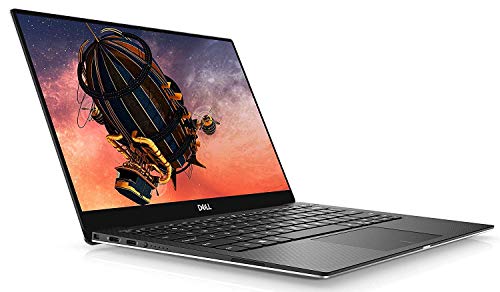
Pros
-
High-quality display that reduces eye strain during long study sessions
-
Compact, premium design with minimal bezels
-
Lightweight and easy to carry
-
Modern, refined look compared to traditional business laptops
Cons
-
Limited ports may require frequent use of adapters
-
Less rugged than business-class alternatives
-
Refurbished display condition should be checked carefully
Real-World Student Use
In everyday academic tasks, the XPS 13 performs smoothly and responsively. It handles note-taking, research, presentations, web-based coursework, and video calls without issue. Multitasking across productivity apps and browser tabs feels fluid, especially for typical student workloads.
While it is not intended for heavy creative or computational work, it performs very well within its intended scope. The emphasis here is less on raw power and more on delivering a pleasant, distraction-free daily experience.
Build Quality and Everyday Handling
The XPS 13 features a compact, well-crafted chassis that feels solid and premium in hand. Its slim footprint makes it easy to carry in a backpack, and the reduced bezel design allows for a larger-feeling screen without increasing overall size.
The display is the defining feature. Text appears sharp and clear, making it easier on the eyes during extended reading and writing sessions. For students who value screen clarity and visual comfort, this can have a meaningful impact on day-to-day use.
The keyboard and trackpad are well-integrated into the design, offering a clean, modern layout that complements the overall aesthetic.
Refurbished-Specific Considerations
When buying a refurbished XPS 13, display condition should be checked carefully, as the screen is central to the laptop’s appeal. Cosmetic wear is generally minimal on most refurbished units, but it’s still worth confirming that the display meets expectations.
Port selection on the XPS 13 is more limited than on traditional business laptops, which may require occasional use of adapters. Battery condition can also vary, particularly on thinner designs, so students should approach battery expectations realistically.
Who This Laptop Is Best For
-
Students who prioritize display quality and visual comfort
-
Those who want a modern, compact, and premium-looking laptop
-
Users who value portability without sacrificing screen experience
-
Students working primarily with reading, writing, and presentations
Who Should Skip It
-
Students who need extensive port selection without adapters
-
Users who prioritize maximum durability over design
-
Those who require high sustained performance or graphics capability
The Dell XPS 13 is best suited for students who care deeply about screen quality and overall design. It delivers a more visually refined experience than most refurbished business laptops, making long reading and writing sessions more comfortable. While it trades some durability and port flexibility for its sleek profile, the XPS 13 remains a strong choice for students who want their laptop to feel modern and compact without sacrificing everyday performance.
To buy this product, click here.
6. Lenovo ThinkPad T Series / ThinkBook – Best Budget-Friendly Refurbished Laptop for Students
For students who are more budget-conscious or simply don’t want to overspend, the Lenovo ThinkPad T Series and ThinkBook lineup offer some of the best value in the refurbished laptop space. These models strike a solid balance between everyday performance, durability, and price, making them particularly appealing to students who need a dependable machine without paying premium refurbished prices.
ThinkPad T Series has long been a workhorse in business environments thanks to its rugged build and practical feature set, while ThinkBook offers a slightly more modern consumer-oriented design with comfortable keyboards and adequate performance for student workflows.
Both families are widely available in refurbished markets, and you’ll often find configurations that deliver good performance for general academic use at a more accessible price point than high-end models. 
Pros
-
Excellent value in the refurbished market
-
Reliable performance for everyday academic tasks
-
Strong keyboard and durable construction
-
Wide availability and flexible configuration options
Cons
-
Heavier and bulkier than premium models
-
Design is functional rather than modern or stylish
-
Display quality varies by configuration
Real-World Student Use
In typical student scenarios—such as web research, document editing, presentations, cloud-based coursework, and video conferencing—the ThinkPad T Series and ThinkBook models perform reliably.
While they may not match the premium feel or lightweight portability of ultrabooks like the X1 Carbon or MacBook Air, these laptops are perfectly capable of handling daily academic tasks with minimal fuss. Switching between browser tabs, productivity apps, and video calls feels smooth within their performance envelope, and they generally stay cool and stable under typical loads.
Given their business roots, many T Series units were driven lightly with regular maintenance in corporate settings, which often translates to predictable wear and reliable refurbished condition.
Build Quality and Everyday Handling
Both ThinkPad T Series and ThinkBook models emphasize functional design and durability—a valuable trait for students who carry their laptop between classrooms, libraries, and study groups.
-
ThinkPad T Series: Known for its classic, utilitarian build quality, robust keyboard, and practical port selection. These units often survive years of office use before entering the refurbished market.
-
ThinkBook: A slightly more modern appearance with a comfortable keyboard and solid build, bridging consumer appeal with business-class reliability.
Neither option is the lightest on campus, but the trade-off is a more rugged chassis and a work-first design that stands up well to daily wear.
Refurbished-Specific Considerations
Since refurbished T Series and ThinkBook models are plentiful and come in varied configurations, students should pay close attention to RAM and storage:
-
Aim for at least 8GB of RAM (higher if multitasking is a priority)
-
256GB SSD minimum for smooth responsiveness and adequate storage
-
Battery health varies by unit, so expect some variation; many refurbished sellers grade battery capacity and include it in descriptions
Because these models are so plentiful, you’ll often find better deals and more confident warranty options compared to rarer premium refurbished units.
Who This Laptop Is Best For
-
Budget-conscious students
-
Users who care more about reliability and practicality than design flair
-
Students who need everyday academic performance without premium price
-
Anyone looking for dependable refurbished value without sacrificing essential usability
Who Should Skip It
-
Students who prioritize the thinnest, lightest design possible
-
Users who want the best color-rich display for media or creative work
-
Those who prefer macOS or are tied to specific software only available on other platforms
For budget-conscious students, the ThinkPad T Series and ThinkBook models stand out as practical, no-frills refurbished options. They may lack premium materials or ultra-thin designs, but they compensate with durability, reliability, and wide availability. Students who want the best balance between cost control and everyday usability will find these models particularly appealing, especially when planning for long-term academic use.
To buy this product, click here.
Frequently Asked Questions
Is a refurbished laptop reliable enough for college or university?
Yes—if you choose the right type of refurbished laptop. Many refurbished laptops come from business or corporate environments, where reliability and long-term use were priorities from the start. These models are typically built to higher durability standards than entry-level consumer laptops.
For students, a well-refurbished business-class laptop often proves more dependable over several years of academic use than a brand-new budget laptop designed primarily to meet a low price point.
How long can a refurbished laptop realistically last for a student?
With reasonable care, a quality refurbished laptop can comfortably last three to five years for student workloads. Tasks such as writing papers, research, online classes, presentations, and general productivity place relatively light demands on modern hardware.
Longevity depends less on age and more on build quality, internal condition, and how the laptop is used day to day. This is why refurbished business laptops often outperform cheaper new alternatives over time.
Should students worry about battery health when buying refurbished?
Battery condition is one of the most important factors to consider when buying refurbished. While some refurbished laptops include new or replacement batteries, others may retain their original battery with reduced capacity.
That said, battery wear does not automatically make a refurbished laptop unsuitable for students. Many students spend most of their time near power outlets—in classrooms, libraries, or dorms. Understanding battery expectations upfront helps avoid surprises and ensures the laptop fits your daily routine.
Is buying refurbished better than buying a cheap new laptop?
In many cases, yes. A refurbished business laptop often offers better keyboards, stronger build quality, and more consistent performance than a new entry-level laptop at a similar budget.
While new budget laptops may look modern, they frequently cut corners in materials, cooling, and long-term reliability. For students planning to keep a laptop throughout their degree, refurbished options often provide better overall value rather than just lower upfront cost.
What specifications should students prioritize in a refurbished laptop?
For most students, priorities should focus on usability rather than peak performance. A responsive system for multitasking, a comfortable keyboard, solid build quality, and reliable storage matter far more than high-end graphics or cutting-edge processors.
Choosing a refurbished laptop that feels stable and comfortable for daily use is usually a smarter decision than chasing higher specifications that may never be fully utilized.
Are refurbished laptops suitable for online classes and remote learning?
Yes. Refurbished laptops handle video conferencing, browser-based coursework, document collaboration, and cloud platforms very well when properly configured. Many business-class models were originally designed to support professional communication tools, which translates smoothly to academic remote learning environments.
A stable internet connection and a functioning webcam and microphone are often more important than raw hardware performance for this use case.
Final Verdict
For students in 2026, choosing a refurbished laptop is less about settling for something “used” and more about making a practical, informed decision. When selected carefully, a refurbished laptop—especially a business-class model—can offer a level of reliability, comfort, and long-term usability that many new budget laptops struggle to match.
The models highlighted in this guide were chosen not because they are the newest or the most powerful, but because they consistently meet real student needs. Strong keyboards, durable construction, predictable performance, and sensible portability matter far more in daily academic life than headline specifications. These qualities are what allow a laptop to remain useful throughout multiple semesters without becoming a source of frustration.
There is no single “best” refurbished laptop for every student. A lightweight ultrabook may suit someone constantly moving between classes, while a sturdier business model may be the better choice for those who value longevity and dependability. The key is understanding how you actually use your laptop—and choosing a refurbished option that supports that reality rather than working against it.
Ultimately, a well-chosen refurbished laptop can serve as a reliable academic tool for years, quietly doing its job without demanding attention. For students who prioritize function, value, and long-term usability, refurbished laptops remain one of the smartest choices available.